



nukecity
Participating Frequently
Jan 1, 2020 2:13 PM UTC
Answered

Lightroom 9.1 - Slow Start

When I start Lightroom, it takes about two minutes before I can begin working in the application. If I even so much as click a menu item or picture, the Lightroom app starts again, so that two sessions are now trying to run. I have cancel Lightroom and start over. 

If I wait the two or three minutes, the thumbnails will sharpen (focus), and I know I can then begin work. I only have 3800 pictures, so I don't know why it should take so long before I can start using Lightroom.

I usually build my previews in Standard, with no Smart Preview. I keep my Catalogue and files on an SSD, connected to my laptop via USB 3.0. (That way, I can attach the SSD to the Desktop PC, and continue working from that platform using the same Catalogue.) 

Any ideas on how / why Lightroom takes so long to generate the Thumbnails, or any comments on my configuration? Thanks.

This topic is closed to new replies. Start a new post to keep the conversation going.
Per Berntsen
Per BerntsenCorrect answer
Community Expert
Jan 2, 2020 8:50 AM UTC

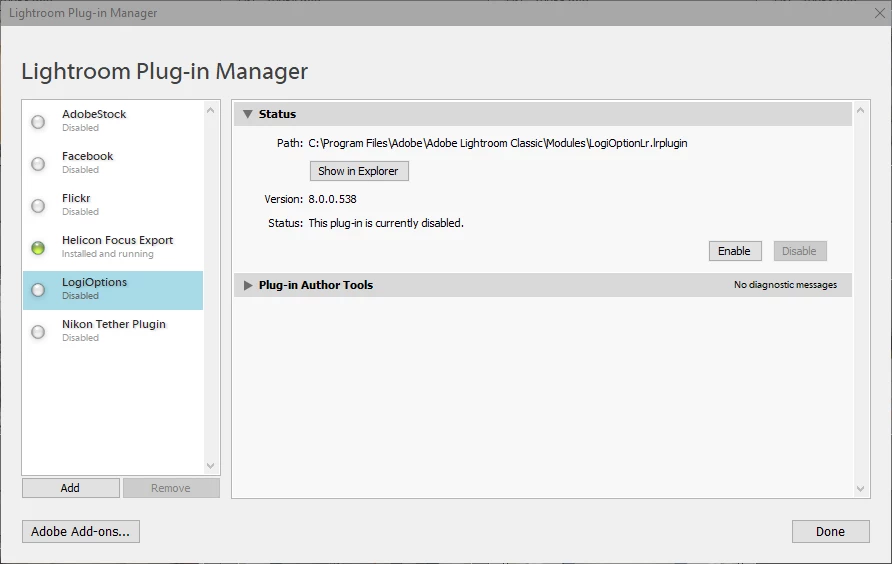
As David has mentioned above, the LogiOptions plugin could be the culprit.

I had a similar problem, and disabling the plugin fixed it.

Go to File > Plugin manager to disable it.


22 replies

linuxmuffel
Participating Frequently
Sep 29, 2021 4:17 PM UTC

That's it. Plugin deactivated and it works again for me.
I never thought that my new mouse could be the problem.
But one question remains for me. What is the funtion of the plugin LogiOptions in Lightroom (°|°) ?

Translate
GoldingD
Legend
Sep 29, 2021 5:21 PM UTC

@linuxmuffel wrote:

That's it. Plugin deactivated and it works again for me.
I never thought that my new mouse could be the problem.
But one question remains for me. What is the funtion of the plugin LogiOptions in Lightroom (°|°) ?


It is used to allow you to use the special buttons on the mouse and the dial on the Kraft Keyboard to trigger LrC actions, sort of like using a LoupeDeck.


Thing is the LogiTech Options has always been a piece of crap in LrC. Blame LogiTech. 


Do not conflate Options plugin in LrC with Options driver for normal mouse/keyboard controll outside of LrC.

Translate
Inspiring
Sep 29, 2021 5:29 PM UTC

Yeah, Logitech is your usual "cheap" IT Company. Money is ONLY spent on new product releases. Once something is released no additional funds are spent refining/updating it to optimal performance.
They released Lightroom support to be able to write/advertise it - no further work or tweaking/optimizing is done again - the money has been spent.


And customer support is non existing above the usual: Have your powered it on? ot the classic: reinstall everything.

Translate
Participating Frequently
Apr 22, 2021 3:16 PM UTC

Removing Logitech fixed the problem. Can't this be locked out somehow? Maybe disable on restart?


Translate
Inspiring
Feb 22, 2021 11:47 AM UTC

Sorry for ressurecting this thread, but it would be really nice if this issue could be fixed without disabling Logitech Options.

I know it's been a well known bug for years, and neither Logitech nor Adobe want's to address the issue.


I like the options however as I have the Craft Keyboard with the Dial I use for editing in LR (Much faster and more precise than moving the mouse). I also have undo actions and copy actions assigned to mouse buttons to speed up editing.


Any idea how we can get Adobe and Logitech to take this "stalling" on load issue serious? There are hundreds of posts online about the issue across several years, so it's definitely not a fluke.

Translate
Participant
Nov 28, 2020 1:49 PM UTC

BAM!  Disabling the plugin fxed it...thank you,

Translate
jeanphilt
Participating Frequently
Jun 22, 2020 11:22 AM UTC

if that can help someone : I keep my computer running all the time and for some reasons, Lightroom does not like it. Starting the app can take up to 2 minutes. Trying File / Import Photos takes about 1 minute just to get to the next window.


Once I reboot, it takes about 15 seconds to open the app instead.

Translate
Known Participant
Apr 8, 2020 3:05 PM UTC

Recently bought a logitec mouse and had no trouble until a couple of weeks ago. Yesterday could not even use lightroom.

Deleted the plug in this am as suggested and for two hours so far this morning have had no issues.

Still using the logitec mouse. 

Translate
Known Participant
Jan 30, 2020 9:28 AM UTC

works for me thanks

Translate
Per Berntsen
Community Expert
Per BerntsenCommunity ExpertCorrect answer
Community Expert
Jan 2, 2020 8:50 AM UTC

As David has mentioned above, the LogiOptions plugin could be the culprit.

I had a similar problem, and disabling the plugin fixed it.

Go to File > Plugin manager to disable it.


Translate
nukecity
nukecityAuthor
Participating Frequently
Jan 2, 2020 10:18 PM UTC

Thanks - the Logitech plugin was the culprit. Disabling the plugin seems the best option, rather than alt-tabbing between two programs.

Translate
GoldingD
Legend
Jan 1, 2020 8:05 PM UTC

Followup


Displays: 1) 1920x1080


As you are not running 4K, consider disabling use of Graphics Processor acceleration, might solve nothing, might speed things up, probably will not slow things down. If enabled try with it disabled. Remember to exit then restart LRC.


And when you disable it, play with an photo applying lots of adjustment brushes to make sure things do not slow down.


Translate
nukecity
nukecityAuthor
Participating Frequently
Jan 2, 2020 1:18 AM UTC

Thanks, again. I tried Off, Custom, and Auto settings - they all seem to not affect the initialization of the application. 


Once I click "Open" for LR, I immediately alt-tab to another open program (e.g. File Explorer), then alt-tab right back to LR Classic. This seems to always work - the initialization is completes in about 20 seconds. If I don't do that, the initialization hangs. 


Seems like there's something wrong with how LR is loading System Preferences. 

Translate
GoldingD
Legend
Jan 1, 2020 7:57 PM UTC

Nothing in your sys info looks wrong.


Nothing to slow loading.


One item to note, and this probably is not the cause of your performance issue. But may be causing some odd, shall I say, annoying behavor is in the plug-ins


Installed Plugins:
1) AdobeStock
2) Facebook
3) Flickr
4) LogiOptions
5) Nikon Tether Plugin


'That LogiOptions one. A known buggy plugin. You do not need it to use your Logitech Mouse or Keyboard, unless you are assigning functions to mouse buttons, or the keyboard wheel (one one or two models). It is not your Mouse or Keyboard driver.


Typically you may get an error when batch deleating photos in LRC.


You may want to disable it.


Be aware during Logitech software updates, it used to get re-enabled.


Translate
nukecity
nukecityAuthor
Participating Frequently
Jan 2, 2020 10:17 PM UTC

Thanks. It was the Logitech plugin that was causing the issue with loading preferences. I confirmed that by enabling and disabling the plugin and observing the results. If one wants to keep the plugin, the workaround (for me) was to alt-tab to another application, then alt-tab back to LR. 

Translate