
Earth Oliver
Legend
August 31, 2022
Question

M1 MBP Notch GUI artifacts in Full Screen

  • August 31, 2022
  • 3 replies
  • 593 views

This has been bugged for about a year now, since the notched MBPs shipped. Will it ever be fixed?
Repro:

- Use Shift-F and cycle through modes until OS menu bar disappears.

- Use Tab to hide all panels

- Mouseover top panel/module picker

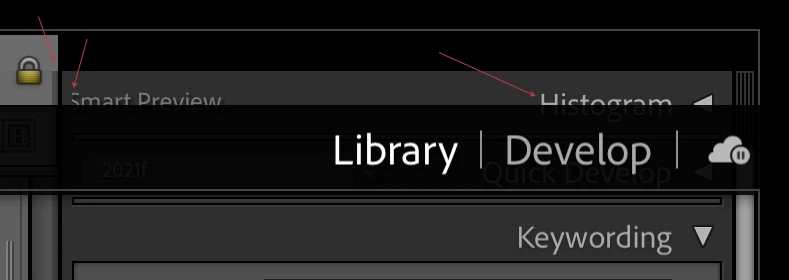
Result: Module picker GUI is detached (see attached)

(I've also indicated other bugs in the SS.)


Alternatively, you can show the module picker using F5, but this then covers up the Library Filters and everything else at the top of the GUI across the modules.


Adobe, you've had almost a year to fix the LR GUI to accommodate the notch and it still hasn't been fixed?


MacOS 12.5.1, M1 Max 16"
This topic has been closed for replies.

3 replies

Ian Lyons
Community Expert
Community Expert
August 31, 2022

I believe this is an Apple issue that results from enabling the 'Scale to fit below built-in camera' checkbox in LrC 'Get Info'. In below screenshot, I've shown how I have my M1 Pro configured to avoid the issue.


Participant
May 26, 2024

I still see this bug as well with latest Lighroom Classic 13.3, MacBookPro M3 with notch. See attached video. Would be great if Abobe would fix.


Steps:

1. launch LR on main screen of MBP with notch camera

2. Window | Screen Mode | Full Screen

3. Quit / relaunch


RESULT

attribute / filter bar is partially obscured by the top navigation area of lightroom catalog window.

note scaling artifact as main window "shrinks" to scale below notch. Not visible in video due to the way screen is captured.


4. switch to develop module and then back to grid.


RESULT 2: layout goes back to normal - no filter obstruction. So this is a problem that is happening in the initial boot of the window while scaling to avoid the notch.


Note2: I tried above suggested workaround of disabling scaling, that did not fix the issue but now some of the top navigation controls are also obscured by the notch.


Rikk Flohr_Photography
Community Manager
August 31, 2022

I have not been able to reproduce this behavior using these instructions. 

Perhaps you could provide more information about your environment. 


Rikk Flohr: Adobe Photography Org
Earth Oliver
Legend
August 31, 2022

Hey @Rikk Flohr: Photography No real enviro to speak of. Just running a standard 16" M1 MBP with a notch. The different aspect ratio of the notched machines causes a bug when the app is in the menu-hiding mode. The bug is persistant throughout all resolution modes... native and scaled. And in Lr, changing the font size pref doesn't change the bug either.

dj_paige
Legend
August 31, 2022

We're not Adobe, we are just other LrC users. We can't fix anything.


More than likely, the problem is the GPU driver and not anything Adobe did.

TheDigitalDog
Inspiring
August 31, 2022

@dj_paige wrote:

We're not Adobe, we are just other LrC users. We can't fix anything.

More than likely, the problem is the GPU driver and not anything Adobe did.


+1. And further: 

https://community.adobe.com/t5/photoshop-ecosystem-bugs/how-do-i-write-a-bug-report/idi-p/12373403

Author “Color Management for Photographers" & "Photoshop CC Color Management/pluralsight"