

ColdForest
Inspiring
October 1, 2023
Question

MP4 Video File(s) Error

  • October 1, 2023
  • 2 replies
  • 1565 views

Haven't seen any posts on this for a while(*) and can't seem to find any chatter about this, which is for me new, recently.


All my MP4 videos are [suddenly] unrecognizable to LRC (12.5 on Win10). Not exactly sure when this started happening but I've never had issues with MP4 files in LRC before; they've always seemed fine in both Library and Develop modules.


All MP4 files show up as the following in the Library (grid) module:
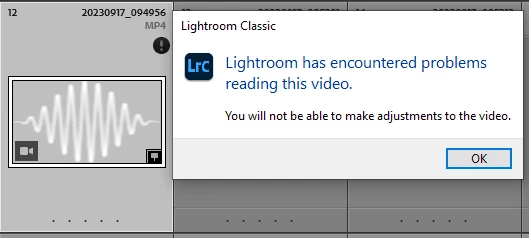
 

Showing the file in [Windows] Explorer (preview thumbnail shows correctly) and double clicking it there brings up the video in Media Player fine.


What's going on with LRC? How do I get LRC to properly recognize these *without* having to do all the silly, completely reset preferences et al options I sometimes see suggested as workarounds when no root cause can be identified/remedied.


Thx for any help here!


* Lightroom Classic unable to read videos and show error: Error working with video [macOS]

This topic has been closed for replies.

2 replies

JohanElzenga
Community Expert
Community Expert
October 1, 2023

"Not exactly sure when this started happening but I've never had issues with MP4 files in LRC before; they've always seemed fine in both Library and Develop modules."


Just as a remark, so you won't keep looking for a solution for the problem of not seeing the video in the Develop module: You remember this wrongly. Lightroom Classic does not show and has never shown videos in the Develop module. You can do some basic edits in the Quick Develop panel in the Library module, but that is all.


-- Johan W. Elzenga
ColdForest
Inspiring
October 2, 2023

Thanks yes. For the minimal video editing that I do in this context I generally use LR Mobile (Android) and not LRC (desktop), where you're right that there is no Develop video editing (and the quick develop editing is more limited than with LR Mobile).

johnrellis
Legend
October 1, 2023

Initial steps:


1. Restart your computer (again, if you've already done it).


2. If the problem continues, select one of the problem .mp4s that's under 47 MB in size and attach it here. If you don't have a problem .mp4 under 47 MB, upload it to Dropbox, Google Drive, or similar (but not Youtube) and post the sharing link here. 


That will let us determine quickly and authoritatively whether the problem is inherent in the videos (occurring on multiple installations) or is something specific to your installation.


"all the silly, completely reset preferences"


Unfortunately, due to a  design flaw in the implementation of LR's preferences mechanism, the preferences file can get corrupted (too often), causing a very wide range of bad behavior.   So resetting preferences is one of the most important magic spells to cast when other steps fail. But you're not there yet...

ColdForest
Inspiring
October 2, 2023

Thanks for offering to help with this.

Here's the link to one MP4 file that's unrecognizable to LRC (but fine with our viewers - e.g., Media Player).

Test Video Error 


I've looked through many other folders in my library and it looks like the number of video files in error is actually small. They are all, however, of the same type (MP4) and many with the same recording device (in this case Samsung Galaxy S23 Ultra) are fine while others are not.

ColdForest
Inspiring
October 4, 2023

"Is there a way to force a re-download of *just* these same files from LRM to LRC (desktop)?"


You could download them manually to your local disk using the Lightroom cloud desktop app or the Lightroom web interface.  Then import those into your catalog (keeping the original bad copies around for the time being).


Another step: Try Preferences > Performance > Video Cache Settings > Purge Cache.


"I'm skeptical though"


Dynamic Link Manager has a reputation for unreliability, so it's conceivable that it sometimes works on those videos, sometimes not. But as I said, a clean uninstall/reinstall would be speculative with a lower chance of success.


"Is there a way to force a re-download of *just* these same files from LRM to LRC (desktop)?"


You could download them manually to your local disk using the Lightroom cloud desktop app or the Lightroom web interface.  Then import those into your catalog (keeping the original bad copies around for the time being).


Good suggestion, this worked. I was able to download these from the Lightroom web interface and then re-import into LRC desktop. They now show up fine, with no reported errors in the Library module. I compared a couple of these (old vs. new) and they match exactly on disk. Not sure what's up with LRC and the originals. I'll delete the originals that LRC somehow has trouble with... Thx for your help!