- Home
- Lightroom Classic
- Discussions
- Re: My photos ARE in folders, but none show up in ...
- Re: My photos ARE in folders, but none show up in ...

Copy link to clipboard
Copied
Hello!
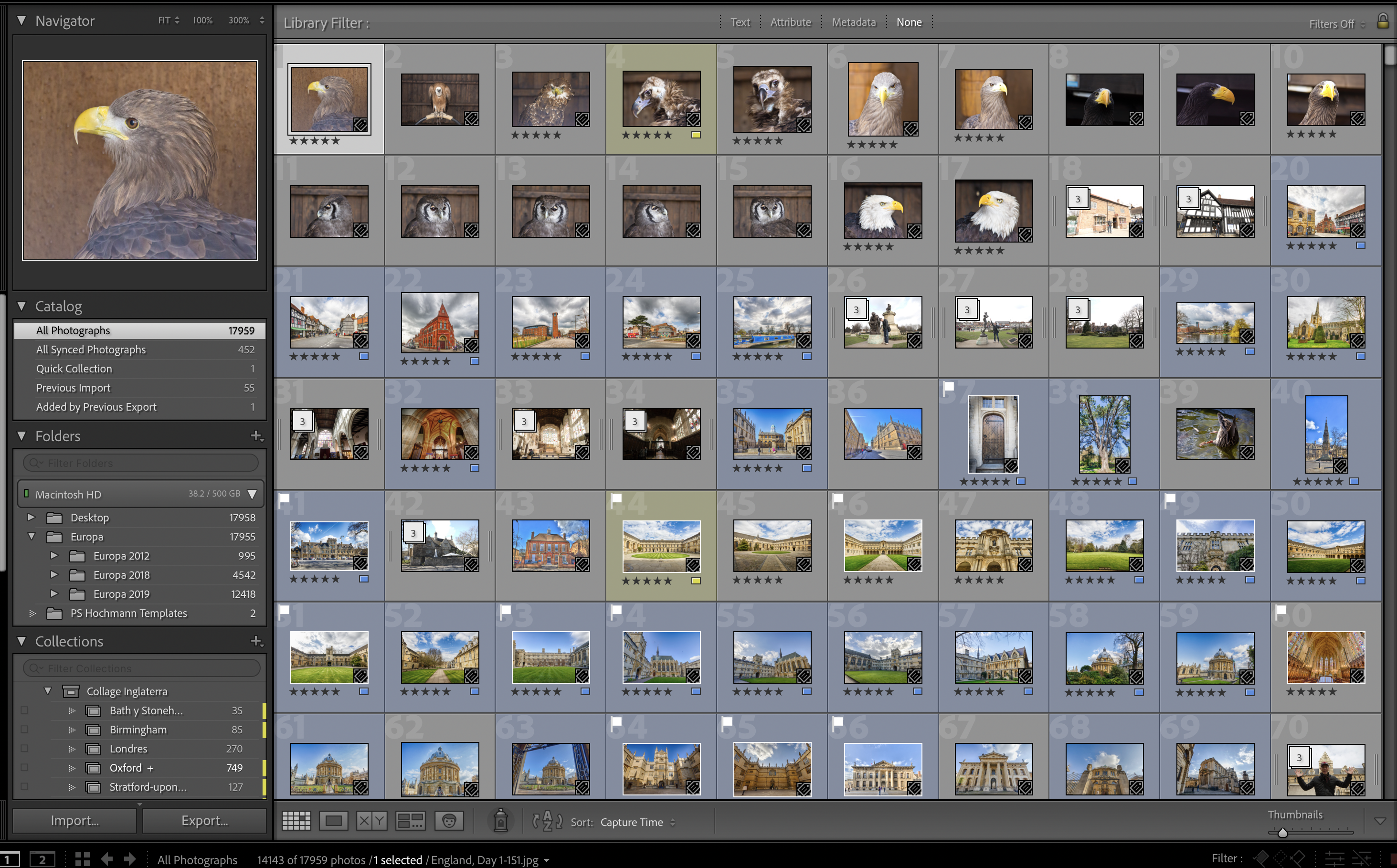
I went to a catalog that I haven't used in over a month. Now, I can see the number of photos in each folder. I can go to the folders outside Lightroom and they're all there. I can even SEE each photo if I go to the All Photographs section above, in the left hand side (see screenshot), underneath Catalog. But I can't see any photos in the Folder section, not in Grid, Loupe, not in Develop. In the screen it just says "No photos in selected folder". So they're not really missing. I just can't see or work on any of them from their respective folders. Can anybody help me?
This is not a work Catalog and thankfully my other catalog, which IS for work, is fine. But it is really annoying not being able to see any of the 17,000+ photos that I have in this one.
By the way, I tried restoring the catalog from a backup I have from about a month ago, and it's the same thing. Nothing was fixed. I don't understand what is going on.
Thank you for any help,
Sergio


 1 Correct answer


Do you have a catalog backup? This looks like catalog corruption. There are several threads in this forum that show the same problem and I think it always turns out to be a corrupted catalog.

 27
Replies
27
27
Replies
27


Copy link to clipboard
Copied
When you are in all photographs so that you can see images, right-click on one of them and choose the option to go to the folder in library. Maybe that will show you where the image is really located. Perhaps the images have been moved or perhaps the drive letter has been changed or something. I don't know for sure, but that might provide the first clue of what might have happened.
Copy link to clipboard
Copied
Hello, Jim.
I did that and yes, it goes to the correct subfolder of where that particular photo is. But again, that photo and all others don't show up. I can see the number of photos next to that folder, but then in the space where the photo should appear in Loupe or develop, it just says "No photos in selected Folder". If I go to all photographs and pick a random photo and then right click and choose "Show in Finder", it shows me the photo in its correct folder. I don't get it.

Copy link to clipboard
Copied
Despite what is visible on the screenshot as to Filters, could this be a Filter issue?
In the Library toolbar, turn on filtering off. You might need to disable each filter, or you might just need to click on the Enable Filters if checked.
In the back of my mind, I recall running into a particular filter enabled (for example filter by rating on 5 star) despite Enable Filters not checked
Copy link to clipboard
Copied
I've gone through all filters and they're all off. And then I went into the Library Menu and also went through the filters to make sure they were off.

Copy link to clipboard
Copied
Did you try left clicking on folder and select syncronize?
Copy link to clipboard
Copied
I've tried it but it always greys out Synchronize. And of the four options in the window, Import New Photos and Remove missing photos from catalog always have the "(counting...) message at the end.
Copy link to clipboard
Copied
Does Optimize Catalog fix anything?
Copy link to clipboard
Copied
Nothing. I just tried it now.
Copy link to clipboard
Copied
1. Is this true for all foldewrs under Europa?
2. And the "folder" Desktop. So that would be your Desktop on your MAC, the actual screen,? That many images on your desktop? I am probably confused.
Copy link to clipboard
Copied
1) Yes, absolutely all folders and subfolders it's the same thing. I can see the photos in All Photographs, but nothing when I go into the individual folders.
2) all those photos are not on the Desktop itself. It's just that I have my two catalogs (work and Europa, the problematic one) in a folder on my desktop called Lightroom.
Copy link to clipboard
Copied
Ok, I see that I am in fact confused about DESKTOP.
So, that is not the actual desktop, but a folder called desktop? And it includes a different catalog?
Had a suspicion that it was not the actual desktop. Experimented on my MACBook, and if I actually imported (ADD) an image on the Desktop, then Desktop was not displayed that way (actually included user path). And of course, who would do that?
Copy link to clipboard
Copied
Ok, that other catalog,
what drive?
what aprent folder?
Copy link to clipboard
Copied
It's on my main drive. On my laptop I don't work from an external drive. I only use external drives for complete backups.

Copy link to clipboard
Copied
It sounds like you inadvertently moved files or folders from outside LR using Finder or Windows Explorer. Follow the intsructions at the below link to reassociate them with the problem catalog. DO NOT USE SYNCHRONIZE FOLDER, which will cause all of your edits to be lost. Make sure to create a backup copy of the catalog file BEFORE going any further.
https://www.lightroomqueen.com/lightroom-photos-missing-fix/
Copy link to clipboard
Copied
Thank you, Todd. I haven't moved files around outside of Lightroom itself. Also, none of my folders have the question mark, and none of the photos have it either when I see them in All Photographs. Folders are not greued out either. It's as if filters were on, like somebody said earlier, but none of them are. That was actually the first thing I checked.
Copy link to clipboard
Copied
It may be the capitalization issue discussed at the below article. Follow the suggestions there.
https://www.lightroomqueen.com/capitalization-catalog-error/
Copy link to clipboard
Copied
Interesting, Todd. Thank you. I'll try it tomorrow to see if it works!
Copy link to clipboard
Copied
Ok, I just checked and it's definitely not a capitalization error. There is only one folder for each of the names in the big folder Europa 2012, Europa 2018 and Europa 2019.
Anybody else have any ideas? Again, I'm not DESPERATE but the problem baffles me completely, 100%. I don't know what else to do.
Copy link to clipboard
Copied
Try searching from the root of each drive (C:, D:, etc.) using Europa 2012, Europa 2018 and Europa 2019. See if there is another folder somewhere else on your drives with that name.
Copy link to clipboard
Copied
I will check and get back to you. Thank you.
Copy link to clipboard
Copied
Returning to your structure shown in the Folders panel, that Desktop folder. are any of the photos in that folder part of this misbehaving catalog?
If not, why is that folder included?
You might want to:
1. Clean up the structure shown in the Folders panel.
2. Optimize and test again
if that goes nowhere
3. Consider checking the catalog for integrity. BUT CAUTION, do not do that without a backup, AND do not do that in conjunction with a backup (if you for, integrity is checked first, then backed up, even if integrity corrupts the catalog) even though LrC provides that option. (Ok, I can not find my reference to support that) Instead start LrC using the option to ask you what catalog to open, the screen you will be presented with includes a check integrity option. (LrC startup option in preferences, or you can use keyboard sequence when clicking on LrC shortcut, for MAC Hold down Opt while opening , for Windows Hold down Ctrl while opening )
https://fstoppers.com/education/take-control-lightroom-classic-startup-setting-521879
4. Consider exporting the catalog to a new copy.
Copy link to clipboard
Copied
I'll try this later on today or tomorrow and tell you what happens. Thanks ☺️
Copy link to clipboard
Copied
Sorry for the delay! I had more photoshoots and left this for later. Anyways, I checked all catalog integrity and everything and restarted it that way and again, nothing. What I DID do just in case is take ONE photograph and add it and it was ok. But the rest... same as before: NOTHING.
What I'm going to do is just delete the entire catalog safely and start again from one of the backups that I have in another disk. Luckily, I haven't worked on anything there in some months so everything is as it should be.
Thank you again!

Copy link to clipboard
Copied
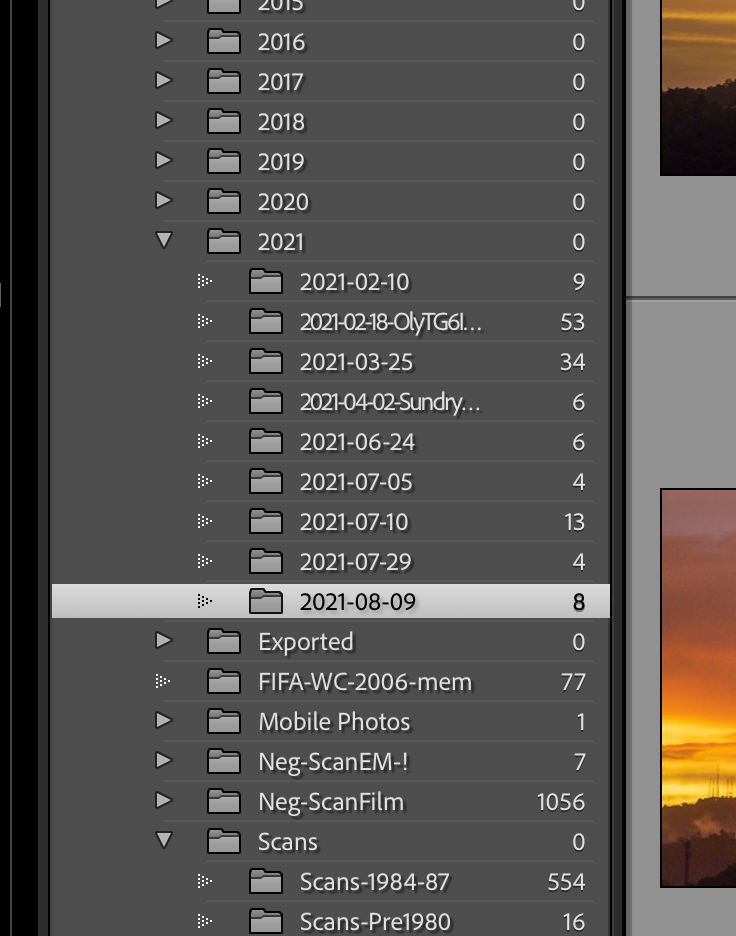
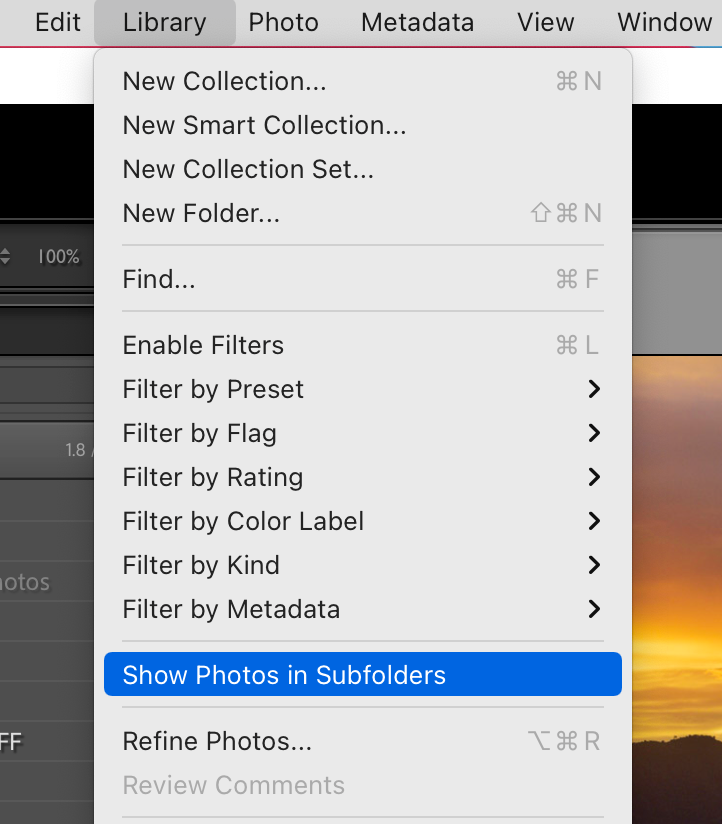
Maybe this option has something to do with your experience. When in Library Module go to the menu bar Lightroom > "Show Photos in Subfolders". That will change how images will be shown in the Folder structure. just a thought.

-
- 1
- 2

Find more inspiration, events, and resources on the new Adobe Community
Explore Now
 AdChoices