Inspiring
April 24, 2021
Answered

P: Changes to Metadata Panel for targeting one or many images

  • April 24, 2021
  • 53 replies
  • 38313 views

In LR 11.0, MacOS 11.6.


I select several images in the grid view. Edit the location info in the Image section. The metadata is only set on the 'most" selected image. It used to correctly set the data on all selected images.


This is a real problem for me. If I go out and shoot a few hundred images, now I have to edit each one individually. Unacceptable.


I did not check to see if any other fields exhibit the same behavior. This was enough for me.


Is there another (reasonable) way to set the location os a set of images?

Correct answer Ian Lyons

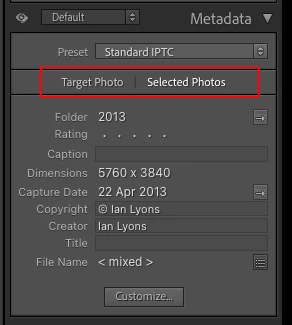
You need to tap on the 'new' and less than obvious 'Select Photos' button as shown in below screenshot. This enables the ability to apply metadata to multiple selected photos


53 replies

Rob_Cullen
Community Expert
Community Expert
November 4, 2021

If you have upgraded to Classic v11 there have been changes to the Metadata Panel.

To enter the same data to a metadata field (eg. Title or Caption) in '300' photos, be in Grid View, select the multile files, AND check the button first-

It seems you have only added the 'Title' to one of the photos shown in the proof sheet.


Regards. My System: Windows-11, Lightroom-Classic 15.1.1, Photoshop 27.3.1, ACR 18.1.1, Lightroom 9.0, Lr-iOS 10.4.0, Bridge 16.0.2 .
herbertn83855588
Participant
November 4, 2021

Die Vorversionen von LR haben es erlaubt im Bibliothekmodus merere Dateien im großen Arbeitsfeld zu markieren und eine identische Bildunterschrift einzugeben.

Die neue Version 11.0 erlaubt das bei meinem iMac nicht. SoftwareBug?

MAC IOS 10.15.7

Herbert

----------------------------------------------------------------------------

Lightroom Classic-Version: 11.0 [ 202110120910-0bccc70d ]
Lizenz: Creative Cloud
Spracheinstellung: de-DE
Betriebssystem: Mac OS 10
Version: 10.15.7 [19H1419]
Anwendungsarchitektur: x64
Anzahl logischer Prozessoren: 16
Prozessorgeschwindigkeit: 3,8GHz
SQLite-Version: 3.36.0
Integrierter Speicher: 32.768,0 MB
Für Lightroom verfügbarer phys. Speicher: 32.768,0 MB
Von Lightroom verwendeter phys. Speicher: 6.382,3 MB (19,4%)
Von Lightroom verwendeter virtueller Speicher: 19.077,3 MB
Cache-Speichergröße: 883,4MB
Interne Camera Raw-Version: 14.0 [ 950 ]
Maximale Anzahl Threads, die Camera Raw verwendet: 5
Camera Raw SIMD-Optimierung: SSE2,AVX,AVX2
Virtueller Speicher in Camera Raw: 979MB / 16383MB (5%)
Physischer Speicher in Camera Raw: 982MB / 32768MB (2%)
Monitore/Anzeigegeräte: 1) 5120x2880

Informationen zum Grafikprozessor:
Metal: AMD Radeon Pro 5700


Participant
November 4, 2021

MacBook Pro version 11.6.1 

2,3 GHz 8-Core Intel Core i9

AMD Radeon Pro 5500M 8 GB

Intel UHD Graphics 630 1536 MB


LR Classic 11.0


Loupedeck 5.0


Hello,

Before I made the update to 11.0 it was working well. If I selected all the photos and started to fill in the IPTC it was before automatically synced to the other photos. Know if I do the same the IPTC will stay empty.

If I do it separately for each photo it will work. But this is not the way, certainly not with 100 photos or more!

Hope to find an answers.

Participant
November 5, 2021

The problem is solved.

After the update to LR 11 the sync button was not set to automatic.


Leandro Lacerda
Participant
November 3, 2021

A versão 11 está muito boa, mas veio com vários problemas chatinhos, principalmente na parte da biblioteca.
Eu seleciono minhas fotos com 2 estrelas, e depois faço uma nova filtragem retirando as que quero apertando 1 estrela. Só que quando faço isso, ao invés dele continuar na última foto como em todas as versões anteriores, ele volta para a primeira foto, aí preciso procurar onde eu estava ou clicar command + Z.

Isso também acontece com outras formas de selecionar.

Por exemplo: Selecionei 20 fotos e dupliquei para deixar preto e branco ou fazer alguma outra ação. Nas versões antigas se eu duplico 20 fotos, ao duplicar ele já vai deixar esssa 20 selecionadas. Agora isso acontece apenas quando o sistema quer, quando esta de bom humor. Na maiora das vezes que faço isso, ao duplicar ele tira a seleção. 


Poderiam rever esses bugs na parte de biblioteca. Obrigado!

Participant
November 2, 2021

My Lightroom updated to 2022 yesterday. I always add the same title to each photo in a catalog (titles are different in each catalog). Usually I just select all of the photos in the catalog and then type in the title. When I do that in LrC 2022, it only applies the title to one photo and not all that are selected. Is that something new or is that a glitch that needs fixing?

dj_paige
Legend
November 2, 2021

Something new. Make sure you have selected "Selected Photos".


Participant
November 2, 2021

Thank you!

Scott-Prokop
Participating Frequently
November 2, 2021

When I select all my images in the Library module and enter the title for all the images, only the first selected image gets the new title.  This is a new problem in the latest version of LRC v11 for Windows.

Inspiring
November 2, 2021

Hmmm...did you read anything here?  Your answer is sitting right in the thread.  Make sure to choose Selected Photos in the Metadata panel and then make your changes.  There are already plenty of screenshots of it in the thread already, so I'll skip adding another.

Known Participant
November 2, 2021

In the previous versions of LR, if you selected a caption (or a title), then copied it, it was possible to select several photos and then paste this caption (or title) in the corresponding field (caption or title) with a single operation (cmd V).

Now it is not possible anymore, in fact only the first photo of the selected group accepts the paste...


MacOS 11.6.1

@MNiessenPhoto
Legend
November 2, 2021

It seems to be the case for all metadata fields. Someone just posted in the forum about this issue for copy name, and I've noticed the same for the title and city/state/country/ISO country code. It's not just when pasting, but also when typing in a field with multiple pictures selected.

LrC 11.0 on Windows 10 (Pro version 21H1)

Michael

_____________

Michael Niessen - Photographer, photo-editor, educator (kelmond.com)

Photo-editing (Ps/Lr/LrC) and photography workshops & one-on-one training (off- and online)
Known Participant
November 2, 2021

Hi,

After the recent 2022 upgrade I can no longer apply a single 'Copy Name' across multiple images!?

I used to do this in the Library module by selecting those images I wanted to change the copy name of, and then changing the copy name of a single image which would then be applied across all. Now that doesn't work 😞

What am I missing....

Cheers,

TIA

Pete

@MNiessenPhoto
Legend
November 2, 2021

Hi Pete,

I had never tried it, but I can confirm that now in LrC 11.0 on Windows 10 (Pro version 21H1) it doesn't work. If you're absotutely sure it worked before, you should file a bug report here in the forum.

In the meantime, you can add the copy name to one picture and then sync it to the others.

Hope that helps,

Michael

_____________

Michael Niessen - Photographer, photo-editor, educator (kelmond.com)

Photo-editing (Ps/Lr/LrC) and photography workshops & one-on-one training (off- and online)
@MNiessenPhoto
Legend
November 2, 2021

This bug report that was just posted seems to be related:

https://community.adobe.com/t5/lightroom-classic-bugs/copy-paste-bug-in-version-11-of-lightroom-classic/idi-p/12491862

You can 'upvote' it.

Michael

_____________

Michael Niessen - Photographer, photo-editor, educator ([moderator deleted the URL from the signature. Kindly note that URLs in the signature may be considered as spam])

Photo-editing (Ps/Lr/LrC) and photography workshops & one-on-one training (off- and online)
Participating Frequently
November 2, 2021

If you select multiple photos in the library and then change one of the text input fields in the Metadata panel on the right, only the first one in the set actually changes as of v11, presumably part of this whole "don't save XMP to file until the input focus moves to the next photo" thing they did in this version.


You can verify this a few ways:


1. Put the library filter into "Metadata Status = Up to date" mode, then paste something into e.g. the Caption box. Note that none of the photos change from up-to-date briefly while Lightroom saves the metadata in the background. Change the input selection and you'll see that the text wasn't applied to any photo but the first.


2. Put the filter into Text → Caption → Contains Words → "!something" where that "something" is a word in your pasted text. Paste the text again. One photo will disappear from the set instead of all of them.


I've got to ask: does anyone on the team actually use Lightroom any more? It feels more and more like software that's written to a spec, not software written by people solving their own problems. The poor handling of metadata in recent versions…ugh!

GoldingD
Legend
November 2, 2021

Sorry if this is rude. But did you read the announcement about the new software? Right at the top on the very group/tab you placed your post in. As always, that includes info on what is new, what got fixed, etc. 


Here is a link to annoncment:

https://community.adobe.com/t5/lightroom-classic-discussions/lightroom-classic-11-0-is-now-available/td-p/12471067


and that leads to what is new:

https://helpx.adobe.com/lightroom-classic/help/whats-new.html


and a video:

https://www.youtube.com/watch?v=SLw0xeoLicM


in that link, a specific link on the new metadata:

https://helpx.adobe.com/lightroom-classic/help/whats-new/2022.html#metadata


wandererAuthor
Inspiring
November 2, 2021

Thanks for the links. But they sometimes aren't as helpful as I would like. For instance, the discussion of the new Metadata Workflow talks about customizing the field choices and order. Great idea, but I could not find the feature on my system. They did not make it at all clear that this was only available if you had the Default metadata view selected. I didn't. No Customize button.


I know the Adobe team is justifiably proud of their hard work for months on a new release. I have been there, I appreciate the work involved, and I really like some of the changes. Let me give the POV of users, though. At least, me. I had heard of the key new features and seen some videos, primarily masking. But I spend my time USING Lightroom, not reading about all the changes in detail. When I saw the new version I decided I wanted to try the new masking so I updated. But then the metadata was "broken". Immediate bad impression of the new version.


When major changes are introduced they should be smoothly integrated and obvious. I can't miss that masking is different. I may trip over it a few times before getting completely comfortable with it, but I can't forget about it. I do not feel that the metadata changes are done as well. Judging from the comment stream here, they are hard to discover. 


Masking is a "big" feature because it extends the capability of Lightroom and reduces the number of images that have to be edited in Photoshop. Metadata is very important, but mundane. The changes should have been woven in as extensions that we can learn to use when we want to improve our workflow. It shouldn't be something many users trip over and curse.

Terry Dunlap
Participant
November 1, 2021

I can no longer add titles or captions to a series of selected photos in the latest Lightroom Classic version.

The title or caption only gets added to the first highlighted photo that has the focus.

GoldingD
Legend
November 1, 2021

Check the options at the to- of the metadata panel.


and read the documents provided:


in this case: https://helpx.adobe.com/in/lightroom-classic/help/whats-new/2022.html#metadata