Inspiring
April 24, 2021
Answered

P: Changes to Metadata Panel for targeting one or many images

  • April 24, 2021
  • 53 replies
  • 38313 views

In LR 11.0, MacOS 11.6.


I select several images in the grid view. Edit the location info in the Image section. The metadata is only set on the 'most" selected image. It used to correctly set the data on all selected images.


This is a real problem for me. If I go out and shoot a few hundred images, now I have to edit each one individually. Unacceptable.


I did not check to see if any other fields exhibit the same behavior. This was enough for me.


Is there another (reasonable) way to set the location os a set of images?

Correct answer Ian Lyons

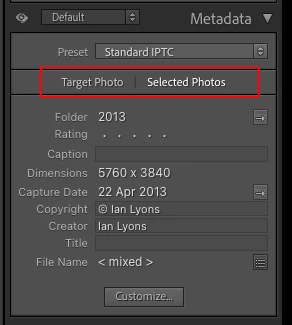
You need to tap on the 'new' and less than obvious 'Select Photos' button as shown in below screenshot. This enables the ability to apply metadata to multiple selected photos


53 replies

Participant
November 18, 2021

LR Classic 11.01 Windows 10. I just noticed that if I select all files in a folder and edit the Sublocation, City and State the only photo that gets updated is the dominant highlighted file (i.e. the first one selected before I hit Ctrl A). Keywords ARE updated across all files. I went back through my recent uploads and noticed that this first started in my November 2021 uploads. I do this process with every upload and it has been working up through the end of October 2021.I don't remember the date when I updated to v. 11. Copyright info is added at import and this is working properly. I also add GPS data using Jeffrey Friedl's plug-in by selecting all and running that plug-in and it IS working across all files. I tried changing the Caption and Title, as well, and they DO NOT change except on the dominant highlighted photo.

johnrellis
Legend
November 19, 2021

See the Correct Answer at the top of this thread for how to use the new feature in the Metadata panel:

https://community.adobe.com/t5/lightroom-classic-discussions/p-changes-to-metadata-panel-for-targeting-one-or-many-images/m-p/12478251#M247357 


Participant
November 17, 2021

Ik heb versie 10.0.1

In vorige versies kon ik een bijschrift of een sublocatie toevoegen in één beweging.

Nu kan dit slechts foto per foto.

Is dit een bug ?

Wordt dit opgelost ?

Ged_Traynor
Community Expert
Community Expert
November 17, 2021

Hi

Version 10.0.1 of which Adobe application?

Participant
November 17, 2021
Lightroom classic
runem42676658
Participant
November 16, 2021

Why is it not possible to write Caption info to all selected pictures in Grid view any more. LR 11.1. Might have been the case also in ver 11.0, as i havent used the function the last couple of weeks. Very annoying.

johnrellis
Legend
November 16, 2021

See the Correct Answer at the top of this thread:

https://community.adobe.com/t5/lightroom-classic-discussions/p-changes-to-metadata-panel-for-targeti... 


A bug in the LR 11 upgrade failed to copy over your previous setting for this option.

Participant
November 16, 2021

Hi

I have an issue since version 11 with Metadata (Location section all fileds,  Sublocation, City, State, etc). As I select a group of photos and enter information in one of the field, the information only appply for the first photo.  So I have to do photo one by one... Prior to ver 11 update, I was able to apply on multiple photos, not one by one.

I did all Lightroom Classic updates  (last one today November 16th).


Lightroom Classic 11.0.1

Mac OS Catalina last update 10.15.7 with all Apple security fix lately


Pierre

johnrellis
Legend
November 16, 2021

"As I select a group of photos and enter information in one of the field, the information only appply for the first photo."


See the Correct Answer at the top of this thread:

https://community.adobe.com/t5/lightroom-classic-discussions/p-changes-to-metadata-panel-for-targeting-one-or-many-images/m-p/12478251#M247357 


A bug in the LR 11 upgrade failed to copy over your previous setting for this option.

Inspiring
November 16, 2021

11-15-2021: Windows 10, Dell XPS All in One PC.  Intel(R) Core(TM) i7-3770S CPU @ 3.10GHz 3.10 GHz, RAM 16.0 GB (15.9 GB usable), 64-bit operating system, x64-based processor.  An old system, but still functional.  Over the last three days, I have experienced keywording problems.  This has been post the 11.0 updating of Lightroom Classic.  I've used Lightroom Classic and its keywording functions for several years.  I can type in a keyword, or click a box in the keyword list, or click on a button for a suggested keyword.  I've had no keywording problems until now.  Has there been a change in keyword methodology? Or is it a bug?  I will select a keyword for a batch of images (say a ZIP Code), and see that it has been added in the keyword box; then returning later to add another keyword (say the name of a person) I will find that the ZIP Code is no longer present in the list of keywords for that photo.  I am doing keywording of batches of photoa via the Library Module.  I am trying to keyword as usual, but am finding my keywords are disappearing.   Is anyone else experiencing this?  Any help is appreciated.  Thanks.

GoldingD
Legend
November 16, 2021

Sounds like the changes in metadata workflow are giving you grief. One issue is edit only mode, another is target photo vs selected photo option.


Read the whats new document, read the metadsta section


https://helpx.adobe.com/lightroom-classic/help/whats-new.html


Inspiring
November 16, 2021

I guess it wan't a bug, but a design change that caught many unaware.the Selected Photos option didn't work for me until I switched from Loupe mode to Grid mode int he Library Module.  Once I did that, my keywording  went smoothly.  Thanks.

cantaluppi.photo
Inspiring
November 14, 2021

With the new version of Lightroom classic 11.0 the synchronization of the 'Titles / Titel' is no more possible.

johnrellis
Legend
November 15, 2021

"With the new version of Lightroom classic 11.0 the synchronization of the 'Titles / Titel' is no more possible."


Are you referring to selecting multiple photos and then typing in the Title field of the Metadata panel?  If so, see the correct answer at the top of this thread:

https://community.adobe.com/t5/lightroom-classic-discussions/p-changes-to-metadata-panel-for-targeting-one-or-many-images/m-p/12478251#M247357


If instead you are referring to the use of the Metadata > Sync Metadata menu command or the Sync Metadata button at the bottom-right corner of Library, then please start a new discussion. Include precise details of the steps you're taking and what you observe going wrong.


Participant
November 11, 2021

I was very happy with LR10.4 and then my computer automatically updated to v11. I found that I could not update multiple images with the same information. For instance, trying to write the same thing in the Title field and Caption field on multiple images at the same time just doesn't work. I was in the middle of doing this when it updated. Extremely annoying. Needless to say I have now gone back to v10.4 until this problem is solved. This is a pity, as v11 looks like it has some awesome features. But I think more work should go into making sure that there are no bugs before an update is released. 

johnrellis
Legend
November 11, 2021

[This post contains formatting and embedded images that don't appear in email. View the post in your Web browser.]


In Library, select multiple photos, and then in the Metadata panel click Selected Photos:


Now changes you make to metadata fields will apply to all the selected photos.


This option used to be hidden on the menu item Metadata > Show Metadata For Target Photo Only, and it's  a good thing it's more visible now on the Metadata panel. But Adobe botched the implementation and ignored the previous setting for many people, producing this confusion.

Participant
November 9, 2021

Good Morning, I have just received this email (Opened) My Problem Is Still Persisting With This Latest Update Of Lightroom.


Using Lightroom, It Will Not Allow Me To Batch Name – Titles/Captions/Copyright/Creator.


I Am Using The Most Updated Version Of Lightroom.


I Am Using Windows 10 (And It Is Up To Date)


I Have Been Using Lightroom, For Years Now, First Ime I Have Encountered This Problem.

@MNiessenPhoto
Legend
November 9, 2021

Hi John,

Make sure to click on "selected photos" in the metadata panel. This is new in LrC 11.0

Hope that helps,

Michael

_____________

Michael Niessen - Photographer, photo-editor, educator

Photo-editing (Ps/Lr/LrC) and photography workshops & one-on-one training (off- and online)
Participant
November 9, 2021

Cheers @@MNiessenPhoto , Many Thanks = "Now Sorted"


Participating Frequently
November 9, 2021

I have two brand new m1 15' MacBook pros, 2 2015 intel 15" MacBook pros, and 2 2019 iMacs. 


Lightroom updated and now I can't use my catalogs I made earlier this month. 


I have remade these libraries from scratch and I still can't select a group of photos and hit "flag" or "label red". It's a joke. 


Please help. 

Rob_Cullen
Community Expert
Community Expert
November 9, 2021

I have two brand new m1 15' MacBook pros, 2 2015 intel 15" MacBook pros, and 2 2019 iMacs.

So you have SIX computer systems?

Do you know you can only Activate TWO installs of Lr-Classic at any one time, and use only ONE at any one time?

And do you have catalogs on all systems?

Lightroom updated and now I can't use my catalogs I made earlier this month.

Does that mean ALL computers upgraded? or only a couple?

Do you know that Catalogs are not 'backwards' compatible. ie. a v11 catalog will not open in Classic v10.4

And if you open any 10.4 catalog with Classic v11 it will copy the catalog and upgrade it to the v11 format.

I have remade these libraries from scratch and I still can't select a group of photos and hit "flag" or "label red". It's a joke.

Why would you "remake libraries (catalogs?)" if catalogs exist?

Which "libraries" where?

Which Mac system is the library on?

Which Version of Lr-Classic ?

What happens when you "hit flag or label red" ?

What are you expecting to happen?

Are there any error messages?

Have you sent Crash Logs to Adobe?

I am sorry  I cannot follow enough of your system and workflow to arrive at answers.


Regards. My System: Windows-11, Lightroom-Classic 15.1.1, Photoshop 27.3.1, ACR 18.1.1, Lightroom 9.0, Lr-iOS 10.4.0, Bridge 16.0.2 .
Participating Frequently
November 9, 2021

So you have SIX computer systems?


I have many more than 6. 


Do you know you can only Activate TWO installs of Lr-Classic at any one time, and use only ONE at any one time?


Obviously. 


And do you have catalogs on all systems?


That's why I posted so. 


Lightroom updated and now I can't use my catalogs I made earlier this month.


Does that mean ALL computers upgraded? or only a couple?


Yes. Some even a version or two behind to try and get some.action 


Do you know that Catalogs are not 'backwards' compatible. ie. a v11 catalog will not open in Classic v10.4


Obviously.


And if you open any 10.4 catalog with Classic v11 it will copy the catalog and upgrade it to the v11 format.


Obviously.


I have remade these libraries from scratch and I still can't select a group of photos and hit "flag" or "label red". It's a joke.


Why would you "remake libraries (catalogs?)" if catalogs exist?


Because the p.o.s. won't allow develop to develop and I have work to do. 


Which "libraries" where?

I have remade this library in big Sur, Monterrey, and Mojave. All crash on develop. 


Which Mac system is the library on?


Which Version of Lr-Classic ?

 10.3, 10.4, and 11


What happens when you "hit flag or label red" ?


It shows a progress bar that says "waiting." Nothing happens.  You click over to develop.after searching for your file names from a. List of customer selected images and it pulls the list. From here it will not allow me to edit this list.in develop.  I refuse to manually separate 900 selections from 6800 in the catalog. That's why we have software. 


What are you expecting to happen?

It to work. 


Are there any error messages?

No.


Have you sent Crash Logs to Adobe?

Doesn't crash. It doesn't do anything..


I am sorry I cannot follow enough of your system and workflow to arrive at answers.

Clearly.


Participant
November 5, 2021

With multiple images selected, the GPS or Label only changes on the first selected image when the field is changed.  Attached shows issue on movie files.  Same issue on image files and changing Label.

Inspiring
November 5, 2021

You have Target Photo selected.  Click Selected Photos and then make your changes instead.