Inspiring
April 24, 2021
Answered

P: Changes to Metadata Panel for targeting one or many images

  • April 24, 2021
  • 53 replies
  • 38313 views

In LR 11.0, MacOS 11.6.


I select several images in the grid view. Edit the location info in the Image section. The metadata is only set on the 'most" selected image. It used to correctly set the data on all selected images.


This is a real problem for me. If I go out and shoot a few hundred images, now I have to edit each one individually. Unacceptable.


I did not check to see if any other fields exhibit the same behavior. This was enough for me.


Is there another (reasonable) way to set the location os a set of images?

Correct answer Ian Lyons

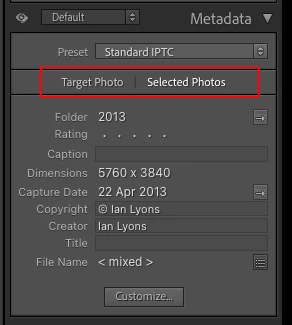
You need to tap on the 'new' and less than obvious 'Select Photos' button as shown in below screenshot. This enables the ability to apply metadata to multiple selected photos


53 replies

Participant
January 4, 2022

Hi, Since upgrading from release 10.4 to 11.1, I see there is now a customizable option for Metadata fields. However in creating this new series of options one feature appears to no longer be available. I keyword images and often apply the Title, Caption and Sublocation to many, sometimes dozens of images at the same time. I do this simply by highlighting all the images I want with the same information, type in the text detail and that's it; all images selected are applied with the text changes. Following the upgrade ONLY the lead image is applied with the text detail updates but the rest are left blank/empty. I have to now sync them additionally to get the data across. As a footnote the Keywording section appears to have remained the same, so I suspect it was a bug added in on the design of the customizable options. Any thoughts or opportunity to change it back please? It would not affect anyone who only wants to update a single image but hugely affects those who apply text detail to hundreds of images at once. Many thanks, Oliver Smart

johnrellis
Legend
January 4, 2022
Participant
January 4, 2022
Very many thanks, got it. I can’t believe I missed that so thankyou for sharing the detail!

Best Wishes,

Oliver

Website: www.smartimages.co.uk
Newsletter Sign-up: mailchimp
Facebook: www.facebook.com/Smart-Images
Linked In: www.linkedin.com/in/oliversmartimages
Twitter: twitter.com/smartwildlife
Instagram: www.instagram.com/oliversmartimages
RSPB Library: www.rspb-images.co.uk
Image Library: www.alamy.com
Telephone: +44 (0)7802 417810
Participant
December 25, 2021

When I select a group of photos, and enter Location metadata (e.g., City, State, Country, etc) this used to set it for all selected photos. Now it only sets the first photo. Not sure when this problem started, but I just updated to LR 11.1, and it's still there. This is seriously inconvenient! Not sure if this problem also applies to other metadata, haven't tried it yet.

johnrellis
Legend
December 25, 2021

@Jordan22390369qnj2 see this reply for how to fix your issue:

https://community.adobe.com/t5/lightroom-classic-discussions/p-changes-to-metadata-panel-for-targeti... 


LR 11 failed to copy your previous setting for this option, confusing many people.

Known Participant
December 16, 2021

Hello! I am able to read metadata from file for one image but not the entire lirbrary when highlighted. We have several people working on different computers in the same studio and mine seems to be the only one that I have to do one at a time. Is there something I'm missing? Thanks!

dj_paige
Legend
December 16, 2021

Under the Metadata menu, make sure that the item Show Metadata for Target Photo Only is UNchecked.

Known Participant
December 16, 2021

I unchecked this but the metadata still only updates for the selected photo.

Participant
December 9, 2021

In the past I have been able to select multiple files in Lightroom Classic using the Library module and using (G) to select many files at once. Then I could add a title and caption information and this information would be written to all of the selected files. Now it only writes to the first one selected much like what would happen if I was in the single file (F) mode. What is wrong?

johnrellis
Legend
December 9, 2021

@gordon k, see this reply for how to fix your issue:

https://community.adobe.com/t5/lightroom-classic-discussions/p-changes-to-metadata-panel-for-targeti... 


LR 11 failed to copy your previous setting for this option, confusing many people.

Participant
December 3, 2021

Hello, since using LR 10 and now 11 I have this issue: I'm used to selecting several quite similar photos in the library view and then give them a similar titel and/or caption.

Now this doesn't work anymore here. What I type in "Title" or "Caption" is only ever added to the first of the selected images. This is annoying. Keywords I can add in the way I'm used to: they get actually added to all of the selected.

Is there a (new) trick or is it a bug?

Thanks for your help!

johnrellis
Legend
December 3, 2021

@Paul22071723es58, see this reply for how to fix your issue:

https://community.adobe.com/t5/lightroom-classic-discussions/p-changes-to-metadata-panel-for-targeting-one-or-many-images/m-p/12550586#M254367 


LR 11 failed to copy your previous setting for this option, confusing many people.

Participant
November 29, 2021

I have a bunch of photos without GPS data in Library module. I selected them all and move to Map module. I find the right location for the photos and drag-n-drop the photos on the map. All the photos get the same GPS, ISO country, country, state and city information. After this I add the sublocation info by-hand. After hitting enter with sublocation the city, state, country and ISO country information disappears. Only the sublocation and GPS info remains.

Also when I add this sublocation to bunch of photos only the first photo I selected gets this information.

So there are two bugs: Disappearing location info and inproperly working batch edit (or whatever you call this) when adding sublocation. I'm using the latest version of Lightroom Classic on Windows 10.

I have done exactly the same thing with previous version of Lightroom Classic (v10) without any problems.

Participant
November 29, 2021

Quick update. The second bug is not a bug but feature with Lightroom Classic 11: Solved: Re: Editing text metadata in multiple photos affec... - Page 3 - Adobe Support Community - 12478110

Why on earth did Adobe check this option on when updating from Lightroom Classic 10 to 11. There is a checkbox when you're in Library module and open Metadata > Show Metadata for Target Photo Only.


So the disappearing location info bug still remains.

Participating Frequently
November 29, 2021

In prior versions of Lightroom classic I was able to create a collection of photos, select them all, then add a title in the metadata panel and have that title apply to all selected images at once. I use the title field to re-name images on export, so I noticed this as soon as it stopped working. Now, I need to add the title to each image, one at a time. I believe this bug first appeared for me after upgrading to Lightroom Classic version 11.

JohanElzenga
Community Expert
Community Expert
November 29, 2021

No, it's not a bug. It's still possible, but you have to select the right option in the metadata panel.


-- Johan W. Elzenga
johnrellis
Legend
November 29, 2021

"No, it's not a bug."


The bug is that LR 11 didn't carry over the user's previous setting of this option. The option has always been present (on the menu item Metadata > Show Metadata For Target Photo Only), but it defaulted to off. It's this bug, not people's failure to read the release notes, that is causing all the confusion.

Tilman Giese
Participant
November 27, 2021
  • Lightroom Classic Version Number: 11.0.1
  • OS Version Number: Microsoft Windows Version 10.0.19042 Build 19042


Steps to reproduce:

  1. Go to Map view
  2. Select multiple photos at once
  3. Set the GPS coordinates

Expected result: GPS coordinates get updated on all selected photos
Actual result: GPS coordinates are only updated on the first selected photo

This used to work in 10.x

johnrellis
Legend
November 28, 2021

"3. Set the GPS coordinates"


Are you right-clicking the map and doing Add GPS Coordinates To Selected Photos?  In my LR 11.0.1 / Windows 10 that correctly sets the coordinates of all the selected photos.


If you're entering the coordinates by pasting them into the GPS field of the Metadata panel in the Map module, make sure you've got Selected Photos highlighted, as described above.

Participant
November 24, 2021

I just started editing a huge job, and I cannot copy and paste a caption or title to an entire gallery. I have to copy each field individually. This is a simple function that has worked just fine until this week. Help!!

johnrellis
Legend
November 24, 2021

In the Metadata panel, click on Selected Photos:


When Target Photo is highlighted with multiple photos selected, changes to metadata fields will only be made to the current (most-selected photo).


This option has always been present in LR but was hidden in a menu item.  When Adobe added Target Photo | Selected Photos to the Metadata panel, they botched the implementation and forgot to carry over the user's previous setting.

Participating Frequently
November 22, 2021

Something has changed in the newest version of LR classic.

In Grid view: Previously if you selected several photos and copied a GPS location into the GPS field in the metadata tab.  Two things would happen - you got a message asking if you wanted to change the metadata for multiple photos and if you relied yes, the GPS data was inserted into the selected photos and .  Now the only thing that happens is that only the most selected photo gets the GPS data copied (and no message).

Similarly, if multiple photos were selected with different GPS locations and you looked at the metadata tab it would show "mixed".  Now it shows the GPS location of the most selected photo.  And this later thing happens for all metadata information - ie when multiple photos are selected in grid view the metadata tab shows the metadata for the most selected photo where previously it showed the metadata for all the selected photos - where it varied across photos it would show "mixed" in the field.

JohanElzenga
Community Expert
Community Expert
November 22, 2021

The metadata panel has been changed. Choose 'Selected Photos'.


-- Johan W. Elzenga
johnrellis
Legend
November 22, 2021

It's true that the Metadata panel has added a visual indication of a setting that's been in LR all along (Metadata > Show Metadata For Target Only).  But that's not what's causing all the confusion -- rather, Adobe botched the implementation and didn't carry over the user's previous setting and they changed the default setting.   This is the cause of all the reports here.