
Participant
June 14, 2022
Answered

P: Gray / Negative image display in the Develop module

  • June 14, 2022
  • 65 replies
  • 64722 views

Bonjour,

Je viens d'installer la dernière version de Lightroom Classic (11.4) sous Windows 11 et mes fichiers RAW ne peuvent plus s'afficher correctement dans le module "Développement". Je ne rencontre pas le problème dans les autres module, l'affichage de la miniature est bon, tout comme l'histogramme qui semble cohérent. Seul l'affichage dans la zone de travail est blanc (cf. copie d'écran dessous). 

__________________________________________

Hello,

I just installed the latest version of Lightroom Classic (11.4) on Windows 11 and my RAW files can no longer display correctly in the "Develop" module. I don't encounter the problem in the other modules, the thumbnail display is good, as is the histogram which seems consistent. Only the display in the working area is white (see screenshot below).
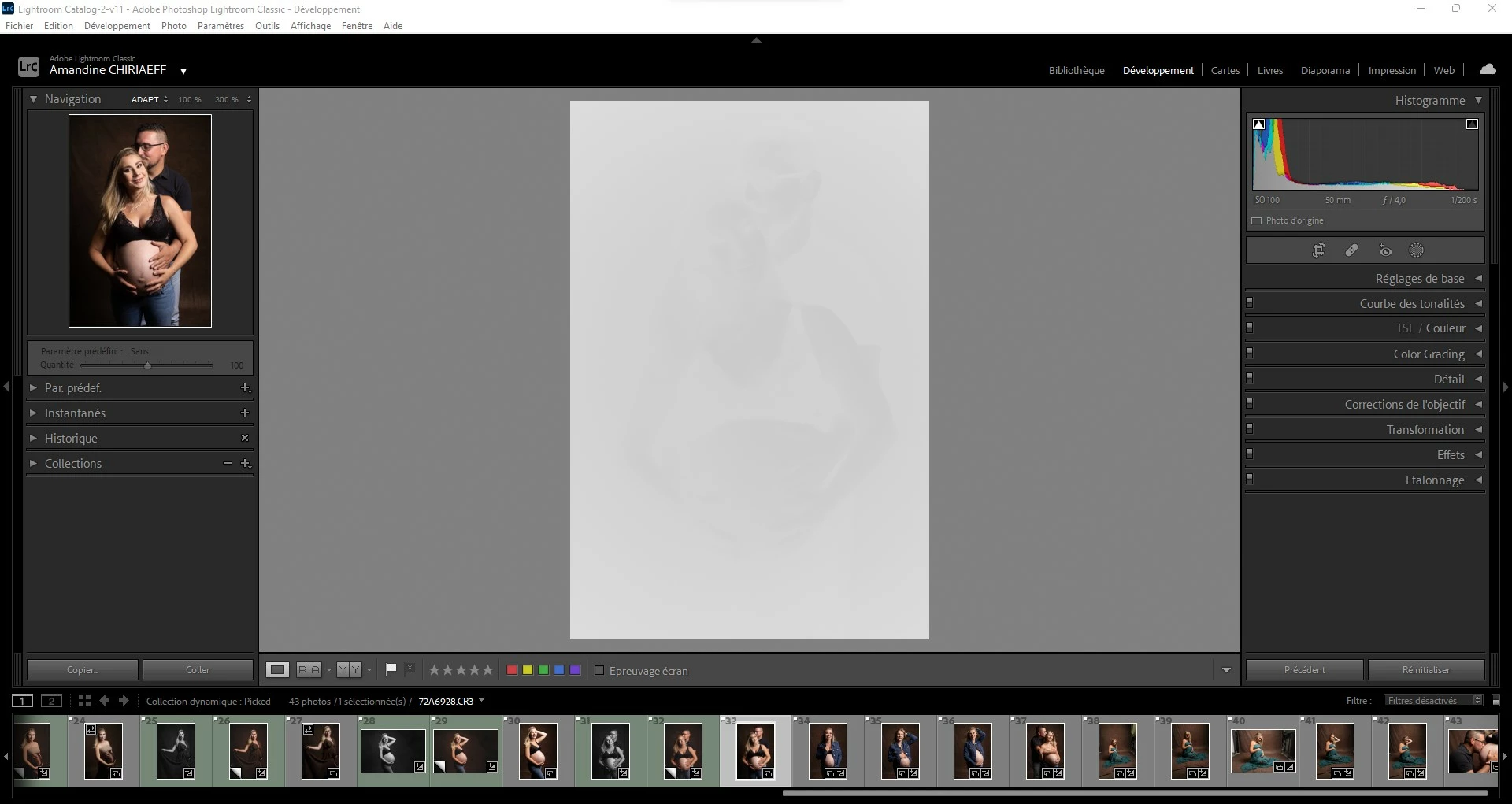
This topic has been closed for replies.
Correct answer AxelMatt

I've heard about this issue for two users here in the forum.

Please try to update the driver for your graphic card.


See also here: Gelöst: Re: P: Gray image display in the Develop module - Adobe Support Community - 13006731


65 replies

CliffJennings
Participant
June 15, 2022

Updated to 11.4 yesterday including camera raw. On startup the last library opened with the pictures showing in Loupe view below but the main window in Edit view showed as a greyed picture. See atached screen capture.I was able to do a photomerge in Lightroom, but had to open in Photoshop to do further editing & save. I wa

I was able to export files to dng I had to use Irfanview to view the result. This is awkward & slows down the workflow.

JohanElzenga
Community Expert
Community Expert
June 15, 2022

First check the drivers of your graphics card. Make sure they are up to date. If that doesn't help it could be a monitor profile issue. Temporarily select another profile (like sRGB), just to check if that solves the problem. If it does, then you must replace your current monitor profile with a new one.


-- Johan W. Elzenga
AxelMatt
Community Expert
Community Expert
June 15, 2022

The first thing that you should try is to switch off the GPU support from the Lightroom preferences and check if that helps to fix the issue.

Go to Lightroom > Preferences > Performance tab > Uncheck "Use Graphics Processor" > Restart Lightroom.

https://helpx.adobe.com/lightroom-classic/kb/lightroom-gpu-faq.html#troubleshooting

https://helpx.adobe.com/lightroom-classic/kb/troubleshoot-gpu.html


Another step is to try to reset the Lightroom preferences.

https://www.lightroomqueen.com/how-do-i-reset-lightrooms-preferences/

It's recommended to backup your preferences before you reset the preferences to the default settings:

https://helpx.adobe.com/lightroom-classic/kb/preference-file-and-other-file-locations.html


You should also check your driver for the graphic card. Do you have installed the latest version: Please check if there's an update available. If yes, install it and check again.


At least it's possible that your monitor profile is corrupt. 

Take a look here for more informations: How do I change my monitor profile to check whether it’s corrupted? | The Lightroom Queen 

My System: Intel i7-8700K - 64GB RAM - NVidia Geforce RTX 3060 - Windows 11 Pro 25H2 -- LR-Classic 15 - Photoshop 27 - Nik Collection 8 - PureRAW 5 - Topaz Photo
Participant
July 9, 2022

I habe updated the graphic card, so the problem was solved! Thanks a lot!

dj_paige
Legend
June 15, 2022

First thing to try is turn off the GPU in Lightroom Classic. (Preferences->Performance->Use Graphics Processor, should be set to OFF)

bertrikh27749214
Participant
June 15, 2022

Wie kan mij helpen?!

Na het uitvoeren van de update van LR CLassic CC (V11.4) krijg ik het scherm "ontwikkelen" een wit-grijs scherm. Het lijkt wel een soort negatief van de foto. Je ziet heel vaag de contouren van de foto.

Zie bijlage voor wat ik zie.


Wie kan mij helpen met de juiste oplossing?!


JohanElzenga
Community Expert
Community Expert
June 15, 2022

Update je grafische kaart drivers.


-- Johan W. Elzenga
Inspiring
June 14, 2022

Hello,

after upgrade form 11.3 to 11.4 in develop window the photos are white.
I found that this error happens with the setting in Performance Camera Raw use automatic graph processor.

If it is off the picture looks good.
I own windows 10 with Nvidia GTX 950M.

These are the information system:

Versione di Lightroom Classic: 11.4 [ 202206021307-2f136917 ]
Licenza: Creative Cloud
Impostazioni lingua: it
Sistema operativo: Windows 10 - Home Premium Edition
Versione: 10.0.19044
Architettura dell'applicazione: x64
Architettura del sistema: x64
Conteggio processore logico: 8
Velocità processore: 2,5GHz
Versione SqLite: 3.36.0
Memoria integrata: 16273,0 MB
Memoria reale disponibile in Lightroom: 16273,0 MB
Memoria fisica usata Lightroom: 3624,3 MB (22,2%)
Memoria virtuale usata Lightroom: 6344,9 MB
Conteggio oggetti GDI: 1313
Conteggio oggetti UTENTE: 3203
Conteggio maniglie elaborate: 2318
Dimensione cache memoria: 330,2MB
Versione Camera Raw interna: 14.4 [ 1121 ]
Numero di thread massimo utilizzato da Camera Raw: 5
Ottimizzazione SIMD Camera Raw: SSE2,AVX,AVX2
Memoria virtuale di Camera Raw: 1157MB / 8136MB (14%)
Memoria reale di Camera Raw: 1400MB / 16273MB (8%)
Impostazione DPI del sistema: 120 DPI
Composizione desktop attivata: Sì
Monitor: 1) 1920x1080, 2) 1366x768
Tipi di input: Multitouch: No, Tocco integrato: No, Penna integrata: Sì, Tocco esterno: No, Penna esterna: Sì, Tastiera: No

Informazioni processore grafico:
DirectX: NVIDIA GeForce GTX 950M (23.21.13.8857)


Adobe Employee
June 14, 2022

Hi advarte fabioc,


Do you have the latest graphic drivers? If not, please update to the latest available version and check if the image is displayed correctly.

Also, could you share the 'logs' folder present in 'CameraRaw' folder?

Location:  C:\Users\<username>\AppData\Roaming\Adobe\CameraRaw\Logs. 


Venkatesh PenjuriAdobe Lightroom Team
Inspiring
June 14, 2022

Hello Venkatesh Penjuri,


I installed nvidia geforce experience and it updated my driver to the Geforce Game Ready version. There were no drivers available for Driver Studio (SD) on the Nvidia site.
I can see the photos in Develop module now although I don't know if this new driver is good for LR CC and PS graphics.
What do you think?
Thanks

Fabio