


Visual-i Fotografie
Participating Frequently
January 12, 2019
해결됨

Presets LR / CR not availbable

  • January 12, 2019
  • 1 답변
  • 820 조회

End of December I have updated from CC 2018 auf CC 2019

Installed Version: PS 20.0.1, CR 11.1 und LR Classic CC 8.1

OS Windows 10 Home

Since the Update I have the problems that some of my Presets are marked grey/italic:
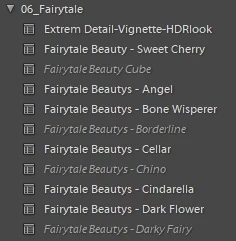
(Screenshot is just an example, this appears in all presets)

I have absolutely no idea where it comes from...

Those grey/italic marked presets I can't use in Camera Raw as they are not even shown there. All my presets are converted from xxx.lrtemplate to xxx.xmp by the system. I have also checked the right path within the directory.

When trying to load the presets within Camera Raw from the HDD the following message appears (on all photos for the gray/italic preset):

Does anybody know the problem?

이 주제는 답변이 닫혔습니다.
최고의 답변: beautiful_Genie15B9

I have the same gray/italic entries in my presets, but it is not really a problem because all of them are working fine! So it may be a different problem on your side. BTW I use a german system too.

First I thought these are presets where the camera profile is missing but that warning "profile is missing" did not show up when I clicked on them. Then I opened some xmp files in a text editor and found the problem: it is indeed the camera profile.

Here are some examples:

preset #1 (gray/italc)

crs:CameraProfile="Fuji 160C SO"

--> this profile does not exist, so I see the "profile missing" warning on the right

preset #2 (gray/italc)

crs:CameraProfile="ACR 4.4"

--> this profile does not exist(??) but I see NO warning on the right!

preset #2 (gray/italc)

crs:CameraProfile="ACR 2.4"

--> this profile does not exist(??) but I see NO warning on the right!

preset #3 (normal)

crs:CameraProfile="Adobe Standard"

--> standard profile

When I change the entry from "ACR 2.4" to "Adobe Standard" and restart LR then the preset shows up normal.

It seems as these are old standard profiles which are not recognized anymore...

Is that a bug or a feature?

1 답변

beautiful_Genie15B9
Inspiring
January 12, 2019

I have the same gray/italic entries in my presets, but it is not really a problem because all of them are working fine! So it may be a different problem on your side. BTW I use a german system too.

First I thought these are presets where the camera profile is missing but that warning "profile is missing" did not show up when I clicked on them. Then I opened some xmp files in a text editor and found the problem: it is indeed the camera profile.

Here are some examples:

preset #1 (gray/italc)

crs:CameraProfile="Fuji 160C SO"

--> this profile does not exist, so I see the "profile missing" warning on the right

preset #2 (gray/italc)

crs:CameraProfile="ACR 4.4"

--> this profile does not exist(??) but I see NO warning on the right!

preset #2 (gray/italc)

crs:CameraProfile="ACR 2.4"

--> this profile does not exist(??) but I see NO warning on the right!

preset #3 (normal)

crs:CameraProfile="Adobe Standard"

--> standard profile

When I change the entry from "ACR 2.4" to "Adobe Standard" and restart LR then the preset shows up normal.

It seems as these are old standard profiles which are not recognized anymore...

Is that a bug or a feature?

johnrellis
Legend
January 13, 2019

Here's what the grey italic presets mean:

https://www.lightroomqueen.com/whats-new-in-lightroom-classic-81/

Show Partially Compatible Presets

When Adobe released the updated preset mechanism in April 2018, they introduced some degree of confusion. Develop presets can apply profiles, but not all profiles are applicable to every file type. For example, there’s no Adobe Color profile for JPEG’s, and you can’t apply Olympus raw profiles to iPhone images. Rather than applying the preset and just skipping the profile, Adobe chose to hide presets that were only partially compatible for the selected photo, causing many photographers to wonder where their presets had gone.

You can now check Preferences > Presets tab > Show Partially Compatible Develop Presets. With this checked, the partially compatible presets display in the Presets panel as italic/dimmed text, and can be applied to any photo, as they could in earlier Lightroom versions.