
Previews not showing & no steps in history highlighted
1. Lightroom Classic, v 13.0.1.
2. MacOS
Upon migrating all my photos and Lightroom from a Time Machine backup from my previous computer, Lightroom is exhibiting two weird problems.
1) None of my thumbnail previews are showing. I am able to create previews in small batches - say, I take one reasonably sized collection at a time and ask LR to create standard size previews, no problem. But when I ask LR to do several thousand photos of previews, nothing seems to happen. (And even when I do a batch of say ~400 photos, the progress bar never fully disappears, and I get no message confirming that x number of previews have been generated.)
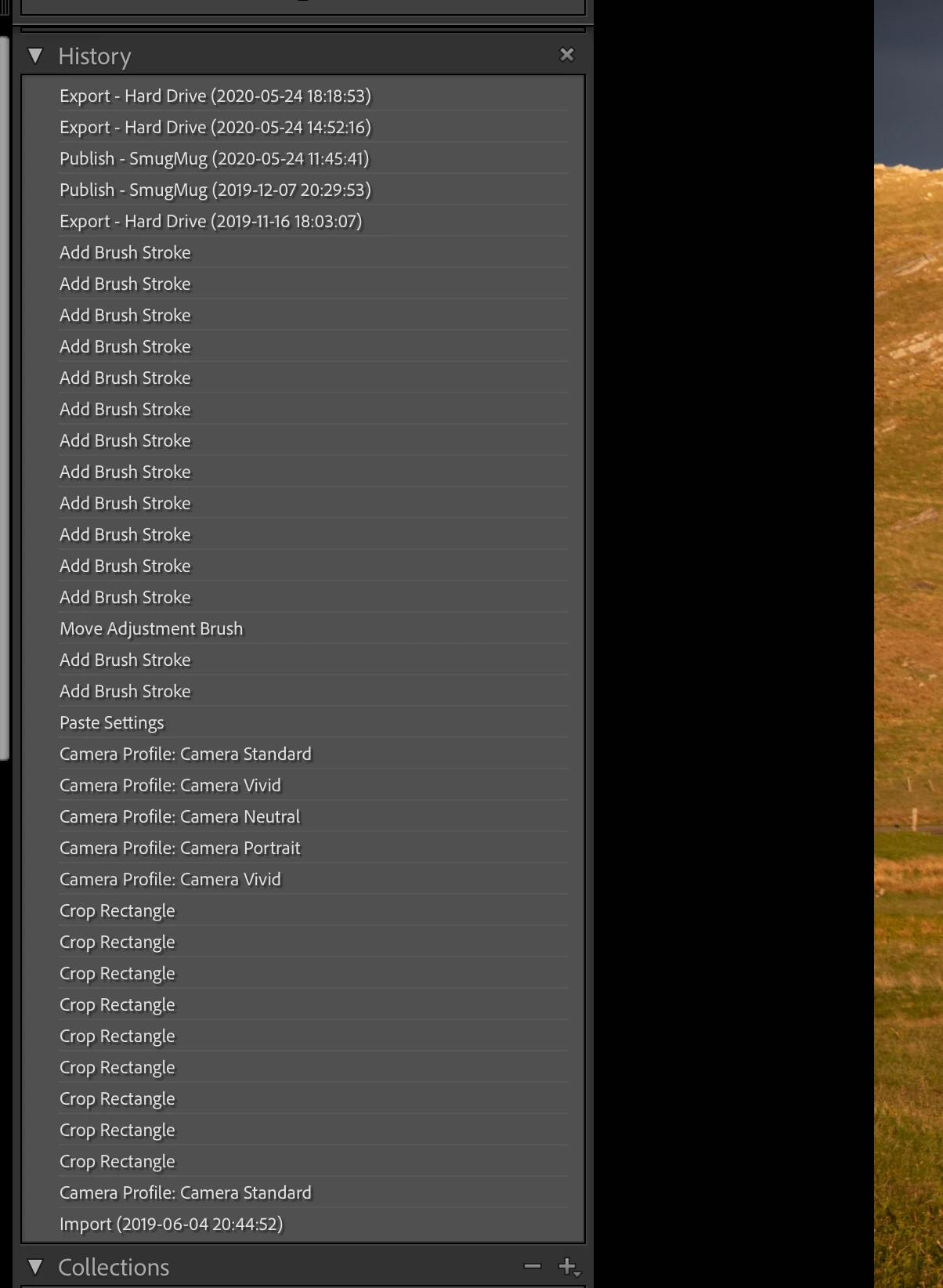
2) More annoying is that while all the steps in the History panel have been preserved from the backup for all my photos, none of the steps are 'in effect'. Essentially, all my photos are displaying as they did in the original raw format, with none of the edits in effect. If I click on any of the steps in the History panel, the picture is appropriately modified, but this is a manual step for each and every photo. I included a screenshot of one such example below. You can see all my edit steps listed, but no step is highlighted, and as a result, my photo is unaltered from the original raw appearance.
I've tried using different backup versions of my catalog to see if that might help, but it is not making a difference.
Any advice would be greatly appreciated.
Thank you,
jeff
 AdChoices