
Known Participant
August 25, 2022
Question

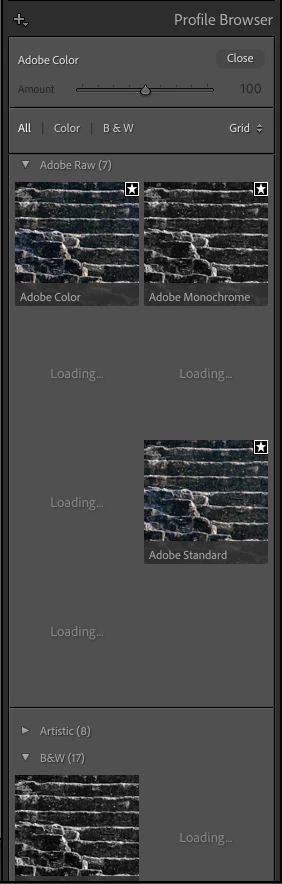
Profile Browser does not display profiles

  • August 25, 2022
  • 5 replies
  • 1810 views

I am using LrC 11.5 on an M1 Mac 16gb with MacOS 12.5.1. I have been using Lightroom for over a decade starting with version 4 on Windows and this year on Mac so I am very familiar with it. For the last couple of months on my Mac I have been having a strange, intermittent problem. I had the same problem with 11.4 and 11.4.1.


Occasionally while in the Develop module when I open the Profile Browser I discover that many of the profiles are not displayed and instead in the place of many of the profiles there is a message that says Loading... The Loading... message never goes away. If I change to a different photo though all the profiles are displayed. It seems to be random. Most of the times all is well, but fairly often I have this problem. It doesn't always happen on the same photos. Sometimes a photo that has this problem will not have the problem if I go back to it later. Restarting LrC does not fix it. Rebooting does not fix it. Here is a screenshot that shows what I see.


Any ideas?
 

This topic has been closed for replies.

5 replies

Participating Frequently
May 14, 2023

I just had this problem today, moving from a mac to a new one and copying the develop presets from a machine to the other. For me, all it took is to switch from list view back to grid. Grid (default) / list / grid. 

GoldingD
Legend
August 26, 2022

Does this problem also occur in Photoshop? When you are in Adobe Camera RAW.


Fairly sure ACR and LrC both use the same folder for those profiles.

on a MAC (Macintosh HD, that is the top level Library, not the User Library)


Library>Application Support>Adobe>Camera RAW>Camera Profiles

and/or

Library>Application Support>Adobe>Camera RAW>Settings>Adobe>Profiles>


hmm, wonder why two areas (mostly different cameras) tempted to do a full un-install then install, see if I have old detritus 


bakuboAuthor
Known Participant
August 26, 2022

Thank you for your reply.


I opened about 10 raw files in Photoshop ACR and the Profile Browser was normal, no problems.  I will try some more because with LrC it often works, but sometimes does not.  Tentatively though it does seem like ACR is okay.


Here is a screenshot of Finder in the Profiles folder.  You can see lots of xmp files.  I suppose this is normal and what I should find there.


TheDigitalDog
Inspiring
August 25, 2022

Try resetting your Lightroom preferences:
https://helpx.adobe.com/lightroom-classic/help/setting-preferences-lightroom.html
Also see: https://community.adobe.com/t5/lightroom-classic-discussions/important-steps-for-manually-resetting-preferences-omitted-from-help-article/td-p/12972518

Quit Lightroom Classic.
MacOS: Press and hold the Shift + Option keys.
Windows: Press and hold the Shift + Alt keys.
While holding down the keys, launch Lightroom Classic.
When asked, select "Yes". 

Any difference? 

Author “Color Management for Photographers" & "Photoshop CC Color Management/pluralsight"
bakuboAuthor
Known Participant
August 25, 2022

Thank you for your reply.


I reset the preferences.  Unfortunately, the problem still exists.  As I said in my original post, it does not happen all the time.  It seems rather random about when it will happen and on which photo.


Here is something that just happened that may give further info.  After I reset the preferences I went into the Develop module for about 10 photos and went into the Profile Browser for each one.  For those photos all looked normal so for a moment I thought that possibly the problem was fixed.  Then I started to configure LrC back to the way I had before I reset the preferences.  While in the Develop module I went down to the bottom-right of the screen and clicked the down arrow button so that I could set the View Modes for what is displayed under the image:  Flagging, Rating, Color Label, Navigate, Zoom.  After I did that I checked the Profile Browser again for the same photo and suddenly the Loading... problem had come back.  It is difficult to see why this would have any affect on the Profile Browser.  It is probably just a coincidence.

bakuboAuthor
Known Participant
August 25, 2022

Can you change the Profile Display to LARGE and see if the missing ones show up?  Does hovering over the missing one change the display of the photo in the main window as it is supposed to?


I changed the Profile Display to LARGE, but the problem still exists.


Yes, if I hover over the missing profiles the main image display changes to reflect the missing profile.

DdeGannes
Community Expert
Community Expert
August 25, 2022

Lightroom Classic had an update version 11.5 a few days ago which had lots of bug fixes, it's worth the update to see if experience any difference.


Regards, Denis: iMac 27” mid-2015, macOS 11.7.10 Big Sur; 2TB SSD, 24 GB Ram, GPU 2 GB; LrC 12.5,; Lr 6.5, PS 24.7,; ACR 15.5,; (also Laptop Win 11, ver 24H2, LrC 15.0.1, PS 27.0; ) Camera Oly OM-D E-M1.
bakuboAuthor
Known Participant
August 25, 2022

As a reminder, here is my first sentence:


I am using LrC 11.5 on an M1 Mac 16gb with MacOS 12.5.1.

DdeGannes
Community Expert
Community Expert
August 25, 2022

Sorry, don't know how I missed that.


Regards, Denis: iMac 27” mid-2015, macOS 11.7.10 Big Sur; 2TB SSD, 24 GB Ram, GPU 2 GB; LrC 12.5,; Lr 6.5, PS 24.7,; ACR 15.5,; (also Laptop Win 11, ver 24H2, LrC 15.0.1, PS 27.0; ) Camera Oly OM-D E-M1.
JohanElzenga
Community Expert
Community Expert
August 25, 2022

Check this: Apple changed the security requirements in MacOS Monterey. Go to MacOS 'System Settings - Security & Privacy' and add Lightroom Classic and Photoshop to "Full Disk Access". Click on the lock icon to unlock the settings, then click on the plus icon to add Lightroom Classic and/or Photoshop if it isn't already listed. If it is listed, then just enable the checkbox. See also  Quick Tips: How to give Full Disk Access to Lightroom Classic on macOS


-- Johan W. Elzenga
bakuboAuthor
Known Participant
August 25, 2022

Johan, thank you for your reply.


A few minutes ago I did steps 1-4.  After my Mac rebooted I started LrC, but the problem still exists.