Participant
July 14, 2018
Answered

"Empty" CR2 files replacing full size.

  • July 14, 2018
  • 1 reply
  • 1673 views

I have a raw file archive of full resolution CR2's, roughly 350GB worth in over 18k files. I use LR Classic CC for catalogue and editing, PhotoMechanic for culling and rating. Last night I was going through culling some old stuff in PhotoMechanic and came to some CR2 files it could not read.  I explored the folder with said files and they were radically smaller in size than the rest of the shots in that group, around 2 MB at the largest many at under 500K.  They still have the thumbnail picture, and can be edited in LR but are obviously hideously low-res.  Photoshop doesn't even recognize the files anymore.  They all still have the .cr2 extension, but all meteadata has been stripped from file. Some of these are files that I've edited at full quality no less than a month ago with no problems.  This happens fairly randomly, some shoots just have a few shots corrupted, other shoots are completely compromised or utterly untouched. I keep up to date on LR, PS and ACR updates through the CC app, so nothing is ever really out of date there.

I have a couple theories as to what may have caused it, but nothing  that feels really likely

#1 Google photo backup (no synch) - I have set to "high quality" rather than original so they don't affect my storage total there. Could google have downsized and replaced ny originals somehow? (Although GoogPhoto filesizes differ from my local "corrupted" files.

#2 Lightroom decided to delete the full resolution pic and metadata and only left the preview portion of the file. (Don't think LR ever modifies actual image files, just stores changes in catalogue(.lrcat) and .xmp sidecars) [LR did crash recently while processing something, but nothing that was affecting so many random files]

3# Virus - Found 1 questionable file, but no active threats (yet, running another full scan with other AV softwr)

4# HDD - newish 4TB hdd, makes strange noises sometimes but nothing else on drive has issues, none of the JPG's in my archive are affected.

#5 Windows - Because Windows...   (Always a possibility, but I just reinstalled windows 10 fresh about a month ago so...)

Kind of at my wits end.  I have a second backup on a disconnected drive, hopefully my damaged files are safe there, not sure if I had recently backed up some of the affected files so that sucks. Don't want to hook it up untill I'm sure it  isn't a virus.

Running Windows 10 64bit pro, Intel i5 3.0GHz, 16gb ram, GEForce 1050ti

Anyone else run in to this or have any helpful suggestions I'm all ears.
This topic has been closed for replies.
Correct answer Bob Somrak

Forgot to relink it after I changing the extension back & forth.

Dropbox - IMG_7376.cr2

edit:Apparently it doesn't preview in dropbox, but it gives a dialogue box to open it locally.


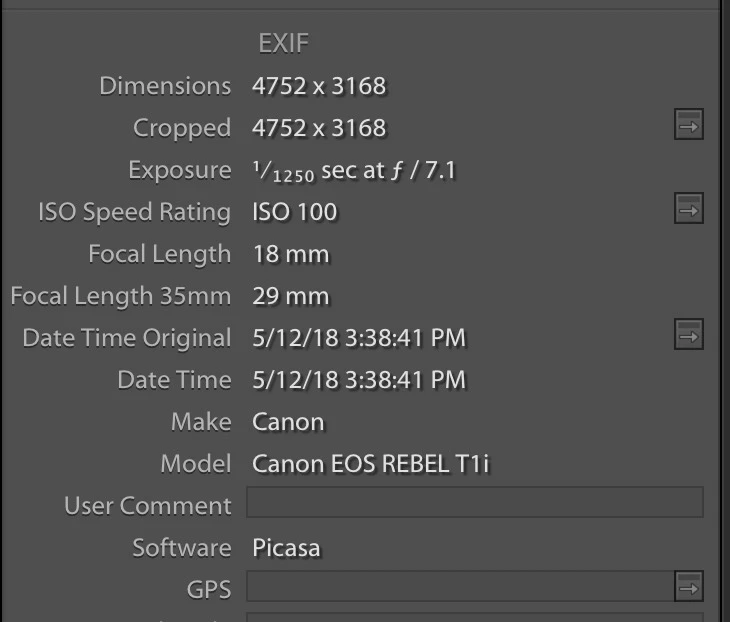
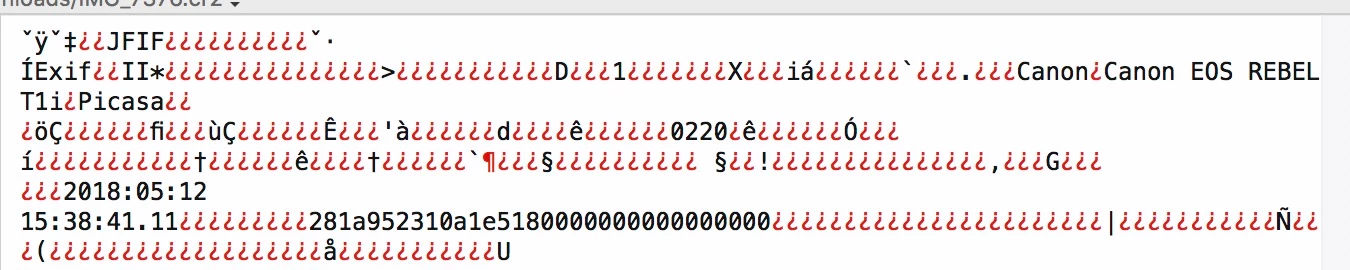
You apparently loaded and saved that file is Picasa at some time or another and Picasa just saved a Lo-Res JPG file but kept the cr2 extension.  I never have used Picasa but I am sure Canon doesn't place the word Picasa in the file header.  As ​dj_paige has said, I am sure Lightroom didn't do this either.

From top of file

From Lightroom Exif panel showing Picasa was used to modify the file.

1 reply

dj_paige
Legend
July 14, 2018

My first impression is that when you get  corrupted files, that were fine on your computer a month ago, this is a hardware problem somewhere. There's really no such thing as a CR2 file that is under 2MB in size. And no software could produce such a CR2 file.

You say that this is a new HD, but sometimes new hardware malfunctions. I would definitely run diagnostics on it; and also make sure you have backups of the originals on a different disk.

Participant
July 14, 2018

I'm going to try that, thank you. And I do have backups (of most, at least).  What makes me think it is not the hdd is that these are 'legit' .cr2 files that show up as images and can be double clicked and open in Windows Photo viewer, here is a link to one from my dropbox - a nice 263kb 4752x3168 .CR2 file (not even possible, I know!).  I've even been able to re-import these into LR and the dimensions are correct. I've also exported the image to high res jpg which results in a 880k image at the same dimensions, WITH the metadata from the cr2 which is still somehow found in LR on a fresh import of this stripped file.  (And both of these files are now on a seperate drive I've never had issues on, and are still reporting sub 500k sizes - so not a hdd issue? Could windows just be misreporting filesize? But if I edit the newly imported cr2 file from the good drive I get histogram banding that you see when you edit a compressed image (png below), so it definitely is lower reso than OG uncorrupted file.

Dropbox - IMG_7376.CR2

Dropbox - IMG_7376.jpg

Dropbox - Screenshot 2018-07-14 13.11.50.png

Bob Somrak
Bob SomrakCorrect answer
Legend
July 14, 2018

Forgot to relink it after I changing the extension back & forth.

Dropbox - IMG_7376.cr2

edit:Apparently it doesn't preview in dropbox, but it gives a dialogue box to open it locally.


You apparently loaded and saved that file is Picasa at some time or another and Picasa just saved a Lo-Res JPG file but kept the cr2 extension.  I never have used Picasa but I am sure Canon doesn't place the word Picasa in the file header.  As ​dj_paige has said, I am sure Lightroom didn't do this either.

From top of file

From Lightroom Exif panel showing Picasa was used to modify the file.

M4 Pro Mac Mini. 48GB