
Participating Frequently
September 24, 2024
Question

Réduction de bruit ne fonctionne plus

  • September 24, 2024
  • 2 replies
  • 1428 views

Bonjour, 

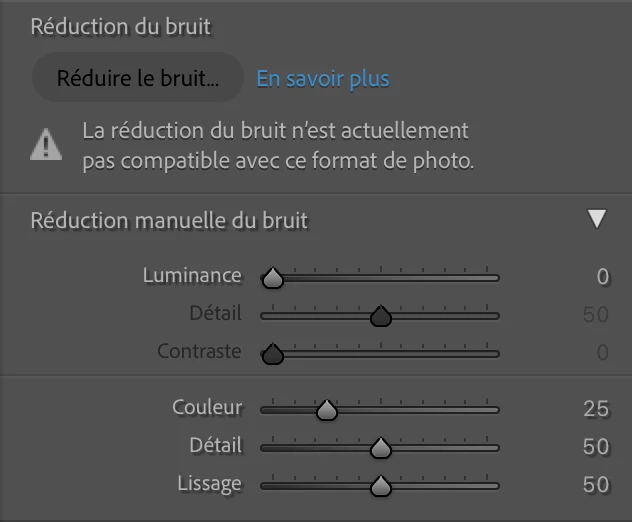
j'ai ce message depuis hier, j'ai tout essayé. Les photos que je retouche sont exactement les mêmes. J'ai d'ailleurs appliqué la réduction du bruit sur certaines. Depuis hier soir, j'ai le message suivant qui s'affiche.  Merci d'avance pour votre aide. 
This topic has been closed for replies.

2 replies

dj_paige
Legend
September 24, 2024
tom_5086Author
Participating Frequently
September 24, 2024

Les photos sont faites avec un Canon R5. En raw... Hier cela fonctionnait parfaitement... Je n'ai changé aucuns réglages entre temps. 

dj_paige
Legend
September 24, 2024

Translation to English


The photos are taken with a Canon R5. In raw... Yesterday it worked perfectly... I haven't changed any settings in the meantime. 


Something has changed, the most likely is that your camera is set to reduced sized RAWs. Can you share one of these photos via DropBox or similar and provide us with the link so we can see if it works in our Lightroom Classic?

johnrellis
Legend
September 24, 2024

The translated error message is:


"Noise reduction is currently not supported with this photo format."


This indicates that you've selected a photo that isn't a full raw (what Adobe calls "Bayer and X-Trans raw images).  Triple check that you're not selecting a JPEG, TIFF, etc. and that you haven't selected in the camera one of the reduced-size raw options such as Canon SRAW.


tom_5086Author
Participating Frequently
September 24, 2024

Cela n'est pas possible étant donné que cela marchait sur les fichiers mêmes hier. Ce sont bien des RAW .cr3 Canon R5. 

Aujourd'hui je n'ai plus l'occasion d'utilisé la réduction du bruit et hier oui. rien a changé je ne comprends pas...