

해결됨
remove jpg pictures from the cataloge
how can I remove all the jpeg files from my calaloge (lightroom Classic)

how can I remove all the jpeg files from my calaloge (lightroom Classic)
1. In the Library module's Catalog panel in the upper-left corner, select All Photographs.
2. Do the menu command Photo > Stacking > Expand All Stacks.
3. If the Library Filter bar isn't visible, do the menu command File > Library Filters > Enable Filters.
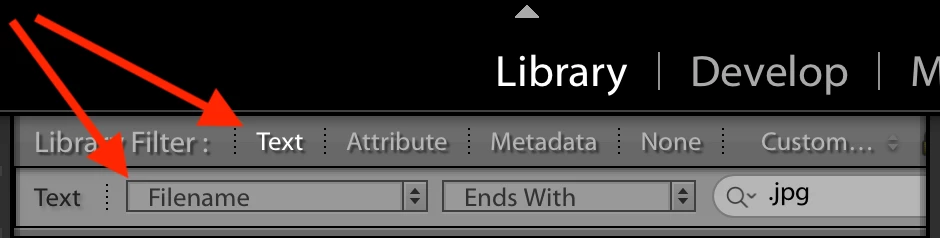
4. Click Text in the filter bar and enter the criterion Filename Ends With .jpg.
5. Do Edit > Select All.
6. Do Photo > Remove Photos.
(Keyboard shortcuts for the various commands are shown in the menus.)
Enter your E-mail address. We'll send you an e-mail with instructions to reset your password.
 AdChoices