


Participating Frequently
February 18, 2018
질문

The following files were not imported because they could not be read or the destination folder is not writable

  • February 18, 2018
  • 1 답변
  • 1769 조회

Just upgraded from El Capitan to high sierra OS 10 and lightroom classic (this new naming convention confuses me - its the desktop version)

Tried importing photos and the import progress bar comes up but nothing happens. It doesn't import. I cancel the import with x and i get the following message:

"The following files were not imported because they could not be read or the destination folder is not writable (1)"

I am importing the photos to an external drive which worked perfectly before these upgrades but i think it may be an issue now for some reason. I did a test import of one photo to the desktop and it works fine. See the attached drive permissions info. "you can only read"

Is that the issue?
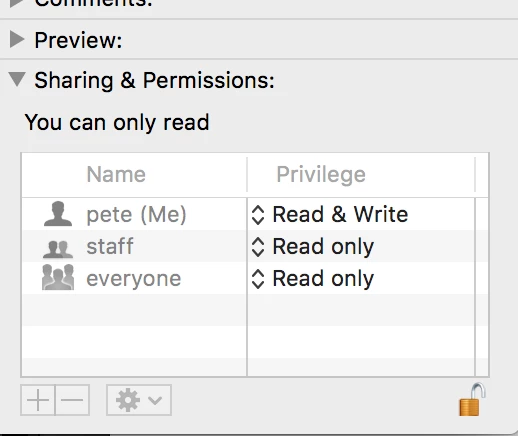
Help please?

    이 주제는 답변이 닫혔습니다.

    1 답변

    Victoria Bampton LR Queen
    Community Expert
    Community Expert
    February 18, 2018

    Yes, folder permissions / drive permissions are almost certainly the cause. We often see odd permissions issues after OS upgrades.

    Victoria - The Lightroom Queen
    peterduke9작성자
    Participating Frequently
    February 18, 2018

    You can see from the screenshot above that it says read and write next to my name.

    Anyone know how to fix it? Ive just tried to google it but i couldn't see a way to solve this issue.

    JohanElzenga
    Community Expert
    Community Expert
    February 18, 2018

    I assume this is the info dialog from the folder, not from the entire disk. Select the disk icon and do 'Info' again. You'll get the same dialog, but at the bottom you should see a checkbox 'Ignore ownership of this volume'. Make sure that box is checked.

    -- Johan W. Elzenga