
Participant
June 20, 2021

P: (Win/Mac) Lightroom Classic 12.0 Unable to export: Watermarking Failed
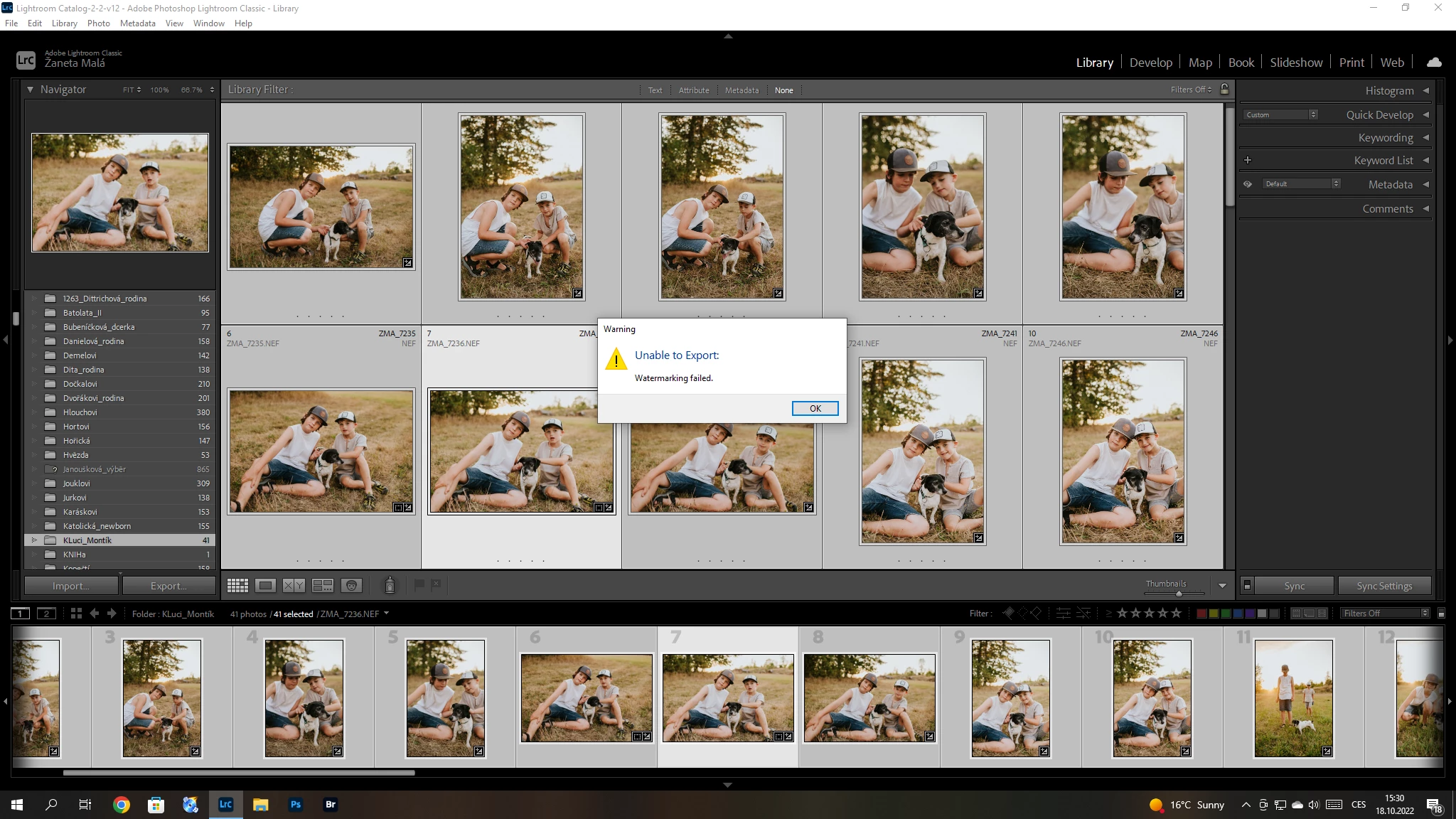
Hello, I have a problem with export my pictures after update Adobe Lightroom classic catalog. I´m not using watermark. So, I can´t understand this failer error. Can anybody help me please? 


{Title updated by moderator}

170 답변

Known Participant
October 19, 2022

Hello from the UK.


I've updated to v12 today and when trying to export an image I get an "Unable to export" Watermarking failed message.


Not sure why since I didn't require a watermark to be added!


Macbook pro 2015 Monterey 12.6


Fuji RAF


export settings below..


Participant
October 19, 2022

Hi guys,

I deleted all my export presets and recreated them. Problem is fixed, export as usual now. Thanks for you help.


Frank DeBonis
Inspiring
October 19, 2022

I got it to work by first exporting an image WITH a watermark OK, then I was able to export images WITHOUT a watermark.

Frank DeBonis
Inspiring
October 19, 2022
I just tried that and it did not fix the problem.
kentdesign
Community Expert
Community Expert
October 19, 2022

Hello - read through the previous posts...

and try John Rellis' suggestion:

"4. Try resetting LR's preferences:
https://www.lightroomqueen.com/articles-page/how-do-i-reset-lightrooms-preferences/
LR sometimes soils its preferences file, and resetting it can fix all sorts of wonky behavior. That article explains how to restore the old preferences if resetting doesn't help."   

resetting the preferences - especially after an update often fixes things!

johnrellis
Legend
October 18, 2022

Another person got the error, "Unable to export: Watermarking failed", even though they weren't exporting with a watermark:

https://community.adobe.com/t5/lightroom-classic-discussions/unable-to-export-watermarking-failed/m-p/13274442


They solved the problem by resetting LR's preferences:

https://www.lightroomqueen.com/articles-page/how-do-i-reset-lightrooms-preferences/


LR sometimes soils its preferences file, and resetting it can fix all sorts of wonky behavior. That article explains how to restore the old preferences if resetting doesn't help.


Participant
October 18, 2022

I'm trying to export an image with no watermark (the check box in export setting is unchecked). When  I hit export there's a pop up showing "Unable to Export: Watermarking falied). Any idea what am I missing? Thanks!

johnrellis
Legend
October 18, 2022

Initial troubleshooting:


1. Are you using an Export preset to do the export?  If so, create a new version of the preset from scratch.  Rarely LR will corrupt an existing preset.


2. Do you accidentally have two presets checked for export?  It will tell you in the lower-left corner of the Export window:


3. If the option Preferences > Performance > Use GPU For Export is checked, uncheck it. It's only recently that LR started using the graphics processor for exporting, and there have been some bugs with it;


4. Try resetting LR's preferences:
https://www.lightroomqueen.com/articles-page/how-do-i-reset-lightrooms-preferences/


LR sometimes soils its preferences file, and resetting it can fix all sorts of wonky behavior. That article explains how to restore the old preferences if resetting doesn't help.

Participant
October 18, 2022

I deleted my watermarks also and it worked for me. I'm on a MacPro running LRClassic 12.0

Participant
October 18, 2022

I followed Sameer instructions and deleted all my old watermarks: now export works. Hope this will help someone

Participating Frequently
October 18, 2022

Diacritical marks are the accents, cedilles, umlauts, etc. on characters that wouldn't be on English-language characters. I see Zaneta has one in the folder name, David is using an Italian version of LrC and you're Italian but using an English language version. That seems like more than a coincidence. And you're all using Windows. 

Sameer, the error message occurs when NO watermarking preset is selected on the Export page. The error message has an error, and there isn't a problem with a watermark preset. Giovanni got past the error by using a blank text watermark, but that's a workaround.

Sameer K
Community Manager
Community Manager
October 18, 2022

Thanks for sharing the inputs.


Ensure there are no stale preferences in Lightroom. Reset Lightroom Classic's preferences by following the steps in this article (I prefer using method 2): https://helpx.adobe.com/lightroom-classic/help/setting-preferences-lightroom.html


If the issue exists, please go to the following location & back up your Watermark presets.

Thanks to @johnrellis - Go to Preferences > Presets and click Show All Other Lightroom Presets. That will open Finder / File Explorer in the "Lightroom" settings folder. The "Watermarks" subfolder contains all the presets (.lrtemplate files).  Move them to your desktop and restart Lightroom Classic.


This should help,

Thanks!
Sameer K