Known Participant
April 3, 2023
Answered

Use GPU for image processing is Greyed out even though minimum specs are met (RTX 4080)

  • April 3, 2023
  • 6 replies
  • 5507 views

I am using an Nvidia 4080 on Win11 pro. All drivers and software up to date.
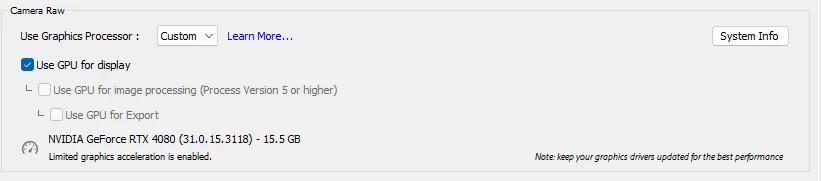
 

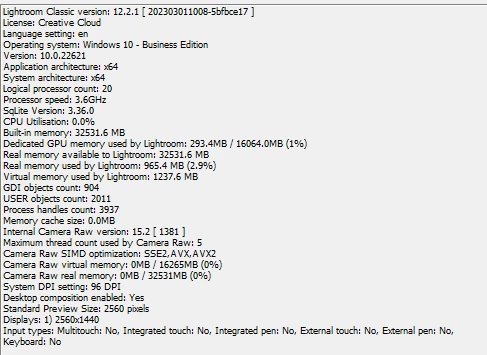
I have no idea why Lightroom sees it as windows 10 business. It's windows 11 pro. Regardless, the card obviously blows the system requirements out of the water. Any idea why I can't use this new, 1200$ card for full acceleration?


Correct answer Ian Lyons

Typically, the issue you're experiencing is due to the GPU crad drivers, and more recent drivers from Nvidia seem to be particularly problematic.  So, checking an earlier version may be worth a shot. However, before going to that length you should first check that the issue isn't due to the GPU test carried out when LrC is launched failing. The steps are as set out below.


  1. Quit Lightroom Classic.

  2. Locate the Camera Raw GPU Config.txt file.

    • (macOS) /Users/[user name]/Library/Application Support/Adobe/CameraRaw/GPU/Adobe Photoshop Lightroom Classic/Camera Raw GPU Config.txt
    • (Windows) \Users\[user name]\AppData\Roaming\Adobe\CameraRaw\GPU\Adobe Photoshop Lightroom Classic\Camera Raw GPU Config.txt

    The user Library folder is hidden by default in macOS X 10.7 and later releases. Use the directions here.

  3. Manually delete the Camera Raw GPU Config.txt file.

  4. Relaunch Lightroom Classic.

6 replies

New Participant
June 5, 2024

Thank you!!! Worked for me, 05 June 2024

johnrellis
Brainiac
April 5, 2023

"I have no idea why Lightroom sees it as windows 10 business. It's windows 11 pro."


It's a LR bug -- LR is tripping over Windows' "as designed" behavior.  See here for details:

https://community.adobe.com/t5/lightroom-classic-bugs/p-sdk-and-help-gt-system-info-report-the-wrong-version-of-windows-on-windows-11/idi-p/13110248 

Ian Lyons
Ian LyonsCorrect answer
Community Expert
April 5, 2023

Typically, the issue you're experiencing is due to the GPU crad drivers, and more recent drivers from Nvidia seem to be particularly problematic.  So, checking an earlier version may be worth a shot. However, before going to that length you should first check that the issue isn't due to the GPU test carried out when LrC is launched failing. The steps are as set out below.


  1. Quit Lightroom Classic.

  2. Locate the Camera Raw GPU Config.txt file.

    • (macOS) /Users/[user name]/Library/Application Support/Adobe/CameraRaw/GPU/Adobe Photoshop Lightroom Classic/Camera Raw GPU Config.txt
    • (Windows) \Users\[user name]\AppData\Roaming\Adobe\CameraRaw\GPU\Adobe Photoshop Lightroom Classic\Camera Raw GPU Config.txt

    The user Library folder is hidden by default in macOS X 10.7 and later releases. Use the directions here.

  3. Manually delete the Camera Raw GPU Config.txt file.

  4. Relaunch Lightroom Classic.

johnrellis
Brainiac
April 5, 2023

To build on Ian's reply, after deleting the Config.txt file, update to the most recent version of the Nvidia Studio Driver, 531.41 (you're on 531.18), which claims in its Fixed Bugs:


  • Adobe application stability issues using 531.18 [4008751]


Known Participant
April 7, 2023

Also as any fyi to anyone that comes across it, the newest game ready driver also worked.

GoldingD
Brainiac
April 3, 2023

LrC Sys Info stating Windows 10 not 11 is an oddity at Windows OS and does not cause issues other than being annoying.

D Fosse
Community Expert
April 3, 2023

Ok. I've chosen to stay at 10 for now so I wouldn't know.

GoldingD
Brainiac
April 3, 2023

In your system info you did not show the gpu info, can you post that? (does it show DirectX in use)


Do you have more than one GPU installed (not referring to an integrated video control, but an actual card)


Do you use a third party GPU accelerator? 


And, somewhere in the community, someone had a similar issue, might have related to Export, and they were instructed to (with LrC closed) delete two files, then restart, but dang if I cannot find it.


Known Participant
April 5, 2023

It should be directx 12, I'll grab the rest and post it. It is the only gpu in the system. I do not use a third party gpu accelerator. 

D Fosse
Community Expert
April 3, 2023
quote

I have no idea why Lightroom sees it as windows 10 business. It's windows 11 pro.


By @TiredOfSubscriptions


That in itself is extremely weird and I'd try to get to the bottom of that first. I wouldn't be surprised if that's where the whole problem is.