


- Home
- Lightroom Classic
- Discussions
- Re: when i transfer to photoshop the edges get rou...
- Re: when i transfer to photoshop the edges get rou...

Copy link to clipboard
Copied
Hey.
When i work in lightroom and make my pictures straight in the side its fine, but when i transfer to photoshop the edges get round again.
I have talked to adobe many times and they have taken over my computer to fix it.
But the cant fix it.
pls. help


 2 Correct answers

That dialog should not show up as the OP is using compatible versions of LrC and Photoshop. Maybe their ACR is out of date.


The choice I posted as a screenshot should open after you choose your screenshot. Try opening as Smart Object in Photoshop... I agree with Bob - maybe your Adobe Camera Raw - which your image needs to pass through as a RAW file is older and doesn't have the camera Profile to keep the settings. You are using PS 2022 - can you update? You should be able to update ACR as well.
 23
Replies
23
23
Replies
23


Copy link to clipboard
Copied
[Moderator moved from Using the Community forums to LR.]
Which version of Lightroom?
Which verion of Photoshop?
Which operating system?
What type of image file are you editing?
Copy link to clipboard
Copied
Hey.
I use windows 10
Its raw pictures
Lightroom is 12.2.1
Photoshop 24.3
I know that there is a new version of lightroom, but i dont like to use it.
And normaly i dont have this problim with not straight edges when i transfer from lightroom. so what can the problem be ?
Copy link to clipboard
Copied
I dont get it, why 2 adobe programs dont work together. that is strange ??
Copy link to clipboard
Copied
Did you save as RAW, JPG or PSD file from Photoshop?
Copy link to clipboard
Copied
When i am in lightroom i press right buttom and edit in photoshop. when it then oppens in photoshop the picture is round in the edge
Copy link to clipboard
Copied
I guess I'm not understanding the roundtrip workflow well enough.
1) You're in Lightroom or Lightroon Classic (two different apps)?
2) You edit image in Photoshop first & then Lightroom or the other way around?
Copy link to clipboard
Copied
I work in lightroom classic. and in the order i wrote
Copy link to clipboard
Copied
Can you post a screenshot? I'm not understanding how the edges can possibly be round.
Copy link to clipboard
Copied
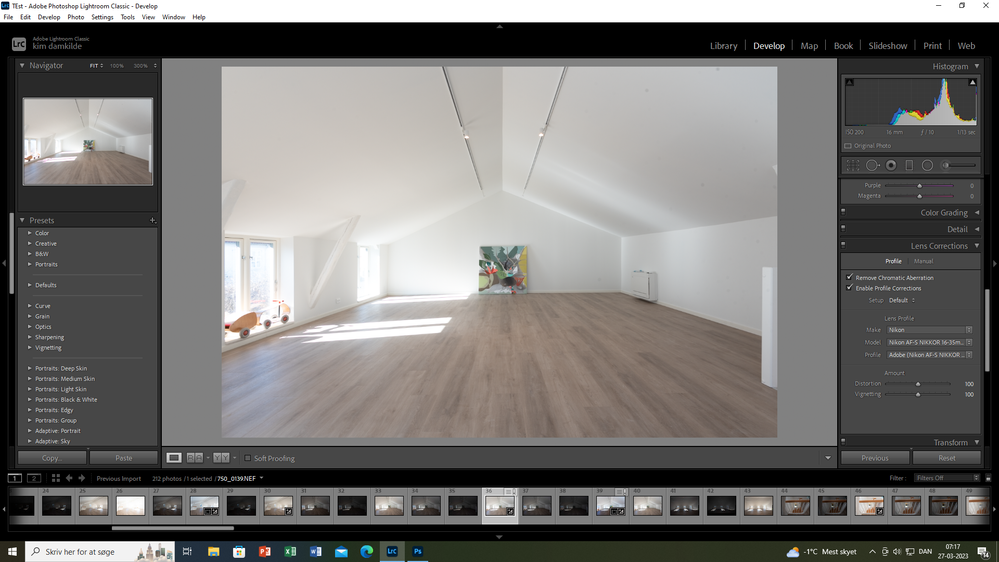
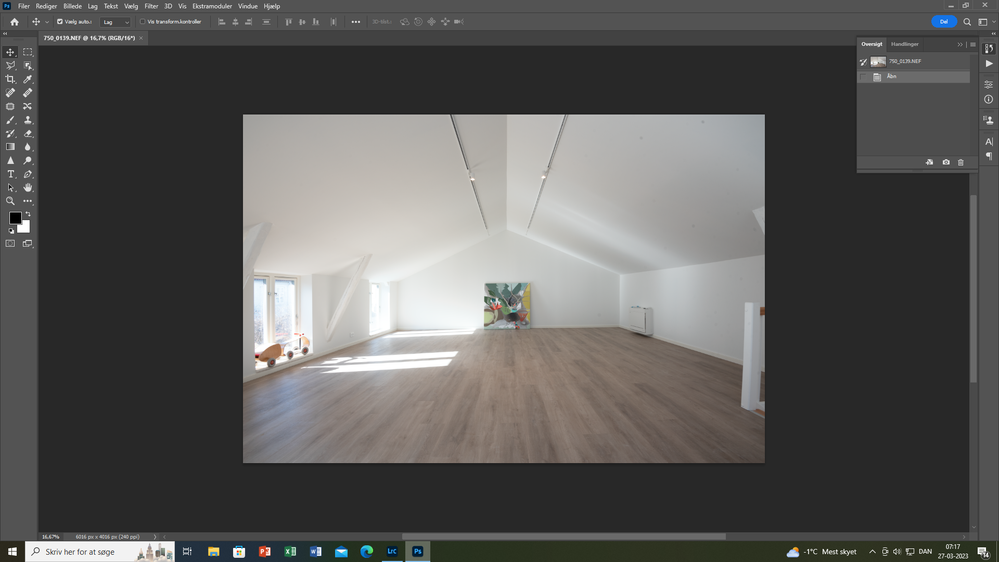
Copy link to clipboard
Copied
I'm assuming you are referring to the white stair railing(?)On the right side of the image. How are you correcting it in Lightroom? And then, more importantly, how are you opening your image in Photoshop? If you are opening in PS with a right click in LR choosing to open the original unedited version, it will revert. You want to edit with LR adjustments.
Copy link to clipboard
Copied
Hey.
As you can see in the lightroom picture i press enable profile correction, wich make my camera lense straight in the sides of the pictures, like you write ex the stair railing. then i right clik on the right mouse "edit in photo shop"
Then it opens up in phothoshop like allways. But now the picture is not straight anymore.
And i have been using the method for a long time, but now photoshop wont let me transfer the lense correction from lightroom ?
Copy link to clipboard
Copied
Ok, now that we know what you are talking about... make sure you are making the right choice for editing in Photohsop. You must choose the top choice to keep the adjustments. Is that the one you are choosing?
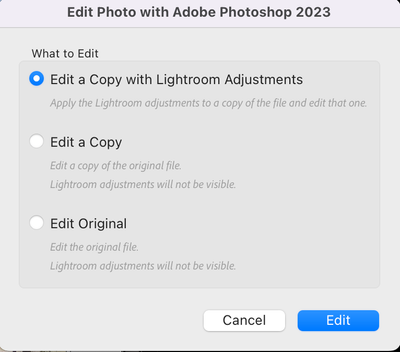
Copy link to clipboard
Copied

Copy link to clipboard
Copied
I dosent show me that page you attached
Copy link to clipboard
Copied
unless the is a setting somewhere the tells ps to remain the changes from lightroom.
But again i have had allmost every indian adobe support team taking over my computer, and they dont know what to do ???
Copy link to clipboard
Copied
Copy link to clipboard
Copied
how do i see that ?? sorry i am not that good at computer 🙂
Copy link to clipboard
Copied
The choice I posted as a screenshot should open after you choose your screenshot. Try opening as Smart Object in Photoshop... I agree with Bob - maybe your Adobe Camera Raw - which your image needs to pass through as a RAW file is older and doesn't have the camera Profile to keep the settings. You are using PS 2022 - can you update? You should be able to update ACR as well.
Copy link to clipboard
Copied
That dialog should not show up as the OP is using compatible versions of LrC and Photoshop. Maybe their ACR is out of date.
Copy link to clipboard
Copied
That is so f... great. I updated the ACR and now it works 🙂 🙂 Is there something i can grade you guys.
I am so happy now.
The funny part is that , as i wrote is i have had all india adobe in my computer, and nobody nobody could fix it.
And we are talking 10 hour support on the internet.
But then you came around, and wupti it works ......You are the king 🙂
Copy link to clipboard
Copied
Sorry your experience with support was so bad - not the first time I've heard this. We actually use the software I don't think they do. Just Mark the answers that helped you the most correct - you can mark as many as you like. Glad to help and that you fixed it!
Copy link to clipboard
Copied
Thanks for taking your time to help me 🙂
Copy link to clipboard
Copied
This looks like a BUG to me. If the ACR and LrC versions are not compatible the dialog allowing you to pick "Edit a Copy with Lightroom Adjustments" as @melissapiccone posted should have shown up or at least an warning.


Get ready! An upgraded Adobe Community experience is coming in January.
Learn more
 AdChoices