



Robbie Khan
Known Participant
January 9, 2021
Open for Voting

P: UI add Dark Mode or Interface Customization

  • January 9, 2021
  • 17 replies
  • 7427 views

Dark mode in Windows would be very useful, I use it on my system and everything is very eye pleasing, but the LRC toolbar is still white which ends up being distracting when working on dark photos since the rest of the UI is dark. It makes no sense that the toolbar does not follow the OS system theme, or at least have a proper dark mode option in LRC settings somewhere?


Pic related,t hanks!
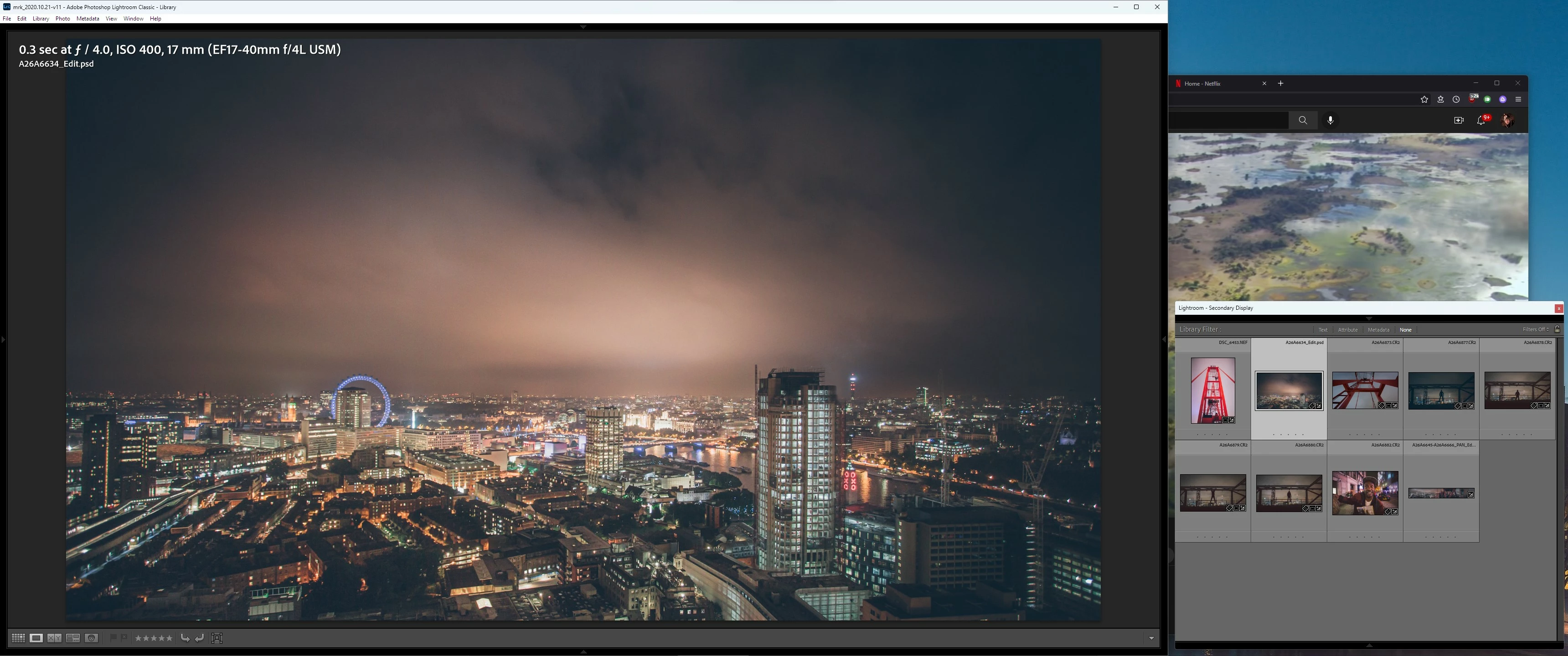
 

17 replies

ralphlouzon
Inspiring
December 15, 2022

I left Lightroom for a few years since V6 and used intensely (and still do) Capture One and some others RAW softwares.
Now I'm back in Lightroom Classic and although the features are excellent I'm suprised to see again this old style UI which I don't like at all.
I can't understand why Adobe keeps this greyish interface, fonts are small and not enough readable, the panels are medium grey where they should be dark grey, the popup menus are light grey even if my Mac is set to dark mode, this white upper bar is weird, the slider buttons are too small and difficult to see... etc.
And Lightroom CC and Photoshop have perfect and customizable interfaces! Why LRC users are punished? Please Adobe...

Inspiring
December 15, 2022

Almost 2023 and Adobe, with one of the highest subscription costs on the market, still doesn't support dark mode on MacOS.

Inspiring
October 18, 2022

Yes. I already found the very limited ways you can customize the interface in Preferences > Interface: This is the subject of my post. 

The size of the text is not the problem. The dark grey text on black is illegible. There is no option to adjust the color of the text.

Robbie Khan
Known Participant
October 17, 2022

I am on a QD-OLED monitor, so having a dark toolbar with the dark stock theme is perfect as I have infinite contrast at my disposal - But even aside from this, when the dark BG is used, th toolbar should be dark too or at the very least it should follow the WIndows system theme mode preference which it does not.

Inspiring
October 17, 2022

I'm new to Lightroom and trying to learn. I have used PSElements for about 15 years; I've used Photoshop from time to time, as well as Bridge and the Raw Editor. So, I'm not new to Adobe products. I need some visual help, so I always change the colors of the dark Workspace, Menus, etc. Specifically, the Photoshop "themes" is very helpful. In fact, I have ALWAYS been able to edit my preferences in Adobe graphic programs to suit my needs, until now.


Lightroom Classic 2022 cannot be adjusted adequately to allow me to do a simple thing like "read the screen/menus". I've been fumbling around with it for days, so not only is it not possible, it's an "undocumented feature".


To me this is bizzare. Adobe has the code to include in Lightroom Classic...why is it deemed not necessary for customers to be able to adjust the application for a visually beneficial experience. Adobe goes to great lengths to modify color in images, yet customers cannot adjust the application to suit their needs.


Please fix this inexplicable problem. then DOCUMENT IT!!!!


Thanks,

Lanell Allen

johnrellis
Brainiac
October 17, 2022

Perhaps you've already found the very limited ways you can customize the interface in Preferences > Interface:


- You can use Font Size to make text bigger, and you can change the Background color around images.


- Note that on Windows, the size of text in the top menu bar is controlled by the Windows display settings (Settings  > System > Display > Make Text Bigger).


Per Berntsen
Community Expert
October 17, 2022

Thank you @Rikk Flohr: Photography 

Could you also change the title to something like "Add option to change interface color" ?

The thread I originally posted in was a request for an option for a lighter interface.

deroderuiter
Participating Frequently
January 9, 2021

Is it possible to change the dark gray interface of Lightroom Classic? Especially for older people the dark color is terrible to work with. In Photoshop Elements it's possible to change the interface to a light color, but I can't find such a possibility in Lightroom Classic...

D Fosse
Community Expert
January 9, 2021

There isn't, and I absolutely agree there should be. All "comfort"-considerations aside, the dark interface usually fools the eye into thinking the image is brighter than it is, and so the final result is too dark and muddy.


You can set the image backdrop to white, which helps - but this makes the whole interface an over-contrasty dizzying mess.


And what's with the black frame? Why is that a good idea?

KR Seals
Community Expert
October 17, 2022

This is the best solution of all given the lack of other options in LrC. By setting the background to white in the Develop Module, you can easily see when the areas of an image that should be white are only a middle shade of gray. There are many sample of this sad situation on line, surf photos where the gray ocean foam should be nearly white, water falls that are coming out gray, etc. It does require a critical eye in evaluating your photos and a good understanding of the tonal scale, black to white.

Ken Seals - Nikon Z 9, Z 8, 14mm-800mm. Computer Win 11 Pro, I7-14700K, 64GB, RTX3070TI. Travel machine: 2021 MacBook Pro M1 MAX 64GB. All Adobe apps.