Answered
Adobe Lightroom 2022 on MacBook Pro Étalonnage
Bonjour,
J'utilise Lightroom 2022 sur MacBook Pro. Je ne trouve pas l'outils étalonnage ?
{Thread title updated by moderator}

Bonjour,
J'utilise Lightroom 2022 sur MacBook Pro. Je ne trouve pas l'outils étalonnage ?
{Thread title updated by moderator}
Hi there,
Thanks for reaching out. We are here to help. I'd be happy to help you figure this out.
Could you please share the version of Lightroom from Help > About Lightroom & the version of the macOS you are working on?
Currently, Adobe Lightroom does not have the calibration panel. Calibration panel is available in Lightroom Classic in the Develop Module.
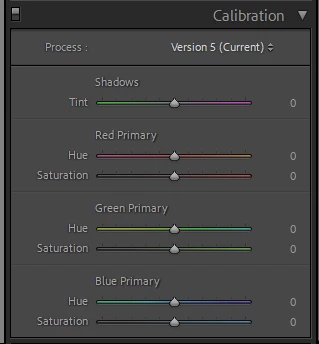
If you are working on Adobe Lightroom, you can get started with Lightroom Classic from here: https://helpx.adobe.com/lightroom-classic/get-started.html
Please upvote this feature request for Adobe Lightroom to have the Calibration panel: https://community.adobe.com/t5/lightroom-ecosystem-cloud-based-ideas/p-add-camera-calibration-panel/idi-p/10633278
We hope it helps.
Thanks!
Sameer K
Already have an account? Login
Enter your E-mail address. We'll send you an e-mail with instructions to reset your password.
 AdChoices