

Quickly convert a photo to black and white using Lightroom for mobile
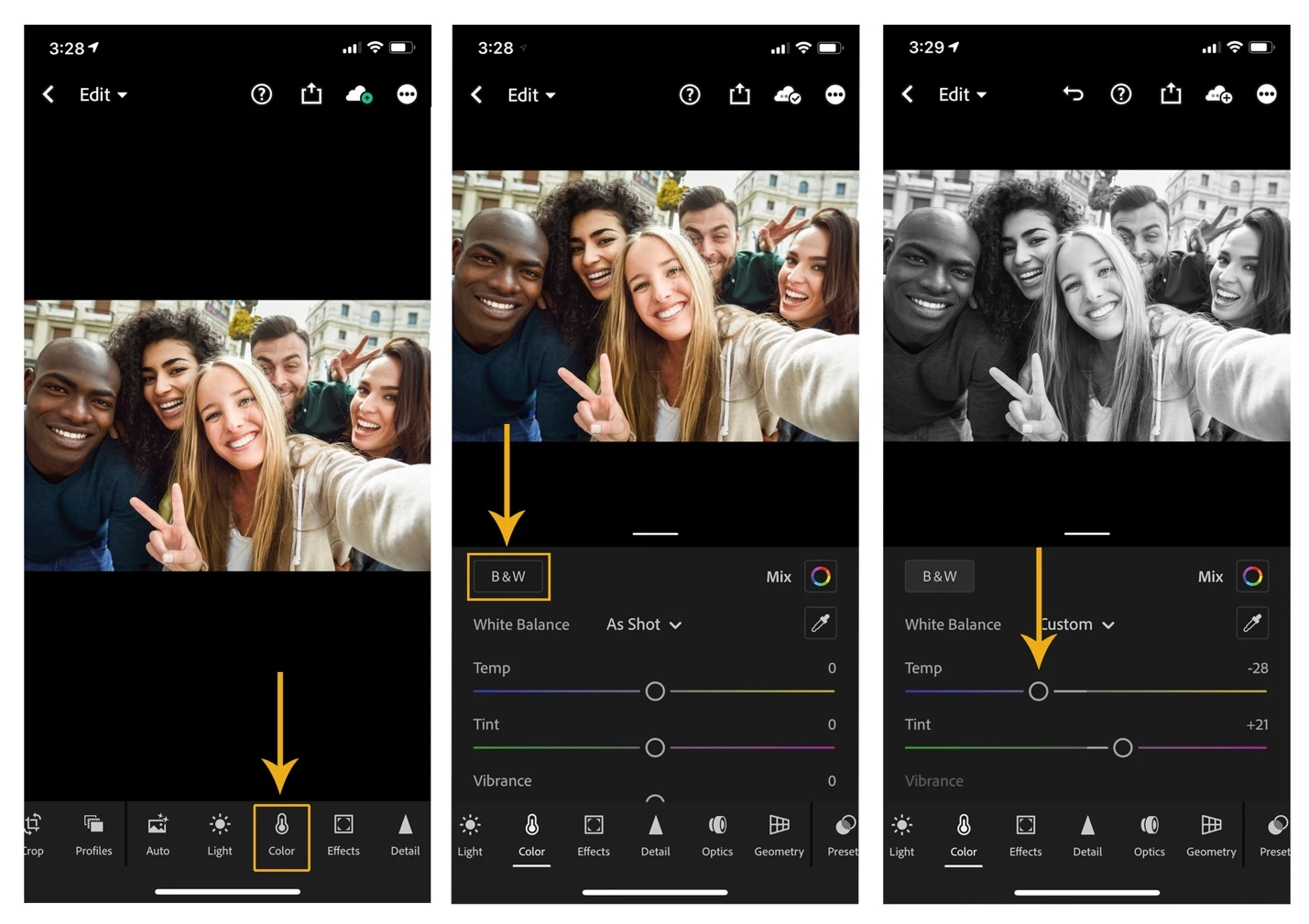
If you use a compatible iOS or Android mobile device, you can use Adobe Lightroom for mobile apps to convert a photo to black and white and easily post it to social media. Adobe Lightroom for mobile on iOS and Android make transforming images to black and white easy with a tap on the B&W button in the color panel. Feel free to get creative and put your own finishing touches on your black and white image by further adjusting the Temp and Tint sliders.
Related links:
Adjust color in your photo - LrM iOS
Fine tune color in your photo - LrM Android
There are, of course, many different ways to accomplish the task of converting from a color image to black and white. If you are new at this, you can start by trying the method above. Are you feeling adventurous? Try it in several different Adobe apps. Share your preferred method or your favorite black and white photo in the comments section below.
Learn how to convert a photo to black and white using other Adobe apps:
Quickly convert a photo to black and white using Photoshop
Quickly convert a photo to black and white using Photoshop on the iPad
Quickly convert a photo to black and white using Lightroom Classic
Quickly convert a photo to black and white using Lightroom


 AdChoices