

Pattie-F
Legend
August 20, 2020
질문

Quickly convert a photo to black and white using Photoshop

  • August 20, 2020
  • 9 답변들
  • 28609 조회


Turn a color photo into black and white


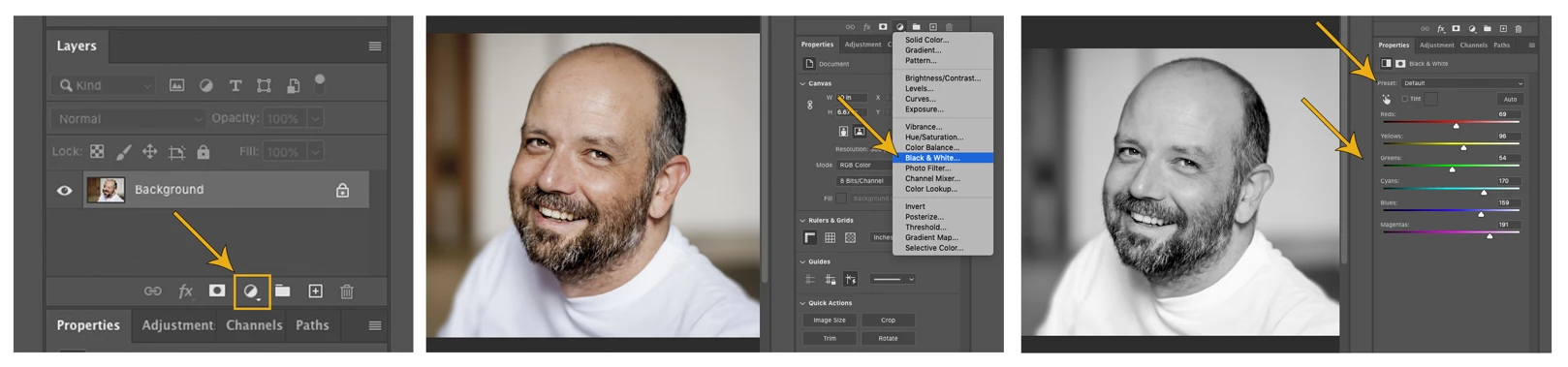
One quick and easy, non-destructive method for converting a color photo to black and white in Photoshop is to use a Black and White Adjustment Layer. Then, if you want to customize the look of your image, you can use a preset or adjust tones for each color with the sliders to create a variety of looks.


Related links:

Convert a color image to black and white

Adjusting color and tone in Photoshop

Adjustment and fill layers in Photoshop

Learn about adjustment layers


There are, of course, many different ways to accomplish the task of converting from a color image to black and white. If you are new at this, you can start by trying the method above. Are you feeling adventurous? Try it in several different Adobe apps. Share your preferred method or your favorite black and white photo in the comments section below.


Learn how to convert a photo to black and white using other Adobe apps:

Quickly convert a photo to black and white using Photoshop on the iPad

Quickly convert a photo to black and white using Lightroom for mobile

Quickly convert a photo to black and white using Lightroom Classic

Quickly convert a photo to black and white using Lightroom

9 답변

Memphixon
Participant
October 12, 2020

Thank you for the post 😀

September 22, 2020

Hi! Nice. someone knows in what format I can save the images for my website. I need them to weigh less. My website
[link removed by moderator]

Thank you

EuanWilliamson
Community Expert
Community Expert
September 25, 2020

In general saving your images in jpg format will give the smallest file size.

Jpg is a lossy format so it's a trade off between that size and the quality of the image.

Alternatively, make the images smaller and / or let a click on these pop up a larger image.

All of the above can be combined to improve page load speeds


For further reading, please take a look at:

Saving smallest JPG possible with Photoshop


Best regards, Euan.
Participant
May 2, 2021

Thanks for the clearance I will do that.

Michael Bullo
Community Expert
Community Expert
September 12, 2020

I'm a fan of converting to a Smart Object and then applying the Camera Raw Filter.

September 3, 2020

Thanks for the post! 


Pattie-F
Pattie-F작성자
Legend
September 17, 2020

You are very welcome!

Known Participant
September 1, 2020

Users can automatically colorize black & white images with Adobe Photoshop Elements 2020.  How come this feature is in the sawn off app and not in the top level expensive subscription version of the app?????

Participant
August 30, 2020

I used photoshop to design my website logo and banners. 


I prefer it to other softwares

Trevor.Dennis
Community Expert
Community Expert
August 26, 2020

I guess we all had our preferred methods of coverting colour images to black and white, but when the B&W Adjustment layer was introduced (was it CS4?) it was a total game changer.  OK, a lot of people swear by Silver Efex Pro, but you can still get that high contrast effect SE Pro just using what comes with Photoshop, and without needing a lot of work.  Why make life complicated?

Participating Frequently
August 23, 2020

I prefer using calculations.

Mohammad.Harb
Community Expert
Community Expert
August 22, 2020

Gradient Map