Quitter
  • Communauté internationale
    • Langue:
      • Deutsch
      • English
      • Español
      • Français
      • Português
  • 日本語コミュニティ
  • 한국 커뮤니티

P: Lightroom Classic>Edit in PS: Long Delay+Erroneous Error Message opening Ps Beta 2024 25.0

Explorateur ,
Jul 27, 2023 Jul 27, 2023

I just recently updated Photoshop Beta to 2024 v25.0 on my Windows 11 machine.


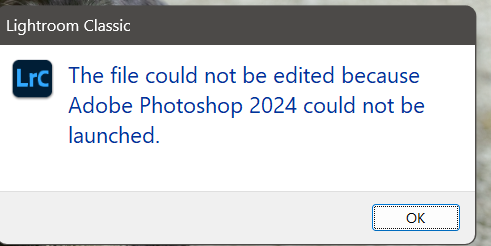
Now when I try to open photos from LR 12.4 using the "edit in...", it hangs up for a time and then comes up saying "The file could not be edited because Adobe Photoshop 2024 could not be launched."


When I hit "Ok" it then opens the file in Photoshop 2024. 


This happens with every file, even if Photoshop 2024 is already up and running at the time. 


This does not happen with 2023 v24.7.

Bug Corrigé Verrouillé
SUJETS
Desktop-macOS , Desktop-Windows
234.0K
Traduire
Signaler
Directives de la communauté
Restez bienveillant et courtois, ne vous attribuez pas la paternité des créations d’autrui et assurez-vous de l’absence de doublons avant de poster du contenu. En savoir plus
community guidelines

correct answers 1 réponse épinglée

Employé Adobe , Aug 16, 2023 Aug 16, 2023

Greetings all,


Lightroom Classic 12.5 released this evening.  If used in conjunction with PS Beta 25.0 or later, this erroneous error message plus long open wait time should be mitigated. Please install LrC 12.5 and make certain that your Beta is up to date.


If you do not see the update in your Creative Cloud Application, you can refresh it by hitting [Ctrl/Cmd]+[Alt/Opt]+[ R ].

Note: It may take up to 24 hours for your update to be available in your Creative Cloud app.


This thread will be

...
Statut Corrigé
Traduire
1 159 Commentaires
Nouveau ici ,
Sep 28, 2023 Sep 28, 2023

Same here (Mac) - this is so annoying!

Beside the bug with the print-module (LR keeps crashing everytime) - actually using LR is a horrible experience!

This bugs are known for months and I would declare them not as minor ones. It can't be took so long to fix this...

Traduire
Signaler
Nouveau ici ,
Sep 28, 2023 Sep 28, 2023
me podeis dejar tranquila no haceis mas que mandarme emails y no entiendo
nada
Traduire
Signaler
Nouveau ici ,
Sep 28, 2023 Sep 28, 2023

i was using the latest version of both LR and PS and was having the same issue. 

I uninstalled PS and "downgraded" to latest PS Beta version. 

Link between LR and PS is working fine now. Try that.

Traduire
Signaler
Nouveau ici ,
Oct 01, 2023 Oct 01, 2023

After some years I did a (real) clean reinstallation of MacOS and all programs (without using TimeMachine-Backups) - now both LR and PS are working fine.

I have no longer issues with the print-module nor the "exchange" between LR and PS.


Traduire
Signaler
Explorateur ,
Oct 01, 2023 Oct 01, 2023

Me too! I made a fix to Photoshop CC to prevent a preset error message from appearing when I exited the program. Now Lightroom won't launch Photoshop (I use CTRL-E). Except I read your explanation and I get that too. Lightroom says it won't launch Photoshop but when I press OK, it launches it anyway.

Traduire
Signaler
Explorateur ,
Oct 01, 2023 Oct 01, 2023

OK, so pressing CTRL-E in Lightroom Classic v12.5 did not launch Photoshop CC v25. Then I read a comment and waited. Lightroom said it couldn't launch Photoshop. I clicked on OK and it did launch Photoshop. I changed the Photoshop workspace from Essentials to Photography. Everything looked like I wanted.


I closed Photoshop. In Lightroom, I pressed CTRL-E again and Photoshop came right up. I had to approve charges first because I was opening Photoshop as Administrator, but then it opened - but on the Essentials workspace, even though Photography was checked. I clicked on Photography and that workspace came up. Is a puzzlement.

Traduire
Signaler
Explorateur ,
Oct 02, 2023 Oct 02, 2023

Last night I finally found a fix that worked. It involves deleting a file and letting Photoshop create a new one that works. I was cautious and just renamed the old file so it wouldn't be accessed.  Here is a video that explains what to do:  


https://youtu.be/duKw8H2Rrjk?si=PTX6Re1ioEPoiKw8


Traduire
Signaler
Nouveau ici ,
Oct 08, 2023 Oct 08, 2023

When using Lr 12.5 and attempting to "Photo>Edit In > Open as layers in Ps 25.0" the application just hangs the landing page in Photoshop. I have restarted the Mac runing the new macOS Sonoma 14.0 and it's still not functioning properly. 

Traduire
Signaler
Explorateur ,
Nov 09, 2023 Nov 09, 2023
LA PLUS RÉCENTE

I had a similar issue just now in MacOS Sonoma 14.1. I had the beta Photoshop installed along with the production release v24. Opening from LrC (latest) opened just fine in the beta Photoshop. I uninstalled the beta because I didn't need it anymore (I only had it installed to try the then-new AI generative fill stuff), then when I tried open-in from LrC, it opened Photoshop 24, but didn't open the file. 


I uninstalled and re-installed Photoshop, and now the edit-in opens the file correctly.

Traduire
Signaler