MrSenpai
Inspiring
November 6, 2021
Question

Automatic selections on hover not Showing Up

  • November 6, 2021
  • 1 reply
  • 715 views

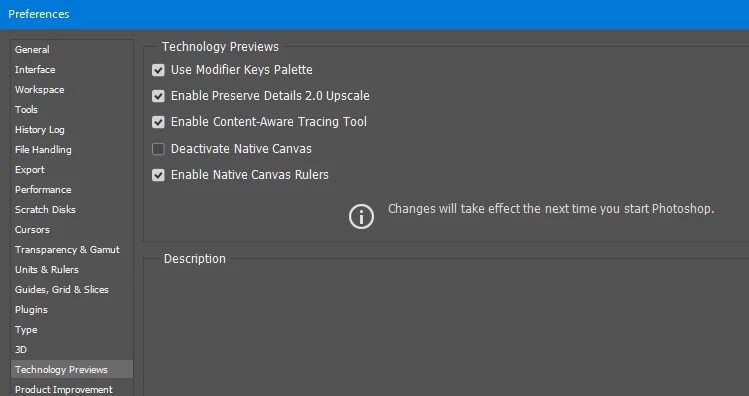
Automatic selections on hover not Showing Up even though I've enabled it in preferences
This topic has been closed for replies.

1 reply

Pete.Green
Community Manager
Community Manager
November 8, 2021

Interesting, thanks for the report here John.


Can you let us know by going to Photoshop's Help > System Info, or Help > About Photoshop, which version of the beta you're working with? My sense is there may be an update available for you.


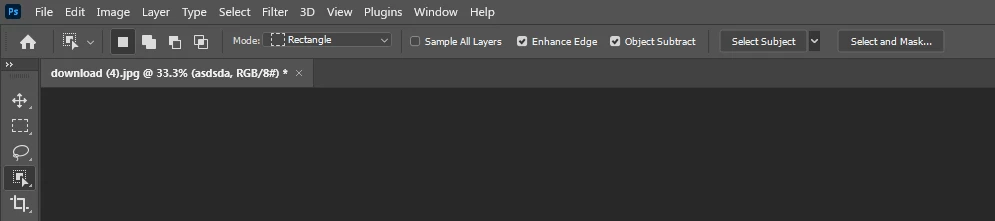
You should be seeing the object finder in the tool options bar: 


Regards,

Pete

MrSenpai
MrSenpaiAuthor
Inspiring
November 11, 2021

Hi Pete,


I opened up the Photoshop Beta and it shows 23.1.0 where as my non-beta is 23.0.1

Whats weird is that the Beat doesn't show the beta icon inside the program


But it does show it on my taskbar 


-John 


Pete.Green
Community Manager
Community Manager
November 11, 2021

Thanks for the version info John. Will work with the team on the icons, apologies for the confusions caused there. 


Both your installed versions of beta and non-beta should have the auto-masking object selection. 

Your second screenshot of the tool options bar doesn't have enough info for me to see what's there or not there. Does the rest of the Object Selection tool's tool options include the Object Finder portion? 


Regards,

Pete