


Participant
May 7, 2024
Answered

Generative Fill with reference

  • May 7, 2024
  • 2 replies
  • 53066 views

Hello there,
this is my first time in this community
I would like to know :

"is it possible to use photoshop's generative fill by giving it an image as a reference for what it should generate?"
I'm trying to add a well to a picture that I took in the desert to make a simulation and despite several attempts I can't achieve the desired result (a complete well with the wooden structure above and the pulley with it).
and my credits are counted each time I try.
I've got a reference image for what I want the result to be, and it'll be handy if we can provide photoshop with a reference of what we want to have, that'll limit the search field.
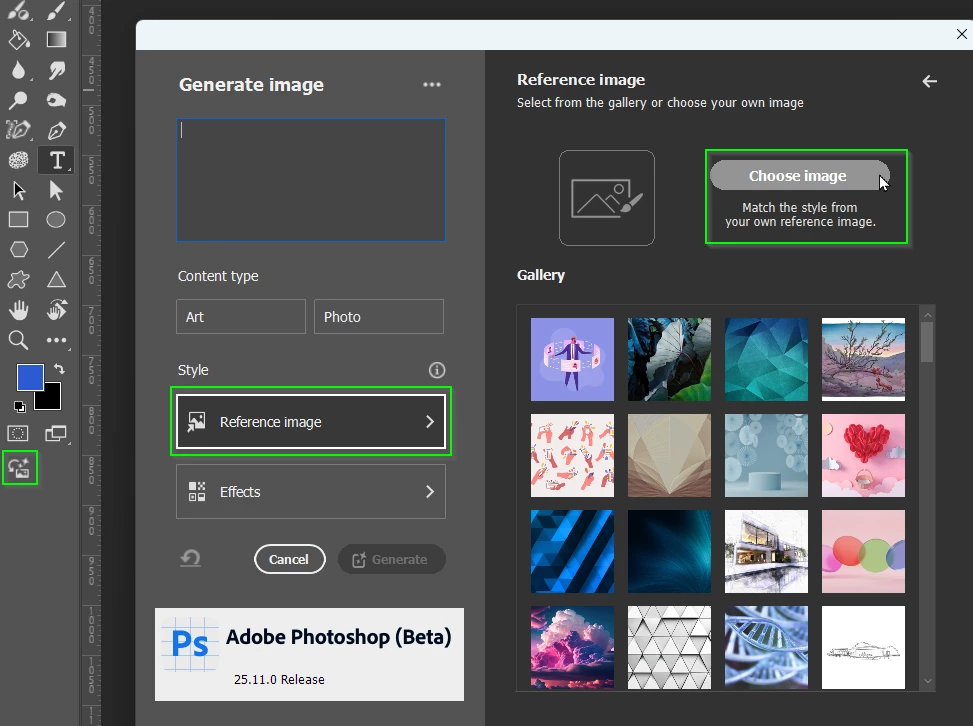
Correct answer Parya38291849jq75

Are you using the Beta version?


Thank you Travor, now I have downloaded Beta version and it works 🥳

2 replies

Participant
May 8, 2024
quote

"is it possible to use photoshop's generative fill by giving it an image as a reference for what it should generate?"


By @Exclusif Media

Yes, Photoshop’s Generative Fill allows you to use a reference image to guide the generation process. Simply upload your reference image and pair it with a descriptive prompt to achieve the desired result.

louisep43155997
Participant
January 27, 2025

is this for generate image of generative fill? i,m look for ref image for fill option, is that possible yet pls


Participant
February 18, 2025

I was told by Adobe that Beta version is no longer available and the current PS version doesn't allow adding a reference image when using generative fill. Which sucks!

Trevor.Dennis
Community Expert
Community Expert
May 8, 2024

When Firefly version 3 was icorperated directly into Photoshop I got very excited thinking about the extra functionality it has over Generative Fill, using a reference image being chief among them.  Allas, that was not the case, so at this time, and as nice it would be, no we can't use a Reference Image in Generative Fill.