


Participant
May 2, 2025
Answered

Latest Beta has broken My pervious action of stacking focus

  • May 2, 2025
  • 7 replies
  • 664 views

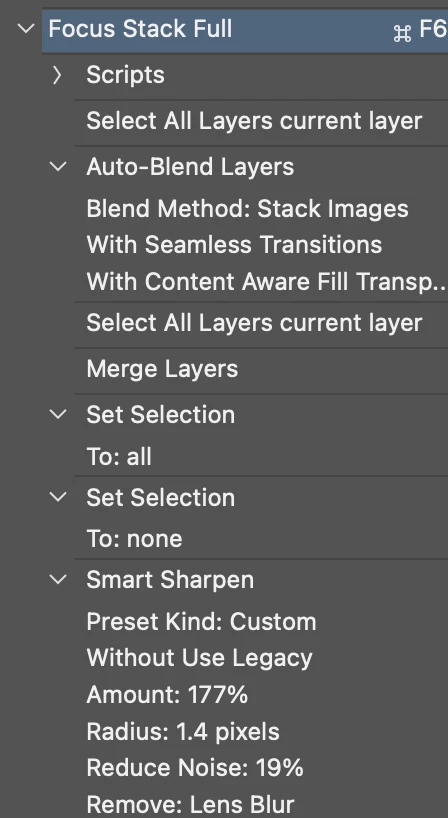
The latest Beta has broken an action I created for focus stacking. This has been working for 15 years. Not sure why it no longer works. I now have to manually do the steps in the action. attached is my action.
Correct answer Pete.Green

Thanks for sharing the action!

I think I may have figured out what the culprit is here. 

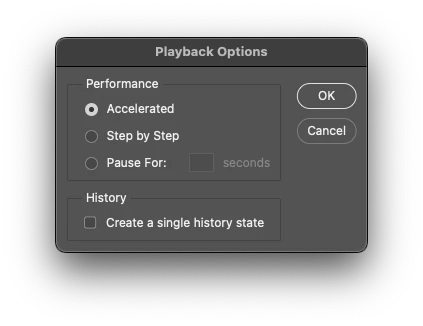
There's a new feature in the latest beta that creates a single history state for when you play an action. 

It seems when I disabled this, your action was able to run successfully. 


You can disable it in Classic Actions panel flyout menu > Playback options > Single History state


Is that the case for you too @davidk77915378 ?


I'm not sure what all is included in the load into stack script, but perhaps it interacts with history somehow?

7 replies

Pete.Green
Community Manager
Community Manager
May 9, 2025

I'll ask the team to investigate what might be going on here. Thanks for reporting this one David!

Participant
May 9, 2025

Brilliant Pete. You figured it out! Works for me now!! Thank you.

Pete.Green
Community Manager
Pete.GreenCommunity ManagerCorrect answer
Community Manager
May 9, 2025

Thanks for sharing the action!

I think I may have figured out what the culprit is here. 

There's a new feature in the latest beta that creates a single history state for when you play an action. 

It seems when I disabled this, your action was able to run successfully. 


You can disable it in Classic Actions panel flyout menu > Playback options > Single History state


Is that the case for you too @davidk77915378 ?


I'm not sure what all is included in the load into stack script, but perhaps it interacts with history somehow?

Participant
May 6, 2025

I created a dropbox folder with the action and sample images for a focus stack. https://www.dropbox.com/scl/fo/2wk83pcyngyd7tfnnkpt7/ALD3Pr8xgaNP4qISo6UYuH8?rlkey=r5qt9wk1fz9h7y71f5zk95yvq&dl=0


Its supposed to create a new document that loads all the currently opened images into a single image with multiple layers, auto aligns all the layers, selects all the layers and auto blends them, deselects, then does an unsharp mask.


Currently it makes the new document with only one layer, and move the new document behind all the other opened files, and throws up an error message. "The command "select all layers' is not currently availble." Which is strange because the "load files into stack" script only loads one image, it should be loading all the images into the new document. Its like the first part of the first action is stopping short of doing its whole job.

Pete.Green
Community Manager
Community Manager
May 5, 2025

What happens when you run the action? 

Does running it from Classic Actions make any difference?

Does it make any difference to disable Single History State from Classic Actions panel flyout menu > Playback Options?


Can you share the action with this thread to test out? Might need to rename it to .txt or.zip if the forum doesn't allow a .atn file to attach. Not sure there. 


Regards,

Pete

Known Participant
May 2, 2025

I'm having very similar issues with my scripts and actions. Never had any issues before this latest beta. Much of it may have to do with how it handles layers or perhaps not calling specific layers correctly or even tracking the layer merging after running the action. If I hit undo it doesn't undo all of the merges of layers it goes back before the merges.

Participant
May 2, 2025

Sorry, this is the full view of the action.