



youthful_Dazzle0D45
Inspiring
March 27, 2024
Answered

Layers Window does not stay in panel

  • March 27, 2024
  • 1 reply
  • 483 views

PS beta (25.7)...the Layers window does not stay in the panel when I close PS.  I have to open the window each time I start the program.  Adjustment and LIbraries no issue. 

This topic has been closed for replies.
Correct answer Trevor.Dennis

What workspace are you using? Try resetting it?
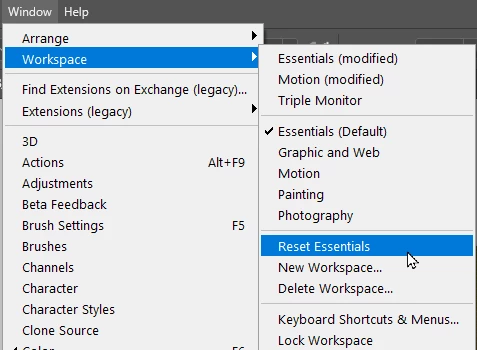
 

The default shortcut for the Layers panel is F7.  Does that work to restore the panel?

Could another app be applying that shortcut closing it as soon as Photoshop opens?


Have you tried making a custom workspace?

1 reply

Trevor.Dennis
Community Expert
Trevor.DennisCommunity ExpertCorrect answer
Community Expert
March 29, 2024

What workspace are you using? Try resetting it?


The default shortcut for the Layers panel is F7.  Does that work to restore the panel?

Could another app be applying that shortcut closing it as soon as Photoshop opens?


Have you tried making a custom workspace?

youthful_Dazzle0D45
Inspiring
April 3, 2024

That was it, thanks!