


Participant
May 23, 2023
Answered

No AI feature with new update

  • May 23, 2023
  • 139 replies
  • 286380 views

Just updated to the new beta version for PS, 24.6.0. (with AI)
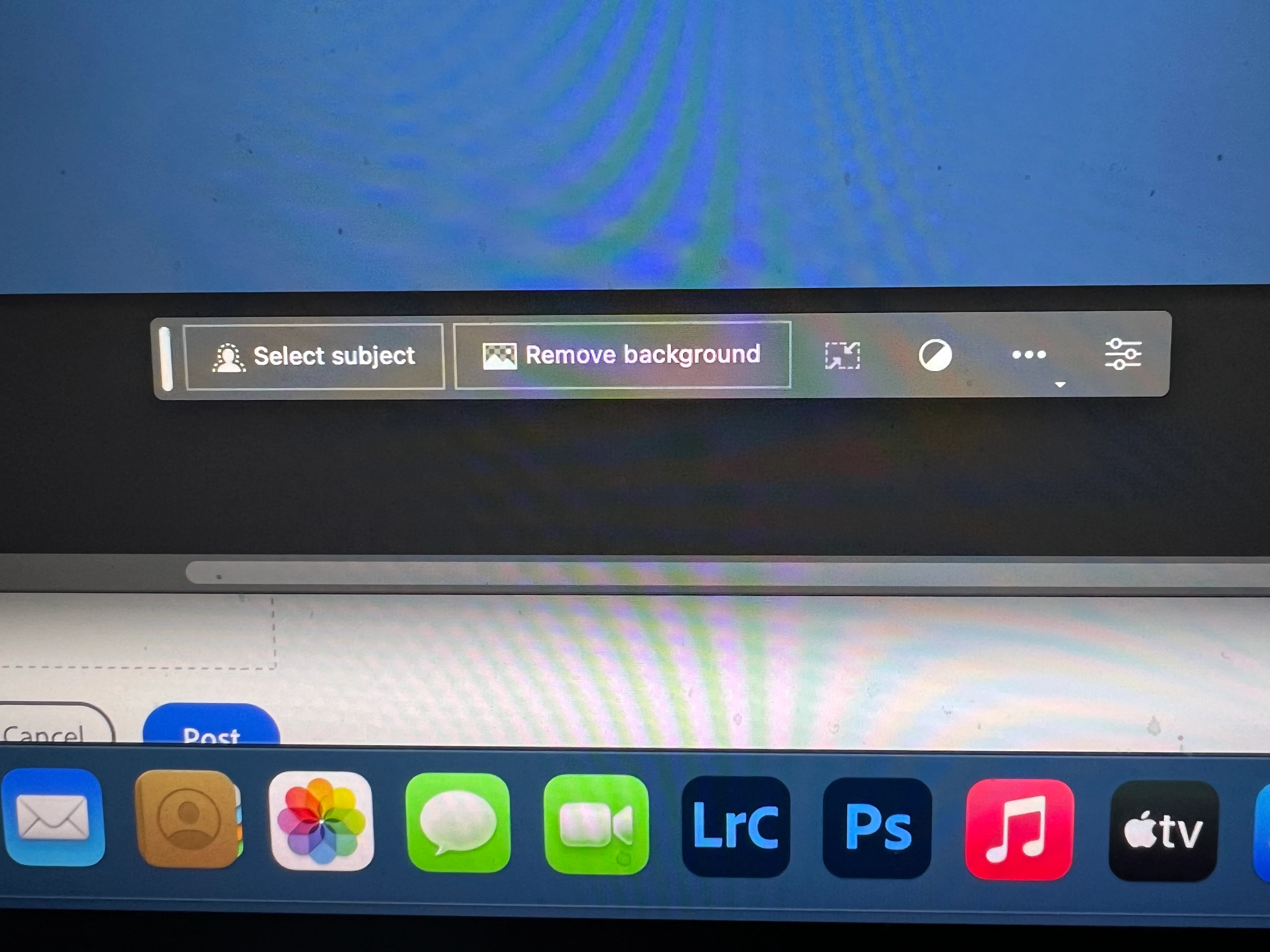
I got the new UI but it lacks the AI portion (or option) in the menu bar, or anywhere else.
Is there a minimum hardware requirement that I need? I might have missed the minimum requirements.
I am running Apple iMac Monterey 12.6.6. (Late 2015 build).
I am providing a screen shot of the UI I have available to me at this moment.
Thanks for any help you could provide.
Correct answer Kevin Stohlmeyer

Hi @Andrew30210510i27y uninstall that version then reinstall. The iterative version with Generative fill is 24.6.0 20230520.m.2181 4e0245f arm64 you are on the 516 release.

139 replies

Participant
May 23, 2023

I also cannot access this under the selection tool menu, it's also not under edit>fill either. I tried both beta 24.5 and 24.6 running on a macbook air M1 with lots of storage and good wifi.

Participant
May 23, 2023

i just downloaded the latest photoshop Beta version, and I can't find the new firefly text to image generator.

Pete.Green
Community Manager
Community Manager
May 23, 2023

Hi Hiba,


Both the previous and the most-recent version of the Photoshop Beta are 24.6.
Please check your Help > System Info and verify that on the first line you see: 24.6.0 20230520.m.2181
Ensure you are on the latest by refreshing the Updates tab of the Creative Cloud desktop app.

Keith23242116exw5
Known Participant
May 25, 2023

Seems like the fix that works is to go to the Behance tab on your Creative Cloud apps page and enter your date of birth. Worked for me! Apparently you have to be 18+ to use it

CShubert
Community Manager
Community Manager
May 23, 2023

UPDATE: Hi everyone. For those of you having issues finding the new Generative Fill feature, make sure you have the latest beta version, Adobe Photoshop Version: 25.0.0 20230801.m.2265 3a00623 x64


Please see this thread for any other clarrification:
https://community.adobe.com/t5/photoshop-beta-discussions/upgrade-your-copy-of-photoshop-beta-to-version-25-or-higher/td-p/13986957


Participant
May 23, 2023

Have the latest version, no Generative fill avaliable. It even directs me from Whats new screen to "download PS"


Participant
May 23, 2023

Die Schaltfläche mit der Funktion "Generative Fill" ist bei meinem Mac Gerät nicht ersichtlich und somit nicht nutzbar. Auf dem Windows Rechner ist diese Schaltfläche nutzbar.

ClaygateDist
Participant
May 23, 2023

+1 here - running on Windows 10 build 19045, latest beta version. No sign of this recent addition anywhere, not even in the edit menu. Defo not showing in the beta install - also tested on another machine, same result. 

conhuirmckee
Participant
May 23, 2023

+1 I am also missing this feature when I make a selection. V 24.6 on MacOS Ventura 

Participant
May 23, 2023

+1 Also have the same issue, I have the correct PS Beta version installed and followed all the steps

g-the-rat
Participating Frequently
May 23, 2023

Has this been removed from the Beta already? Nothing showing for Generative Fill after making a selection.

CShubert
Community Manager
Community Manager
May 23, 2023
this_rmx
Participant
May 23, 2023

I get the same. I have read through the help pages. Before selection I see this:

After selection, I see this:

running Beta 24.6


CShubert
Community Manager
Community Manager
May 23, 2023

Hi @randoo53 to activate the Generative Fill functionality you need to make a selection first, then the contextual menu bar will change to show you the options/workflow.


https://community.adobe.com/t5/photoshop-beta-discussions/generative-fill-in-photoshop-beta/td-p/13809064


randoo53Author
Participant
May 23, 2023

Hi Cory.
I tried following your instructions but I am still failing to see the option?
My screen shot is included.
I selected the enlarged the canvas area, selected the image and then inverted the selection to where both (white) sides were selected. Shouldn't I get the Generative fill option on the menu bar at this point or did I screw up a step somewhere?
Thanks for the quick response too. I appreciate it.

CShubert
Community Manager
Community Manager
May 23, 2023

Thank you for the update @randoo53 

Let's go through this and make sure you are not missing anything:
https://helpx.adobe.com/photoshop/using/generative-fill.html


Participant
May 23, 2023

when select ai generator option is not visible.


v 24.6.0

windows 11 

CShubert
Community Manager
Community Manager
May 23, 2023

Hi @roshanm95620203 


Try resetting Prefs for the Beta:

/Users/yourname/Library/Preferences/Adobe\ Photoshop\ \(Beta\)\ Settings 

Launch BETA Photoshop While Pressing The Keyboard Shortcut

With Photoshop closed, press and hold Shift+Ctrl+Alt (Win) / Shift+Command+Option (Mac) on your keyboard and then Launch Photoshop the way you normally would.


Participating Frequently
May 24, 2023

SHIFT+CONTROL+ALT does not launch a program (at least on Windows 11).

It shows the properties.


Participant
May 23, 2023

I have been trying to use this tool, but It doesn't appear in the contextual bar 

CShubert
Community Manager
Community Manager
May 23, 2023

Hi @shaimaa224 sorry to hear this.  Curious if you have made a selection first as this is what triggers the Generative Fill option?


Participant
May 23, 2023

Judging by coments elswhere the version of beta is no correct on Adobes site. Maybe it wasnt updated yet fully?