
Participant
May 23, 2023
Resuelto

No AI feature with new update

  • May 23, 2023
  • 139 respuestas
  • 286415 visualizaciones

Just updated to the new beta version for PS, 24.6.0. (with AI)
I got the new UI but it lacks the AI portion (or option) in the menu bar, or anywhere else.
Is there a minimum hardware requirement that I need? I might have missed the minimum requirements.
I am running Apple iMac Monterey 12.6.6. (Late 2015 build).
I am providing a screen shot of the UI I have available to me at this moment.
Thanks for any help you could provide.
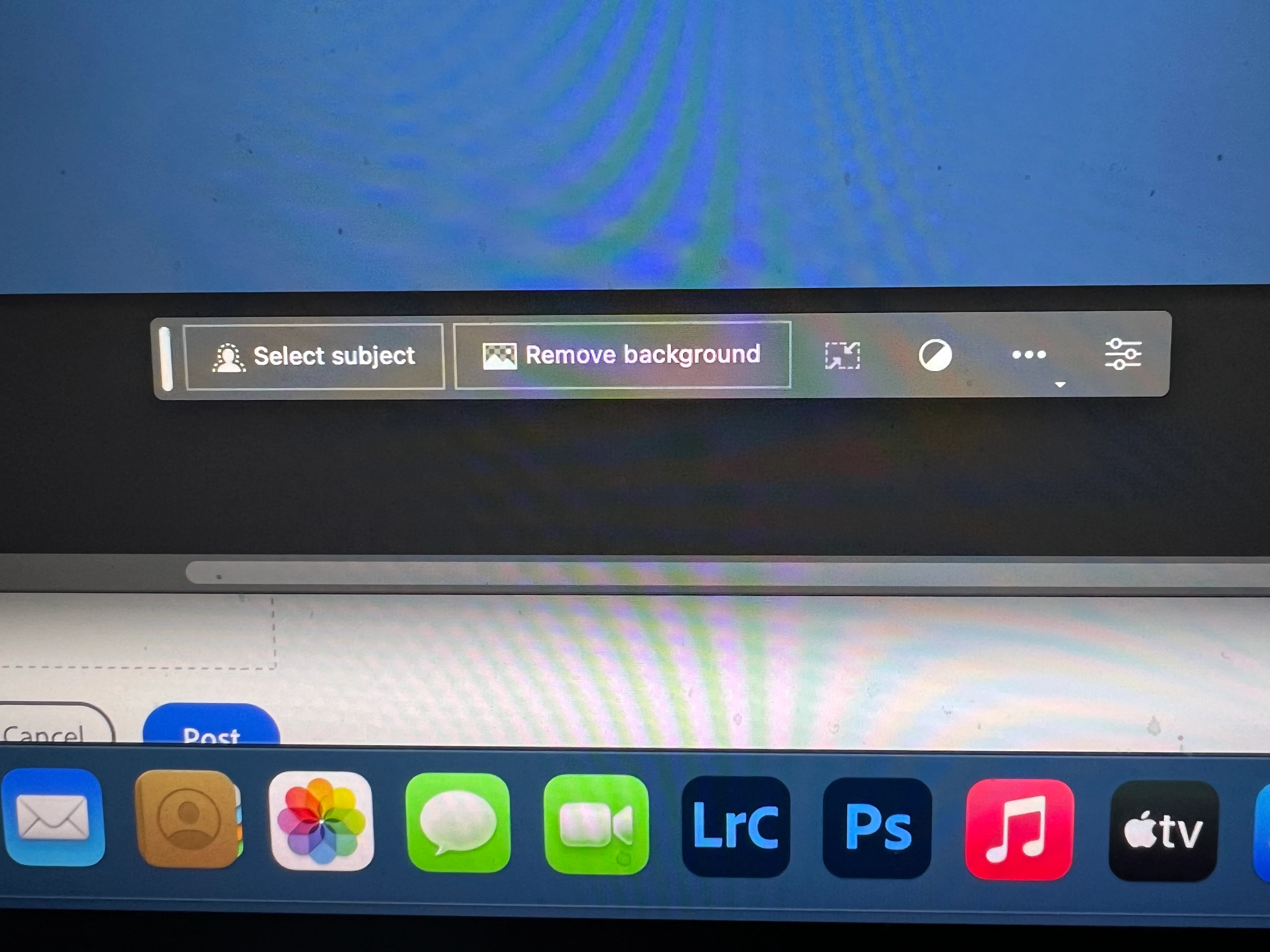
Mejor respuesta de Kevin Stohlmeyer

Hi @Andrew30210510i27y uninstall that version then reinstall. The iterative version with Generative fill is 24.6.0 20230520.m.2181 4e0245f arm64 you are on the 516 release.

139 respuestas

Participating Frequently
May 24, 2023

I'm able to see the generative fill window, but it's greyed out and the hover prompt states "Generative fill currently not available". I had an adobe technician remote into my computer and for the last hour she uninstalled, reinstalled like 3 times, I rebooted my computer 4 times, and the problem is not fixed. She said she would report it to the engineering team, but apparently there is a bug with some users. I'm windows 10 pro. Not sure if this OS is exclusively the one causing the issue. 

0xSha1man
Participant
May 24, 2023

Taken from: https://helpx.adobe.com/photoshop/using/generative-fill.html

Why can’t I access Generative Fill?

[....] "Also, for non-RGB 8/16 bits documents, the feature is visible but disabled. Hovering over the Generate button will show a tooltip explaining why the feature is unavailable."

Participant
May 24, 2023

I just installed the Photoshop Beta version so I could use the Generative fill tool.  I made a selection, and the toolbar appeared, but Generative fill was not an option.

trishlovesfood
Participant
May 24, 2023

I have the exact same problem.  I am hoping someone can offer some advice!

martinv72632865
Participant
May 23, 2023

The generative ai feature not showing up on my beta version.

Kevin Stohlmeyer
Community Expert
Community Expert
May 24, 2023

Why is the Generative Fill unavailable?
If you find that Generative Fill is greyed out for you, it is possible that you may not have a valid Date of Birth associated with your Adobe ID account. To update your Date of Birth, you can do any of the following:
• Log into Behance with your Adobe ID and enter your Date of Birth.
• Log into your Adobe account and enter your Date of Birth. To learn more, see Error: "Not eligible to use Creative Cloud services".
Once your Date of Birth is up to date, relaunch the Photoshop (beta) app to enable Generative Fill.
https://helpx.adobe.com/photoshop/using/generative-fill.html

Participant
May 23, 2023

Generative Fill tool not showing. I have the latest beta and macos.

Kevin Stohlmeyer
Community Expert
Community Expert
May 24, 2023

Why is the Generative Fill unavailable?
If you find that Generative Fill is greyed out for you, it is possible that you may not have a valid Date of Birth associated with your Adobe ID account. To update your Date of Birth, you can do any of the following:
• Log into Behance with your Adobe ID and enter your Date of Birth.
• Log into your Adobe account and enter your Date of Birth. To learn more, see Error: "Not eligible to use Creative Cloud services".
Once your Date of Birth is up to date, relaunch the Photoshop (beta) app to enable Generative Fill.
https://helpx.adobe.com/photoshop/using/generative-fill.html

Participant
May 23, 2023

I have downloaded the latest Beta and the "generative fill" option is not showing up for me. I have restarted both the program and my computer. I have also uninstalled and reinstalled the beta.  

Participant
May 24, 2023

I had the same problem. in my case I went to updates tab in the creative cloud and installed update for beta, this was weird, because I just installed beta, but it works, 

debbieb62371445
Participant
May 23, 2023

I make a selection using the lasso tool and then I am not getting the generative fill taskbar.

Participant
May 23, 2023

I first downloaded beta version of photoshop and wasn't up to date so I updated it to 24.6. The generative box came up but I can't type. Later I did the next step which was uninstall and restart my computer which is a MacBook Air and on Ventura. I cant get this to work. Generative box pops up but can't type. Please help. 😞

Participant
May 23, 2023

I have installed Photoshop Beta and when i make a selection the Generative Fill option is not available as a prompt or in the Edit Menu.  I restarted all apps and the Macbook Pro 16, I also reduced my file to 8 bit and converted to sRGB to see if it enable the feature with no success. 

Michel Bérubé
Inspiring
May 23, 2023

The generative fill and associated features are not available even though it says that it should in my version.

Michel Bérubé
Inspiring
May 24, 2023

Update. After I posted this, I received an notification from Creative Cloud that I had a new update for Photoshop beta for the generative fill. Problem solved. 

Keith23242116exw5
Known Participant
May 25, 2023

Thanks! This worked for me

Participant
May 23, 2023

 I've tried Photoshop Beta and it doesn't show up for me Generative Fill button. I'm old enough and from Bulgaria. Where is the problem? How to resolve it?

Participant
May 23, 2023

Same happening on my side too