

annaf22082551
New Participant
June 20, 2023
Answered

Revert to classic gradient

  • June 20, 2023
  • 16 replies
  • 22743 views

The new Gradient tool is awful please give us the option to use legacy gradient.

Correct answer annaf22082551

IGNORE ME.


I've found how to revert back to the old way.

Oops haha.


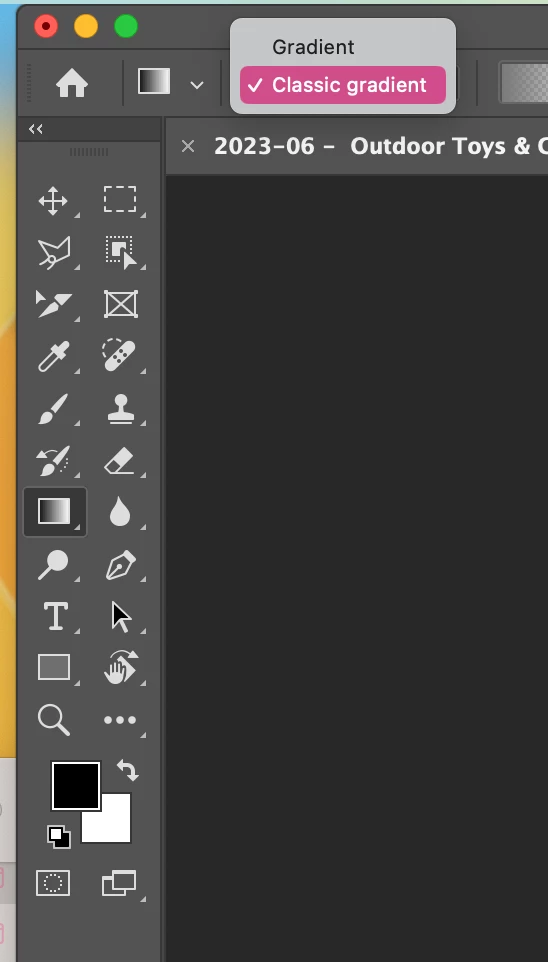
Select your gradient tool › right at the top, select the drop down where it says 'Gradient' › Change this to Classic Gradient.

Your welcome.
 

16 replies

New Participant
November 30, 2023

New gradient is awful.


It overlaps onto surrounding storyboards even when creating a clipping mask and has all sorts of export issues.


Please revert or fix the gradient fill overlapping onto other storyboards. (Also not being able to stack is ridiculous)

Trevor.Dennis
Community Expert
May 9, 2024

If by Stack you mean occuping less than the full screen, you can do that by making the gradient layer a Smart Object.


For the overspilling artboards, so long as you drag the gradient layer onto the artboard so you see the blue bounding box, then it clips to that artboard.


If you just see the one blue line instead of the box, then it is not inside the artboard and will fill the document window.

Fill the mask with black

Invert the mask (Ctrl i)

And you'll be good to go.


New Participant
October 23, 2023

Agreed. The new Gradient is a mess. Fortunately I kept the earlier Photoshop version so I will return to using that until Adobe responds and makes it work excactly as it did before. Even the "fix" doesn't totally fix it, especially when working with Masks. Very disappointed.

Trevor.Dennis
Community Expert
October 24, 2023
quote

Agreed. The new Gradient is a mess. 


By @darylblasi


What the heck!!!  OK there is a tiny learning curve, but the new tool is way more powerful than the 'classic' tool.  It really isn't complicated, and you will love it when you get to grips with it.  Feel free to ask us if you get stuck, or take a fe minutes to watch a tutorial.  But please don't shoot yourself in the foot by asigning it to the 'too hard basket'.

ElegantScience
Participating Frequently
January 21, 2024

Adobe messed up something that the entire community relies on, and when you muck around with people's legacy workflow, and make "default" things that they ABSOLUTELY do not need, you create mayhem. Photoshop is becoming a mess. I'm on a very powerful Mac and PS 2023 crashes whenever I have more than 12 files open, the menus stop working, there is a weird jitter whenever I use a slider to change Brightness, Levels etc. It's a total mess. People are at Adobe just trying to prove themselves to management. Did they do ANY user research on these screwed up 'upgrade' ideas? I've been working in Photoshop for 20 years and I've never seen it get so messed up by "upgrades". I'm seriously now reviewing alternatives.

New Participant
August 15, 2023

I found the way to toggle to go back and forth between the "Classic" gradient tool (in photoshop 2023) and the new version. 

But, photoshop-2023 keeps reverting away from the classic version to the new version by some mysterious keystroke I am mistakenly hitting.  Does anyone know what keystrokes I am mistakenly hitting that makes me jump back to the new version?

Glenn

New Participant
July 22, 2023

Thanks! The new tool is good, I see the value in it, however it completely disrupted my workflow and no time to learn it enough to use it right now.


Pete.Green
Community Manager
Community Manager
June 21, 2023

Glad you were able to find the Classic gradient option Anna.


Cheers

ebhsestdesign
New Participant
October 13, 2023

it doesn't work on layer masks the way it used to, aka more than once - it's frustrating - this isn't an upgrade, its a straight up new tool . . . Dear Adobe, stop taking away things that work, and messing up workflow ! if you have a new idea make a new tool, don't mess with that works, or keep the original as a legacy tool ! 

worst upgrade ever 


Trevor.Dennis
Community Expert
November 28, 2023

Please please please take four minutes to check out this video from Colin Smith.  It breaks my heart to see people are still not getting the new gradient tool.  It absolutely works in layer masks, and does so a lot me effectively than the classic tool.  Watch it to the end as Colin demonstrates an added bonus feature about adding texture to his lighting effects workaround. It's quite clever, and is not remotely complicated.

annaf22082551
annaf22082551AuthorCorrect answer
New Participant
June 20, 2023

IGNORE ME.


I've found how to revert back to the old way.

Oops haha.


Select your gradient tool › right at the top, select the drop down where it says 'Gradient' › Change this to Classic Gradient.

Your welcome.


Known Participant
June 23, 2023

Thank you for posting this...I would have never figured this out by just poking around. 

New Participant
October 13, 2023

Thank you so much!