


brianw79828710
Inspiring
April 25, 2024
Answered

transform controls button on options bar missing

  • April 25, 2024
  • 1 reply
  • 1814 views

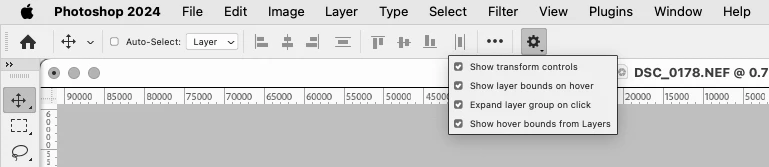
Beta version 25.9.0 no longer displays the box to toggle the display of the Move tool handles. This can only be done via the options bar cog setting. The Ctrl-T shortcut only turns the handles on, not off. This box used to be to the left of the various options. The screen caps show PS with and without that box.
This topic has been closed for replies.
Correct answer Jeff Arola

Yes now you have to click on the Gear icon in the Tool Options Bar


1 reply

Jeff Arola
Community Expert
Jeff ArolaCommunity ExpertCorrect answer
Community Expert
April 25, 2024

Yes now you have to click on the Gear icon in the Tool Options Bar


brianw79828710
Inspiring
April 26, 2024

Darn it, OK thanks. I often toggle this setting as the handles get in the way on smaller objects so it was convenient. Seems a silly change as there is plenty of space. Someone might have a hack for this maybe?

Trevor.Dennis
Community Expert
Community Expert
April 26, 2024

I have to say I had to hunt that down as well.  It can certainly be frustrating keeping up with an ever evolving Photoshop.  Something else you have just cleared up for me.  After opening m.2590 I found myself going straight to Preferences > Interface to see if my UI settings had changed, but your screenshots show that they have made things smaller to fit the additional options in the Options Bar


@CShubert  and @Pete.Green  FYI  I am using a 32" 2560 x 1440 display with UI at 100% and font set to Large and scaled to the OS, and things are on the cusp of getting difficult to see.  I just checked Photoshop on an iPad Pro, and the Photoshop UI is easy to see and use on it.  So what is the optimum display resolution for Photoshop now? 


Blimey!  I see that 8k displays are a thing now, but I can't find a price for it.