
New Participant
August 4, 2024

P: PS v25.12 Tool menu appear behind image - a problem coming from Beta

  • August 4, 2024
  • 20 replies
  • 21518 views

Drop down pop up is UNDER the photo instead of behind it. I shouldn't have to move the photo to see the drop down box, right??
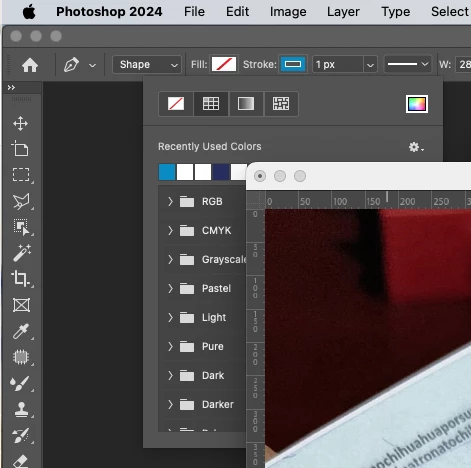


This problem is coming from Beta release, and ADOBE team did not fix it, insted now bring it to oficial release. See link below.

https://community.adobe.com/t5/photoshop-beta-bugs/p-ps-beta-v25-12-tool-menu-appear-behind-image/idc-p/14853842/page/2#M17493

20 replies

Rustus Maximus
Participating Frequently
October 7, 2024

Having an issue with Photoshop 25.12.0...


The fly-out menus for the toolbar are covered by floating windows. They should always be visible above any window you are working out of. Anyone else seeing this issue?


iMac Pro 18 core - 128GB RAM
Radeon Pro Vega 64 16 GB

macOS 14.7

Known Participant
October 3, 2024

Bonjour à tous, depuis un moment les options des outils comme la gomme par exemple, s'affichent sous la fenêtre du fichier sur lequel je travaille. Je suis obligé de déplacer la fenêtre de mon fichier pour augmenter la taille de la gomme par exemple. C'est pénible surtout dans le cas où j'ai pleins de fenêtres ouvertes. 

merci de votre aide

Olivier

Ged_Traynor
Community Expert
October 3, 2024
Known Participant
October 3, 2024

thanks for your answer I will do that before Adobe fix it. 

Have a nice day

New Participant
September 25, 2024

I was able to fix the issue by going to Window -Workspace and unchecking lock workspace. Then I moved the toolbar a bit. The tool options then appeared on top of my image. When I went back and locked the workspace it kept working properly.

Participating Frequently
September 23, 2024

I've been having problems with the floating window of PS brushes for 4 days now. When I try to use a brush on the canvas, the floating window is positioned behind the Canvas. HELP!
***I attach image

Ged_Traynor
Community Expert
September 24, 2024
kboister
Inspiring
September 23, 2024

Hi everyone.


I have this problem that the brush palette is behind my canvas. It's difficult to paint when I can't easily ajust my brush.
Do anyone know what to do?


/Kenneth

New Participant
September 19, 2024

Recently my tool menus and pop up window are appearing behind my floating canvases. Resetting preferences and workpsace has not helped. Photoshop v 25.12 on Mac.


Jeff Arola
Community Expert
September 20, 2024

Yes that seems to be a bug that carried over from the Photoshop Beta to the release 25.12 version of Photoshop.

It's been fixed in the latest Photoshop beta 25.13 so hopefully it will be fixed in the next release Photoshop update.


Since your using Floating Document Windows you could turn off the Application Frame for a temp fix until Adobe fixes the issue.

Window>Application Frame

silk-m
Community Expert
September 19, 2024

This issue was fixed in Beta m.2780 released today on 9/19, so I think it will be fixed in the next update for the regular version as well.

--Susumu Iwasaki
New Participant
September 18, 2024

Hi, my Stamp tool brush menu suddenly appears at the back of the photos Im editing. I dont know what happened, I tried to Uninstall and reinstall 3 times already and its still bugging my PS. Does anyone has experience this bug/ problem?

Jeff Arola
Community Expert
September 18, 2024

Yes that seems to be a bug that carried over from the Photoshop Beta to the release 25.12 version of Photoshop.


Since your using Floating Document Windows you could turn off the Application Frame for a temp fix until Adobe fixes the issue.

Window>Application Frame

New Participant
September 21, 2024

Thank you very much for this information 👍

Andee NG
Known Participant
September 13, 2024

I'm working with an undocked canvas in PS, and when I right-click to adjust my brush, the pop-up window is appearing buried underneath the canvas. The problem isn't present when I'm working in tabs, but because of the nature of my work I need to have multiple documents visible across my workspace.

Ged_Traynor
Community Expert
October 3, 2024

@Bri@nnn did you read the reply from @Jeff Arola above

time4698658
New Participant
October 9, 2024

Hallo,

ich habe Photoshop vorhin auf 25.12.0 aktualisiert. Beim Arbeiten musste ich feststellen, dass mir z. B. die Pinsel beim Anklicken immer hinter meiner Arbeitsfläche eingeblendet werden. D. h. wenn ich einen anderen Pinsel wählen möchte, muss ich alle geöffneten Bilder bei Seite schieben, um an die Pinselpalette ran zu kommen. Gibt es eine Möglichkeit, dass Pinsel, Werkzeuge usw. (wie bisher) immer vor der Arbeitsfläche angezeigt werden? Das nervt echt hart (wenn ich es mal in Jugendsprache ausdrücken darf).


Beste Grüße,


– Tim

Participating Frequently
August 4, 2024

Hello all!! I'd like the drop down box for brushes to go OVER the photo instead of behind it. I shouldn't have to move the photo to see the drop down box, right?? I'm hoping it's a simple fix or that I'm just not seeing. Thanks!


Trevor.Dennis
Community Expert
August 5, 2024

Consolidate to tabs.  Your document window is floating in your screen shot.

(Ignore my shortcuts.  They are not standard)