


Participant
September 15, 2023

Can't change the weight of variable fonts after update to 25.0

  • September 15, 2023
  • 42 replies
  • 24511 views

When I try to change the font weight, only a few letters have their weight replaced. First, this happened on Photoshop Beta version, but I updated both of the versions at the same time, and after trying it in the current Photoshop version (v25.0), the same problem happens.
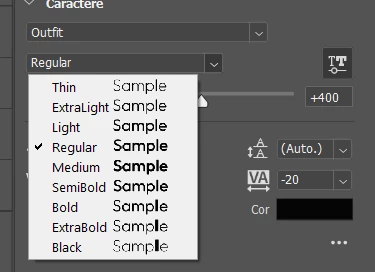


Even the font preview shows it bugged. (Only the L in "Sample" changing weight)

 

The letters affected change when I try it on the canvas, but it's still the same problem. I didn't test a lot of fonts, but the fonts that have this problem are Raleway and Outfit, both from Google Fonts. From what I've seen from other people's posts, a lot of people using fonts from Google Fonts are having this problem. We really need a way to fix this.

42 replies

Pete.Green
Community Manager
Community Manager
August 14, 2025

Moved into bugs, and updated status. 

Participating Frequently
November 4, 2024

It's been a year [cursing removed]

Adobe Employee
January 26, 2024

Good news. This issue has finally been fixed in the Photoshop version 25.4 just released. Please update your Photoshop and try it out. Thank you for your patience and support.

Participant
January 26, 2024

Is there still no fix for this? I just started getting this issue and looked it up to see it's been a bug since September. 

I am having this issue on mac version 25.3.1 with the font Railway.

jane-e
Community Expert
Community Expert
December 11, 2023


For an FYI, there is a primary thread on the beta forum that also discusses this issue for those of you on beta.

https://community.adobe.com/t5/photoshop-ecosystem-bugs/can-t-change-the-weight-of-variable-fonts-after-update-to-25-0/idc-p/14291310/


This thread is for the public release version of Photoshop (and should not be merged).


Known Participant
December 11, 2023

The text engine has been fast in version 25.2.0.196, but this problem (variable font) has not been solved yet! I have a font that is VF (has no static versions), and I want to know if there is a workaround.

Participating Frequently
November 29, 2023

This bug has been posted about before, but it persists in the newest version of Photoshop. Variable-weight fonts display incorrectly. Specifically, letters appear at inconsistent weights when using a variable-weight font. Some are bold and some are thin. This causes type to look like a ransom note in my projects. As a result, I am unable to use variable-weight fonts in the newest version of Photoshop. I tried to install the static version instead, but when I do, the affected typeface is not available in the menu.


This issue started with version 25 and version 24.7.1. I first noticed the issue with League Spartan, but it affects numerous other variable-weight fonts. Generative AI is fun, but can we please get some help fixing basic functionality?

J E L
Community Expert
Community Expert
November 29, 2023

Hi @Kenny98BC, I can confirm that this is not fixed in the newest 25.2.0 Release. I've been checking using the Red Hat Display variable font. Unfortunately, this fix wasn't included in the update. Meanwhile, keep upvoting for a fix. Note that your post may be combined into a similar topic thread by a moderator.

Participating Frequently
November 29, 2023

Has there been any update on this? I installed the newest version to see if it was fixed and the issue is still there. Back to version 24.7 for me. 

Participant
November 20, 2023

Thanks for the topic and thanks for all the responses! I had the exact same problem with Raleway from google fonts, but not Lato.  It turns out that I installed Lato with static fonts and Raleway with a variable font.  I deleted Raleway, downloaded it again, and the downloaded zip file contained static versions of the different Raleways weights. I installed those (ignoring the variable version) and now InDesign is rendering things correctly.

Rocketstro
Participant
November 8, 2023

I had to go back to Photoshop 2021