
Participant
October 1, 2024
해결됨

Can I constrain brush softness to the actual size of the brush?

  • October 1, 2024
  • 3 답변들
  • 797 조회

When I choose a brush hardness of 0 (maximum softness), the feathering extends beyond the brush's displayed radius. How can I constrain it so that it is fully contained within the size I have set for the brush?


As you can see in the attached video, as I paint with a hardness of 0, the paint exceeds the brush size by at least 50%. I'd like to constrain it to the size of the brush, so that all of the feathering lives inside the brush's border.


Is that possible?
이 주제는 답변이 닫혔습니다.
최고의 답변: fbeaume


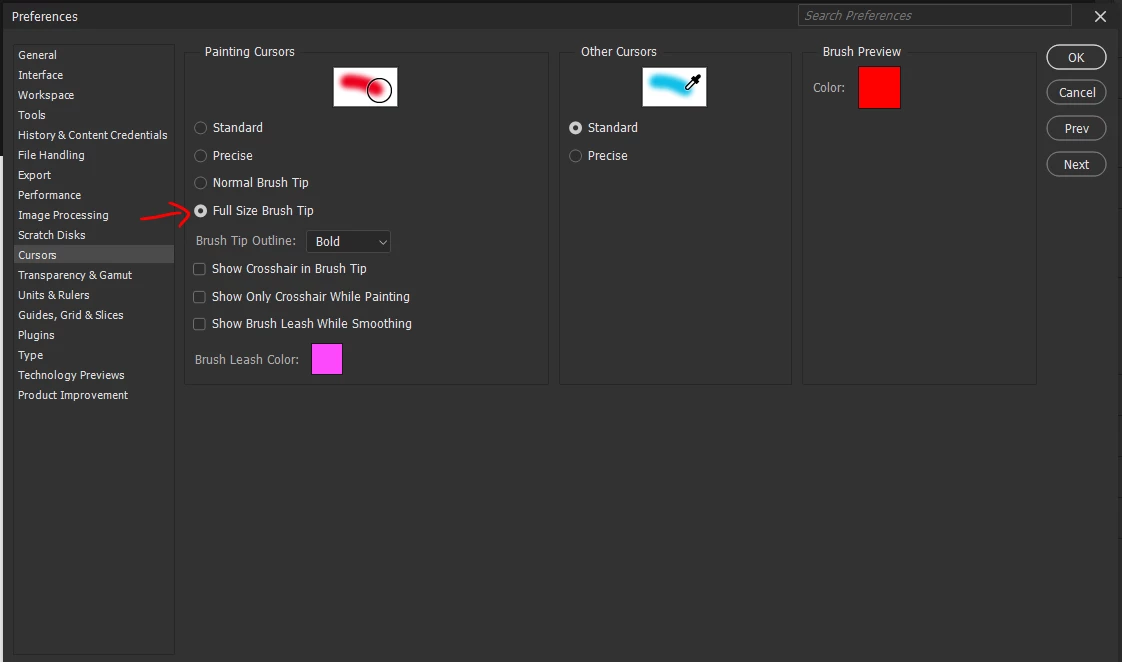
Did you try to change settings of Cursors Preferences? 
Choosing "Full Size Brush Tip" option should do what you want.

3 답변

aminadream작성자
Participant
October 1, 2024
Jeff Arola
Community Expert
Community Expert
October 1, 2024

In Photoshop go Photoshop 2024>Settings>Cursors>Painting Cursors and check Full Size Brush Tip


Didn't see the other post with the same answer

https://community.adobe.com/t5/photoshop-ecosystem-bugs/constrain-brush-softness-to-the-actual-size-of-the-brush/idi-p/14890381

aminadream작성자
Participant
October 1, 2024

Thank you!

aminadream작성자
Participant
October 1, 2024

Right now, when you choose a brush hardness of 0 (maximum softness), the feathering extends beyond the brush's displayed radius. I need to be able to constrain it so that it is fully contained within the size I have set for the brush.


As you can see in the attached video, as I paint with a hardness of 0, the paint exceeds the brush border by at least 50%. I'd like to constrain it to the size of the brush, so that all of the feathering lives inside the brush's border.

aminadream작성자
Participant
October 1, 2024

You solved it! I can't tell you how much time I spent on the phone with Adobe customer service getting second and third opinions when they said this wasn't possible. Thank you. Side note: it's interesting what happens to the brush border with this change. When set to "normal," the brush border is round and smooth. With this new "full size" setting, the brush border is jagged (it's the same brush). See attached screen grab.The resulting paint application isn't jagged, just the brush border prior to painting. Weird. Anyway, thank you for solving.