
steveharrington1974
Known Participant
April 22, 2025

P: Photoshop 2025 v26.6 Bug - black document window

  • April 22, 2025
  • 179 replies
  • 36788 views

Photoshop 2025 v26.5 was working absolutely fine, then I made the mistake of updating to the latest patch, version 26.6.0 on my M4 Mac Mini.


After updating to 26.6, the actual document window is solid black - even if I open a photo or previous document...
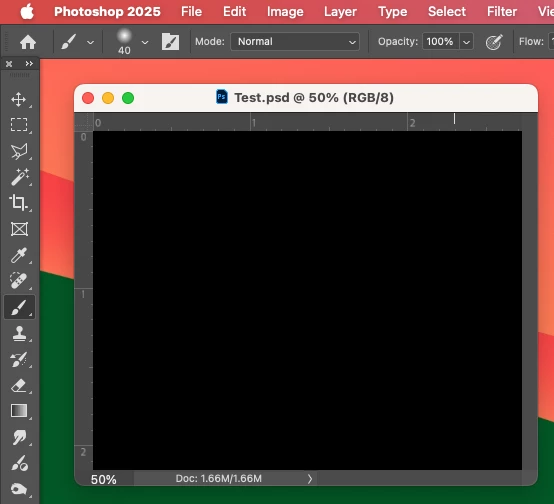


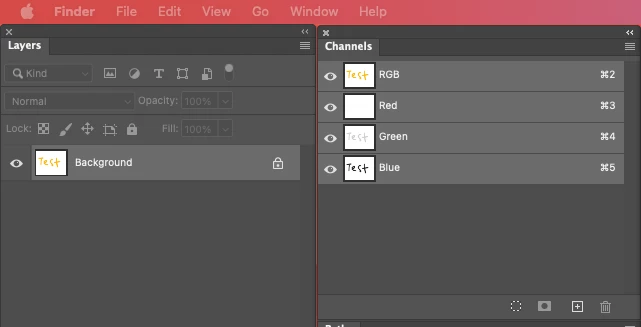
Even though the Layers and Channels palette preview thumbnails are showing what's in the document...


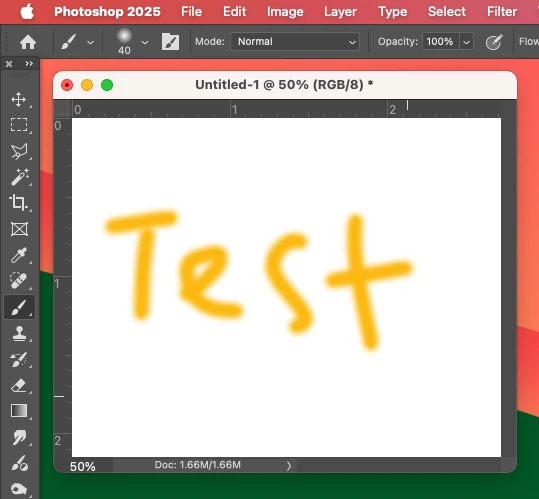
After digging around in Preferences, I tried turning off the "Use Graphics Processing" option and relaunching Photoshop afterwards, and it's working fine again...


I'm just wondering if this is a bug related to the M4 Mac Mini graphics driver compatibility with the version 26.6.0 release? And, if so, when can we expect a fix from Adobe. 


I've discovered the workaround for now, but obviously turning off the Graphics Processing setting will affect perfomance. Like I say, with this option switched on previously to the latest 26.6.0 release, it was working fine so it must be a new bug with 26.6.


I'm never updating this software ever again!!

179 replies

Inspiring
April 27, 2025

You can put back old preferences and just reset preferences (to not restore all actions, brushes etc that stored in prefs folder).

Inspiring
April 27, 2025

Reset preferences did the trick for me on my Intel.

Maybe something breaks preferences on Photoshop update to version 26.6.0.

Suchbild
Participant
April 27, 2025
I​ right-click an image (DNG or JPG from several cameras) in Lightroom Classic (Mac, newest version) and select the “Edit In photoshop” submenu in the popup menu. Photoshop starts, but a black image is displayed.
 
The images are displayed correctly via the "Open" dialog in Photoshop.
 
Is there a solution for this? Thank you!
Per Berntsen
Community Expert
Community Expert
April 27, 2025
jeffreyS1767173
Participating Frequently
April 27, 2025

Photoshop auto updated yesterday on my all apps CC plan. Now when I open a RAW or psd file, the image window is solid black. The histogram shows there is data in there somewhere but all that is visible is black.  I needed to DISABLE the setting for using the Apple M2 Max graphics processor to get to see the image again.  Shouldn't I want to be using that?  This has never happened in any previous version of PS.. Running OS 14.6.1 on a Mac Studio M2.  I'm in new territory with this one.  Advice?  Thanks.

Ged_Traynor
Community Expert
Community Expert
April 28, 2025
Participant
April 27, 2025

After updating last night from Photoshop 26.5 to 25.6 all my files open with just a black image. The menus, app windows all look normal, just the loaded image is not displayed. The same files open OK after I re-installed Photoshop 26.5.  The same files open with other apps including Bridge 15.04 and Apple Preview with no problem. So the problem is definitely with the 25.6 update.


I am using a Macbook Pro 2021 M1 Max,  64 GB, lots of disk space, Sequoia 15.4.1.

Ged_Traynor
Community Expert
Community Expert
April 28, 2025
Participant
April 27, 2025

Hallo

Nach dem neuesten PS Update 26.6.0 werden die Fotos, welche ich aus Lightroom mit cmd+e öffnen möchte nur schwarz angezeigt - in der Ebene ist das Foto jedoch sichtbar. Habe ich eine falsche Einstellung oder besteht hier ein Problem mit Photoshop. Alle Programme sind auf dem neuesten Stand, auch das Macbook Pro.

Participant
April 27, 2025

Selbes Problem hier!!

Als derzeitige Problemlösung kannst du vielleicht auf CMYK oder den Bit Kanal Ändern dann funktionierts wieder bei mir. 


Hier gibts das Thema auch schon


P: Photoshop 2025 v26.6 Bug - black document window


Omdoudou
Participating Frequently
April 27, 2025

Black Windows here with PS 2025 and PS Beta, resetting preferences made the trick (i moved folders "Photoshop 2025 settings" and "Photoshop Beta settings" out of my folder "Preferences" in my "Library")

Now I'm going to put back preferences in place, one after one, to see which was the culprit... 🤗

Participant
April 27, 2025

I get the black square as well when opening the photo in Photoshop. It displays correctly when placed in Indsign but I don't feel I can trust it enough for print. Turning off "Use Graphics Processing" or changing Technology Previews has not helped. 

Known Participant
April 27, 2025

Not accurate at all.


1) CMYK is a much smaller color gamut than RGB. So there will be all sorts of color shifts/conversion when moving from RGB to CMYK or from CMYK back to RGB.


2) You are confusing number of channels with bit depth as far as number of colors available. 

Participant
April 27, 2025

PS2025 ver26.6

OS Sequoia 15.4.1

Opened PS and selected "new", 7x 10", white or transparent background

Trying to create a new template. I have selected transparent, it comes in black. I have selected white, it comes in black. I dragged a photo in and it is still black. Is it possible to go back to the prior version of PS? I didn't have any issues yesterday with the prior version.

Legend
April 27, 2025

Cecilia, the problem has been identified and reported to the Adobe developers. A fix has not been released.


Your choices --

* wait for the fix

* read this link, apply one of the work-arounds

Photoshop 2025 v26.6 Bug - black document window

* uninstall 26.6, go back to 26.5 (via Creative Cloud. Click ". . .", follow steps)


Larry
Participant
April 27, 2025

Thank you for the help. I stepped back to the previous PS version.