


October 25, 2023

P: macOS 14.1 / Photoshop 2024 v25.0/25.1 Toolbar click through issue

  • October 25, 2023
  • 47 replies
  • 22998 views

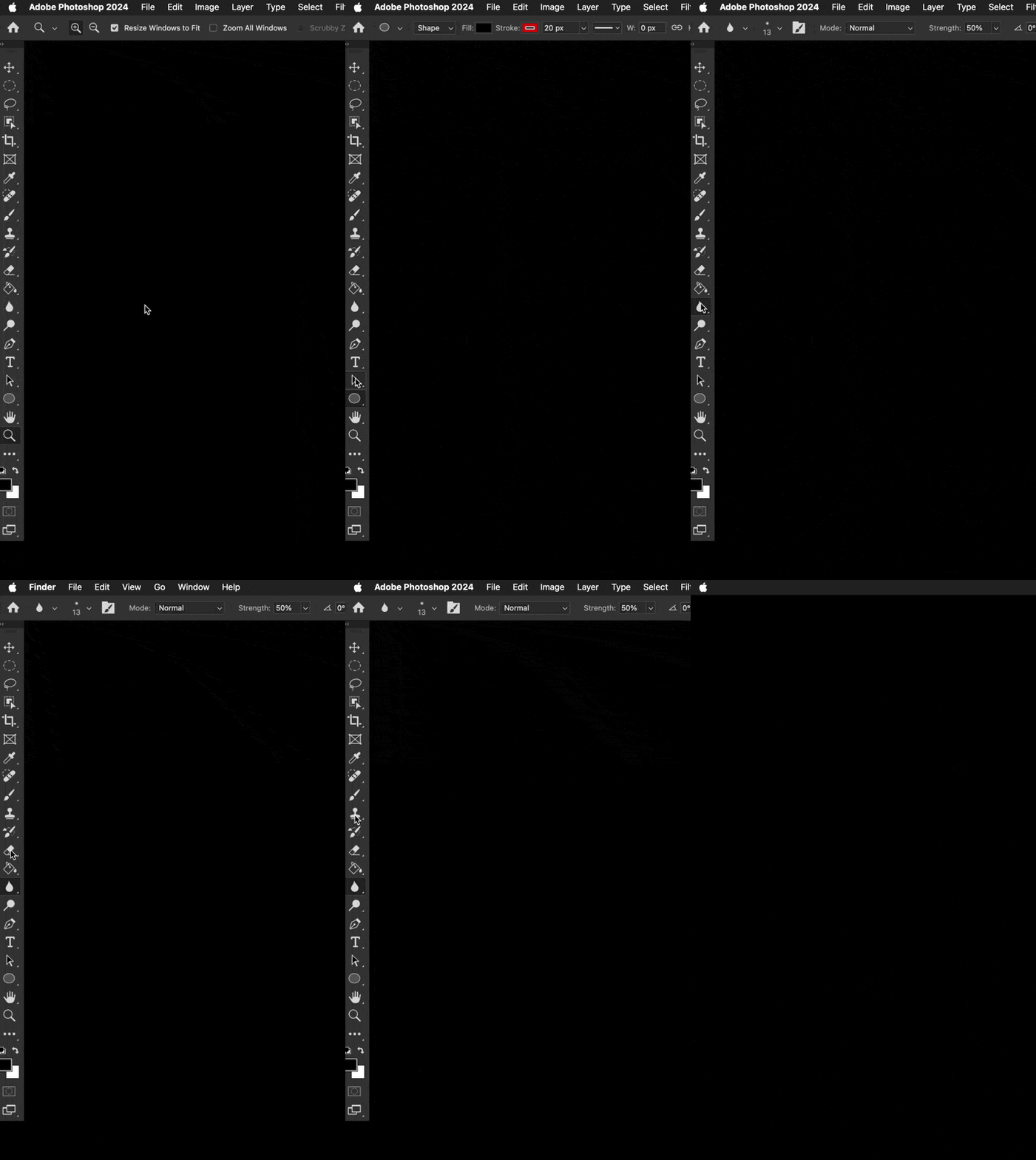
Well ... that wasn't something I ever expected or have ever seen. Was using Photoshop 2024 v 25.0.0 just this morning no problem with macOS 14.0.1. Updated to macOS 14.1 this afternoon, and now the top half of the toolbar clicks THROUGH the toolbar into the Finder. What? The bottom half of the toolbar works as usual. I've turned off most of the toolbar and tool prefs & that does nothing. Did a bunch of Interweb searches ... nothing relevent yet.


This is pretty new Photoshop behaviour ... wondering if anyone else has run into this yet.


Any ideas?


I could temporarily move all the most used tools to the bottom half of the toolbar. Though all the tools can be chosen by keyboard commands ... just can't click on those tools in the bar.


Color me perplexed. ¯\_(ツ)_/¯ 
 

47 replies

Mark43064
Participating Frequently
November 8, 2023

Yay! Glad it's fixed.

Not going to say that it should've never happened in the first place, or it took longer to fix than we all woul've liked.  Just happy I can work again without that lousy application frame. And, isn't that why we all prefer to use Macs than those other computers!! 😉

Michał Ziółkowski
Participating Frequently
November 8, 2023

Sonoma 14.1.1 solves the problem!

Jesper Storm Bache
Adobe Employee
Adobe Employee
November 7, 2023

removed duplicate

Jesper Storm Bache
Adobe Employee
Adobe Employee
November 7, 2023

This should be addressed in macOS 14.1.1 which just shipped today.

Participating Frequently
November 7, 2023

I've just updated to Sonoma 14.1.1 and my toolbar & panels appear to be working correctly again.

Legend
November 7, 2023

Rolling back from 14.1 to 14.0 is a bad idea for numerous reasons, especially since the security fixes are now public and exploitable. Just use one of the workarounds.

Inspiring
November 7, 2023

Same issue here after recent update to 14.1.  Called Apple and they actually alerted me that it was a known issue with Photoshop. I don't have the problem in Illustrator. The toggling off the application frame workaround is working for me. I will just work that way until there is a fix.

JudyHost
Participant
November 7, 2023

Spoke to Adobe yesterday.  This is a known issue which they will fix along with Apple.  It was suggested that I uninstall OS 14.1 Sonoma, yes I'm on a MAC and install 14.0 until they've had a chance to fix it.  I'm going to work with the Application on, easiest fix for me until they do.

Legend
November 6, 2023

I NEVER use the Application Frame and I have my toolbar anchored, but I'm not seeing this under Sonoma 14.1. I suppose its possible that a dual-display setup doesn't have this issue?

I also have Stage Manager options turned off where possible.

JudyHost
Participant
November 6, 2023

I ran into the same situation. I turned off the Application Frame and my tool bar, half of it anyway, stopped working.  It just snapped back into the left side of my monitor.  Turned it back on and it works the way it should.  I don't understand this.  I don't like working with the Application Frame turned on.  On hold now with Adobe.