


P: 16 bit calculated masks show artifacts
16 bit calculated masks - issue of random squares on mask that destroy effectiveness.
Am using CS5 v12.0.4 64bit ona Win 7 64bit Ultimate PC with 12Gb RAM. I do not believe the problem is only one of display.
I started with a 16bit RGB image and my detailed workflow was - I only had a background layer -
Image | Calcuations | Source 1 channel = Gray | Source 2 channel = Gray | Blending | Screen (Overlay also shows issue but this image was too dark for good demo) | Result = selection
I then
Image | Calcuations | Source 1 channel = Selection | Source 2 channel = Selection | Blending | Screen | Result = selection or new doc or new channel
If you choose new channel, you see an alpha channel witht hese random squares where the mask is not applied correctly.
However, if you "result" the first calculation as a "New Channel" and then recalculate you do not see the issue. 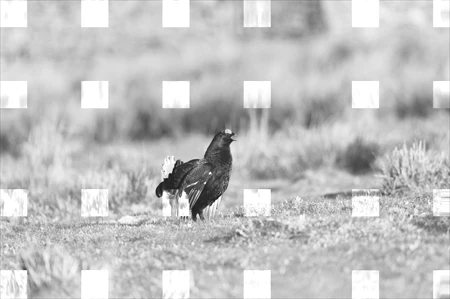
 AdChoices