


Participating Frequently
May 24, 2012

P: Acrobat offsets raster objects in after editing in CS6

  • May 24, 2012
  • 24 replies
  • 752 views

I tried on two different machines os windows 7 it in acrobat 8, 9.51, 10.1 versions, also pdf document version from 1.3 to 1.7.
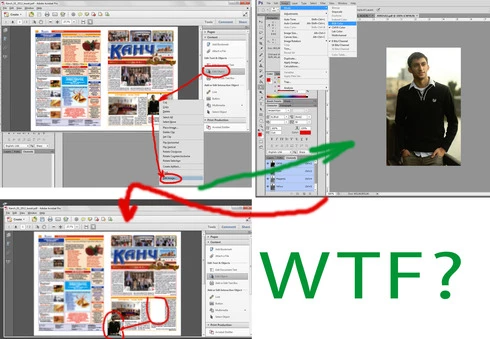
Problem: when choose "Edit object" tool, choose image>right click>Edit image. Image opening in photoshop CS6, after any editing for example change color model, saving and closing, in acrobat position of image changes, often to bottom and left corner of document.
If do such actions in Photoshop CS5, everything is ok, position of object after editing is constant
Thanks in advance and good luck
This topic has been closed for replies.

24 replies

Legend
February 3, 2015
Fixed in CS6 (13.0.1) or later.
September 11, 2012
Updated and tested today. Works great on files that previously failed. Excellent work!
Inspiring
September 7, 2012
Yeah, Acrobat added some new metadata that they wanted preserved, but, um, they missed.
Once we found out what they were missing, we added code to preserve their new metadata.
Inspiring
September 7, 2012
Yes, This issue appears to be taken care of... I have not had a chance to fully test it but it certianlly passes the sanity test...

Thank you Adobe!
uran1cAuthor
Participating Frequently
September 7, 2012
tried the new update 13.0.1. It seems that everything works as it should. I express my deep gratitude.
Inspiring
August 21, 2012
I am also experiencing this problem on our Mac and Windows machines.

Today it caused a reprint of an entire job. One of our operators used the Edit Image option of the Edit Object tool to change a QR code to black only and when she saved the image it moved more than 1/8" in the PDF. She didn't notice and it printed that way! My company lost money and the boss is pissed.

Now I know that we cannot use this useful tool until a fix is released.
June 25, 2012
When using Photoshop CS6 as the TouchUp image editor for Acrobat 9 or X on Mac OS 10.6.8 images are frequently blowing outside of their masking paths and moving from or losing their original positions and/or size ratios and/or rotations in the PDF file when saved back into the PDF after editing.

I have tested these same PDF files using Photoshop CS5 as the touch up editor instead of CS6 and this is not occurring so something is definitely not working right. I also tested using Acrobat 9 instead of X and CS6 produced the same errors.

Edited images should keep the same position, rotation, and size ratio, and they should remain masked by associated path objects within the PDF file when the image is saved.

I wish I could go ahead and make the switch to Photoshop CS6 as my Acrobat TouchUp editor, but until this is fixed that workflow will be hopelessly broken.

June 25, 2012
I am ecstatic to find that I am not the only one experiencing this problematic issue with using Photoshop CS6 as Acrobat's TouchUp editor.

Last week I had searched for but did not find this problem posted, so I posted the problem myself here .

Since this is clearly already a known issue I would like to delete my post from last week, but I am having trouble doing that for some reason. Can an admin delete or merge for me? ...thanks.
Legend
June 6, 2012
Thanks. We have and bug logged internally and the team's working on this with the Acrobat folks.
Inspiring
June 6, 2012
That's just another symptom of some placement/transform metadata getting lost. Same problem, different spot.