


New Participant
September 3, 2024

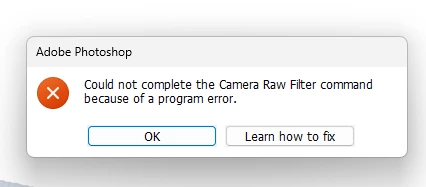
“Could not complete the Camera Raw Filter command because of a program error”
  • September 3, 2024
  • 98 replies
  • 17597 views

i m facing issue in letest photoshop..
i try all the ways, like reinstallation, older version, but still not working 

any buddy knows solution ???
please Help me...
Bhargav


[subject renamed for clarity]


98 replies

New Participant
July 25, 2025

ARC stopped working for me in both Photoshop and Bridge.  I have updated the latest Nvidia drivers.  The type of file I'm working with does not matter, neither does file size.

Tele55
Inspiring
July 24, 2025

D Fosse, You are absolutely right ... if I can say so, being not as knowledgeable as you.

Yes, the problem only occurs when trying to open fron PS > Filter.

ACR is absolutely working fine. 

Bridge always opens in ACR just fine ... regardless if RAW image or anything else.

It must be a PS issue ... and no solution yet.

Yes - scottbu's problems are largely something else (loosing presets, workspaces, actions,, etc)

Yes - this thread is so large ... without solution ... I'll opt out.

It s really not a major distraction since I work from Bridge mostly.

Cheers

D Fosse
Community Expert
Community Expert
July 24, 2025

@kglad 

Actually, this is the right place for the post. This is a Photoshop bug, not an ACR bug (except for some additional unrelated issues brought up by @scottbu which should be posted separately).


This is a very long thread, merged from many separate threads, so it's unfortunately quite incoherent and difficult to follow chronologically. But anyone taking the trouble to read through all of it, will find that the problem is very well defined and precisely described in the above.


Alas, still unresolved. The workaround is to launch ACR hosted by Bridge, which is unaffected by this bug. This will kickstart ACR hosted by Photoshop back into correct operation - including the ACR filter. Or relaunch Photoshop.

Tele55
Inspiring
July 24, 2025

This is for scottbu,

you are having a major disaster going and I feel for you.

I don't have answers to all your problems but maybe some:

- I have the same problem with opening images in ACR, sometimes!! / not every time!!. But all images always open in ACR when opening from Bridge. 

- Your PS Workspaces, Actions, etc, etc are all in C>Users(You)>Application Data (not visible until you change under View>Show>Show Hidden Items). All in Roamind>PS>Presets and Settings. I back those always up just in case.

- ACR are under CameraRaw>Settings, I think.

I guess you just retype e.g. the workspace name again under Window>New Workspace and it should refetch from AppData.

Actions are retreavable from the Actions window where all saved actions.action groups are listed (under the three bars)

- I have no answer why ACR looses all settings, neither to PS misbehaving.


I pretty much gave up on further investigating or asking for help regarding the Error>"Could Not Open ...". It only happens sometimes (some images) and ONLY when attempting to open from PS > Filter. From Bridge always works.

I hope you stay sane resetting everything. Good Luck!

Cheers

kglad
Community Expert
Community Expert
July 24, 2025

@scottbu 


if you're still having an acr problem, start your own thread in the acr forum.

scottbu
Inspiring
July 22, 2025

I NEVER have CC Desktop set to auto update.  But it did for ACR 17.4.1 anyway.  When I checked CC  Desktop, auto update was on.


Ok, except I when trying to open a file in PS from ACR, I kept getting "Could not save because of a program error."  I tried all of the suggestions from "Learn how to fix" short of reinstalling, but nothing worked.  This was especially a pain because every time I got into ACR after one of these errors, it acted as if I had never installed ACR before.  All the panels were rearranged, my saved workspace was gone, my presets were there but no longer favorites... I had to reset everything several times.


So I went to CC Desktop to down rev ACR.  That option no longer appeared.  But I noticed that even though PS was open and running on my computer, CC didn't think I had PS installed.  Ok - no other choice, I clicked on install PS.  It immediately said there was conflict because PS was already running.  So I closed it and the install of 26.8.1 proceeded.


Big mistake.   This install has wiped everything I had set up in PS.  My workspace - gone.  All my actions - gone.  Tool bar tools and groupings - gone.  It remembered a few things, like how much memory to use (70% of 64GB), but it forgot what scratch drives to use.  Just a few of MANY problems.


I cannot begin to explain what a monumental disaster this is.  It will take me DAYS to get PS back to something usable.  I simply cannot understand how Adobe could allow software so clearly not stable to be released.  I have been VP of Engineering in multiple small software companies.  If we had this level of quality assurance on our products, we would have gone out of business - and quickly.


If anyone has suggestions on how to recover my settings, and especially my actions, I would sincerely appreciate your help.


scottbu
Inspiring
July 22, 2025

Update... 

First, a correction: the error message I was getting is "Could not open (filename) because of a program error."


It's a PS error, not an ACR error.  Closing PS and opening it again sometimes fixes the problem.  But it still hapens with 26.8.1.


Probably related: many times per day (before and now after the aformentioned disaster), when I save and close a file in PS, I can't bring Bridge forward.  It's there and running, but clicking on the Bridge tab (Windows) does nothing.  I have to minimize PS to get Bridge to be visible.  When that happens, the next time I open a file in PS from ACR, PS is no longer maximized - it's windowed.  My suspicion is that PS is crashing because when this happens, a psautorecover file appears in that folder.


Just more foolishness to slow me down.

D Fosse
Community Expert
Community Expert
July 14, 2025

Yeah, that's exactly the behavior we all see.


I don't think there's any doubt that this qualifies as a bona fide bug. The problem is that it can't be reproduced on command; it's unpredictable when it kicks in.

Participating Frequently
July 14, 2025

Still have this issue as well. I'd thought the latest updates had finally fixed it as I managed a couple of hours work and then it struck again. It's almost as if a very specific command or sequnece triggers the error in the program and after that point it stays. Now back in the same pattern, open a couple of raw files and error message returns. So still stuck using PS25.9 (which works fine all day long).

Surely somebody at Adobe can figure this one out, as for me it's very specific, the first run of acr always works on a restart every time and then breaks after a couple more runs/few minutes.

New Participant
July 14, 2025

Right Fosse. You've noticed the very same thing as I did. I somehow missed that. 

D Fosse
Community Expert
Community Expert
July 13, 2025

Yes, I noted this in an earlier post:

In other words - ACR works, but it fails to bring up the UI. So an action works with predetermined parameters, but it won't open the UI to change or add any parameters.