


Inspiring
October 26, 2018

P: Free Transform/Distort tool inconsistency

  • October 26, 2018
  • 128 replies
  • 3298 views

Hello,

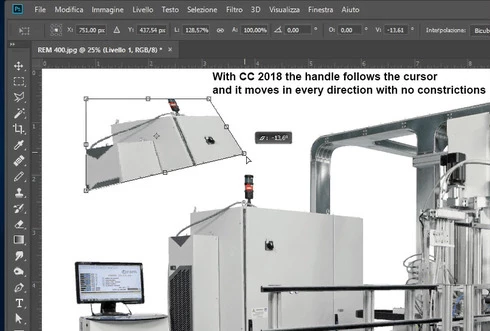
using the tool Free Transform (Ctrl+T) in the new version of Photoshop CC 2019 (release 20.0.0) on a Windows 10 64 bit PC, I'm not able anymore to move the handle of a selected area (using the Ctrl button) in a free mode, now I can move it along the vertical or horizontal ax only.
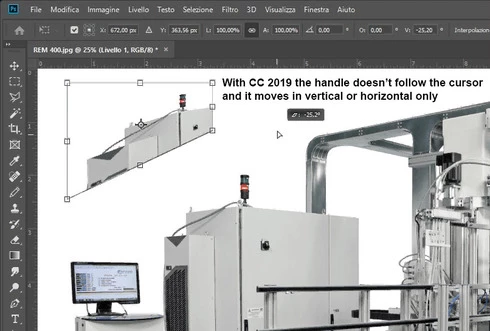


Which setting I have to change in order to have the same behavior of the tool as in Photoshop CC 2018 (release 19)?


Many thanks!!!

Luciano

This topic has been closed for replies.

128 replies

Kukurykus
Legend
November 9, 2018
Accordingly to last change that would be enough bad they changed (without asking us) Ctrl-S with Ctrl-Shift-S, and all other shortcuts that Shift does additional work. btw to be honest I wouldn't like change about Save but when I'm thinking of it now I use Ctrl-Shift-S more often than simply Ctrl-S, so following them we can expect they are gong to make our life 'easier' also about this shortcut 🙂
anooska
Participant
November 9, 2018
I just posted my own angry rant but I figured I'd add my voice to you guys. It's ridiculous. If they're going to make changes like that, while we're at it, lets change the "Save" shortcut to CTRL+SHIFT+5. That makes sense right? sigh....
anooska
Participant
November 9, 2018
Who's bright idea was it to change BASIC keyboard shortcuts??? Please Adobe, please for the love of god, DO NOT change shortcuts and buttons that have been a apart of your software for decades. Holding SHIFT while scaling an image has ALWAYS scaled the image without messing with the proportions. UNDO was ALWAYS CTRL+Z and Step Backwards was ALWAYS CTRL+ALT+Z. I immediately downgraded.....
Inspiring
November 9, 2018
Speaking of inconsistent, if you want to proportionally transform a Shape object in new Photoshop you still have to press the Shift key. 
Known Participant
November 9, 2018
Gee  Adobe... I believe Jay Pope summed it up.  Adobe, you have a problem.  PS CC 2018 is pretty good!  PS CC 2019 was like it was designed by 4 year old kids.  I got rid of it... it's junk and went back to PS CC 2018.  Whoever is in charge of this "update" needs to be fired.
Mathias17
Inspiring
November 9, 2018
Thank god you can revert BOTH changes - new transform behavior and undo/redo behavior.
davideb47470794
Participating Frequently
November 9, 2018
Totally agree, it keeps confusing me and such a waste of time having to change habits ingrained deep by years of work, it bugs me off as much as the ctrl+z that is now shift+z or whatever, bad move really 
Inspiring
November 9, 2018
Why in world would Adobe make a change to the functionality that has been in use for 15+ years??? WTF Adobe? Do you care at all about professionals who have used your app since the inception of Photoshop? It makes no effing sense to switch the shift key from constraining proportions to non-constraining, unless you're doing it just to confuse your users. Who is in charge of these idiotic decisions that serve no purpose other than pissing people off?
Wake the F up and pay attention to your user base instead of putting all your resources into creating tons of new apps that nobody cares about!
Kukurykus
Legend
November 8, 2018
To the list of that is transformation in other post - however I'm not sure now (un)affected by new way of doing it - I should also add 'Selection' and 'Cropping'.
Kukurykus
Legend
November 8, 2018
To the list of that is transformation in other post - however I'm not sure now (un)affected by new way of doing it - I should also add 'Selection' and 'Cropping'.