
Inspiring
December 1, 2015

P: Liquify lightens result on 16 bit/channel images

  • December 1, 2015
  • 231 replies
  • 4088 views

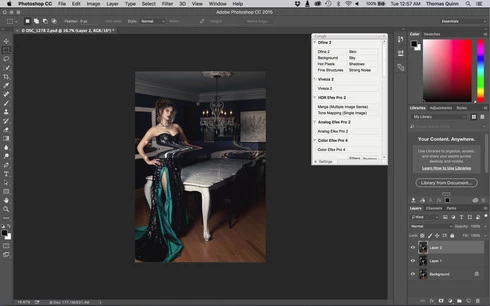
I am having issues with the new upgrade to Photoshop CC 2015 on Mac El Captain. The only thing I did was upgrade from a working CC 2015 to the new version. Using the liquify tool give the following look. There is a box around the area liquified that is lighter than the other areas. When I turn of Use Acceleration in Graphics Processor, it is better but .... I didn't have to do this in the prior version i.e.. Yesterday.

New Update: The Squiggly waist is the liquified:
This topic has been closed for replies.

231 replies

Inspiring
December 13, 2015
When we can get a fix for that ? i want to downgrade Photoshop to the preview version of CC15 ! i cant work with this crap !
trishmennell
Participating Frequently
December 13, 2015
Here here!
trishmennell
Participating Frequently
December 13, 2015
This is driving me nuts!! How can they not test these things before releasing??!
trishmennell
Participating Frequently
December 13, 2015
Same problem here! Overexposed square when I try to use liquify. Now to see if I can revert to old version. Argh!
cpt richardv33207078
Participant
December 13, 2015
Another unhappy working professional here! This really creates a setback, lost time and money. Not acceptable Adobe! Get this fixed!
Known Participant
December 13, 2015
This seems like a good temporary fix, but where did you find the previous version of the Liquify plugin? Did you have to install a previous version of Photoshop just to get that one file?
Inspiring
December 12, 2015
Same thing is happening to me.
Inspiring
December 12, 2015
be careful editing in Adobe Pro Photo versus sRGB. You will be in for some surprises when you print.
romarubenis
Participant
December 12, 2015
The same problem!
romarubenis
Participant
December 12, 2015
WTF Adobe?