
Participant
September 16, 2023

P: (macOS Sonoma) Photoshop 2023/2024 Save for Web shows incomplete preview

  • September 16, 2023
  • 184 replies
  • 38011 views

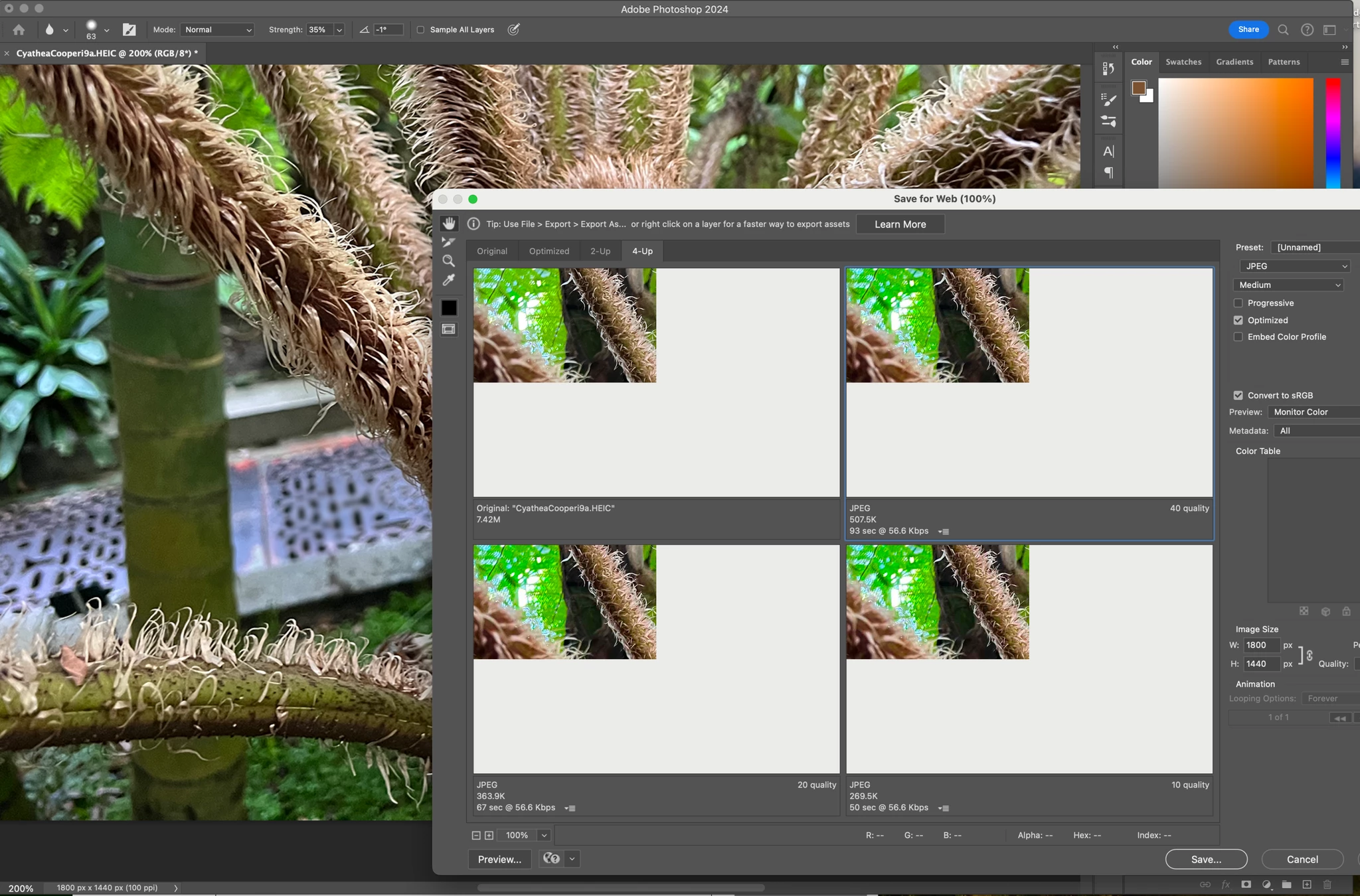
Have just updated to Photoshop 2024 and my save to web panel is now not displaying correctly - see screengrab.  How can I adjust it to have the full image fill the four windows?  cheers, Bob


184 replies

Kevin Stohlmeyer
Community Expert
Community Expert
October 4, 2023
Participant
October 4, 2023

Same problem!

waleeda56997
Participant
October 4, 2023

Same problem

Participant
October 4, 2023

Same problem with the preview over here after Update to MacOS Sonoma, too. Resetting Preferences or/and a reinstallation didn't work. Hopefully there will be a bug fix by Adobe soon. 

Participant
October 3, 2023

I have dat same problem! 

I installed and uninstalled Photoshop 3 times, deleting preferences, I even installed a previous version and the same problem continues.

Participant
October 3, 2023

Also having this issue on both my work desktop (Mac Studio with M1 Max) and my home laptop (Macbook Pro with M1 Pro). Both are running the latest version of Photoshop (25) and MacOS (14 Sonoma)

Participant
October 3, 2023

Same issue here- just updated to Sonoma, and can't save for web.

Participant
October 3, 2023

Hi! I have a problem in Photoshop. When I try to Export-->Save for Web, the image in the preview does not display correctly. It appears cut off and most of it appears white. (Black in the image I attached.)
How can this be resolved?
Using: Adobe Photoshop 2024 (25.0.0) on macOS Sonoma.

Stephen Marsh
Community Expert
Community Expert
October 3, 2023

@ArturoAR – A known issue with Sonoma!

curt.gallery
Known Participant
October 2, 2023

Same, glad I am not alone. So why with something as important as exporting content is adobe relying on a legacy export. That "legacy" export has been there many many years now. So confusing how this is not a top priority. 

Participant
October 2, 2023

Didn't work for me.