
Participant
September 16, 2023

P: (macOS Sonoma) Photoshop 2023/2024 Save for Web shows incomplete preview

  • September 16, 2023
  • 184 replies
  • 38222 views

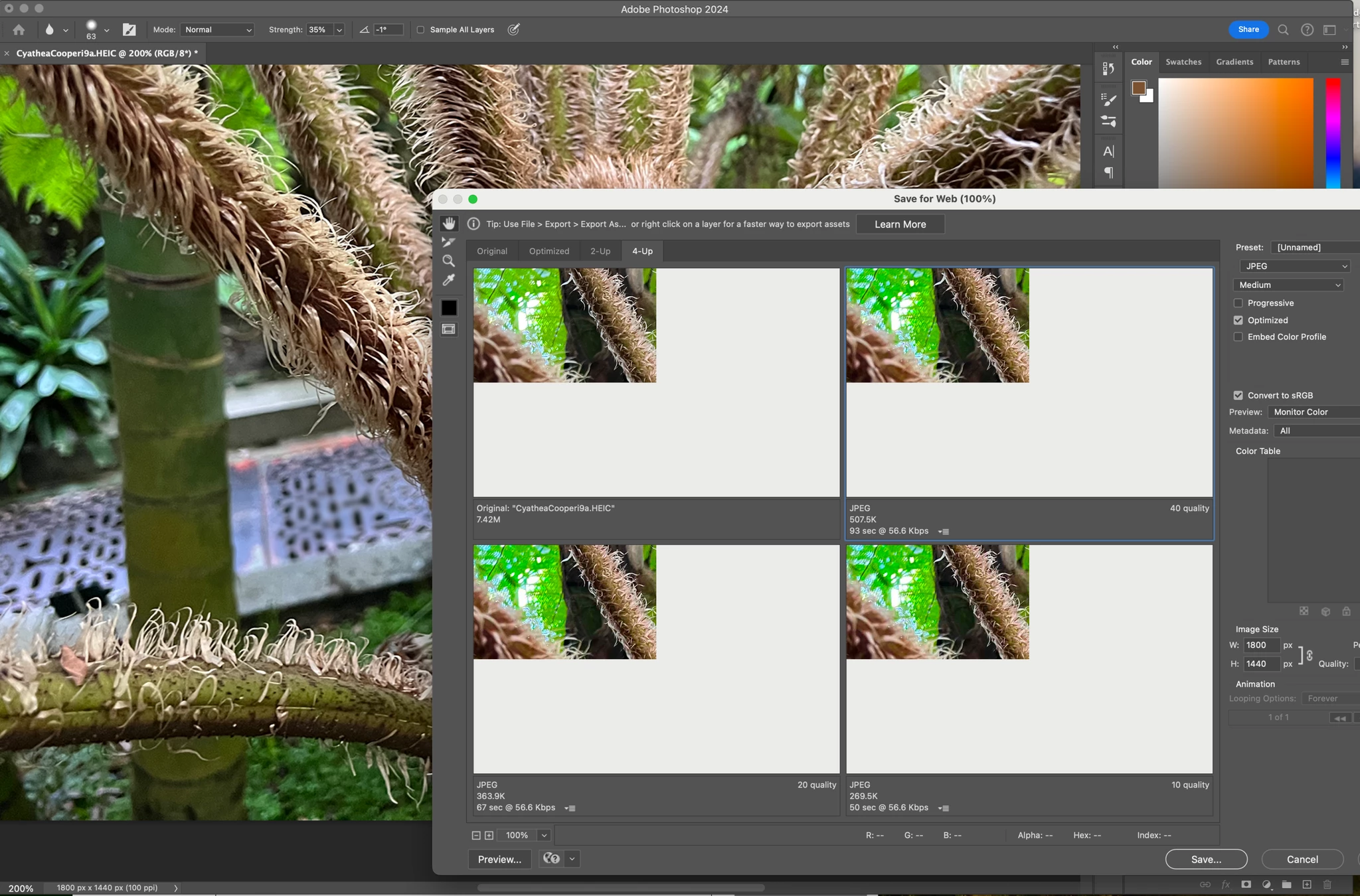
Have just updated to Photoshop 2024 and my save to web panel is now not displaying correctly - see screengrab.  How can I adjust it to have the full image fill the four windows?  cheers, Bob


184 replies

silk-m
Community Expert
Community Expert
October 4, 2023

This issue is caused by macOS Sonoma 14.0, so your best option is to wait for a macOS update.
If you don't want to wait for an update, you have the option of updating to the Sonoma 14.1 Public Beta, but you should also consider the risks associated with the Beta.

--Susumu Iwasaki
Participant
October 4, 2023

Let's just hope that Apple brings a quick patch to fix that. This is seriously something related to their graphic processing systems.

Kevin Stohlmeyer
Community Expert
Community Expert
October 4, 2023

@asif_tanzeem I would stop uninstall/reinstall unless its the OS back to Ventura. No version prior to a future update from either apple or adobe will address this. Going back in Adobe versions wont fix Sonoma.

Participant
October 4, 2023

Having the same problem in Adobe Photoshop 2022, Adobe Illustrator 2022 is doing fine. I have tried uninstalling and reinstalling, updating to the latest 2024 version. Nothing worked.

Known Participant
October 4, 2023

This issue started when I installed Mac OS 14 (Sonoma). As you can see by the screenshot, all images previewed in Save for Web (Legacy) display only the upper-left quarter of the full image; the rest is lost.

Ged_Traynor
Community Expert
Community Expert
October 4, 2023
Participant
October 4, 2023

tested :PS 25 on Ventura OS works, on Sonoma same problem described.

Kevin Stohlmeyer
Community Expert
Community Expert
October 4, 2023

@mickel36 while I understand your frustration - users have some personal responsibility when it comes to upgrading your OS. Its a choice - not a forced action. 

This is a common issue with any major OS release (Windows or in this case Mac) not all software works 100% right out of the gate and requires updates. I'm certain Adobe is very much aware as @ Sameer K noted in the pinned post and will address in an upcoming update.

Stating that your Mac is worthless is a bit dramatic.

If this is completely ruining your work - there are various posts how you can downgrade to Ventura to resolve for now.

https://macpaw.com/how-to/downgrade-macos-sonoma


Participant
October 4, 2023

I'm sorry, but thousands of customers use a Mac. It would be helpful if you could send an email in advance reminding people not to update their Mac to Sonoam 14.0. Or use the Creative Cloud app to give a notification. Now my Mac is worthless and can't do my daily work anymore. And this cost me (a lot of) money... sorry that I'm a bit frustrated.

Participant
October 4, 2023

I'm experiencing a similar issue since the Sonoma 14.0 update and I've tried multiple solutions to no avail. It's frustrating to encounter errors like this, especially when we're paying a premium for the service. While I understand that some mistakes can occur, this seems like a major issue. For reference, I'm using a Mac Studio M1 MAX.

Participant
October 4, 2023

i'm using Photoshop 25.0 version and the error in preview is still there