


Participant
September 16, 2023

P: (macOS Sonoma) Photoshop 2023/2024 Save for Web shows incomplete preview

  • September 16, 2023
  • 184 replies
  • 37888 views

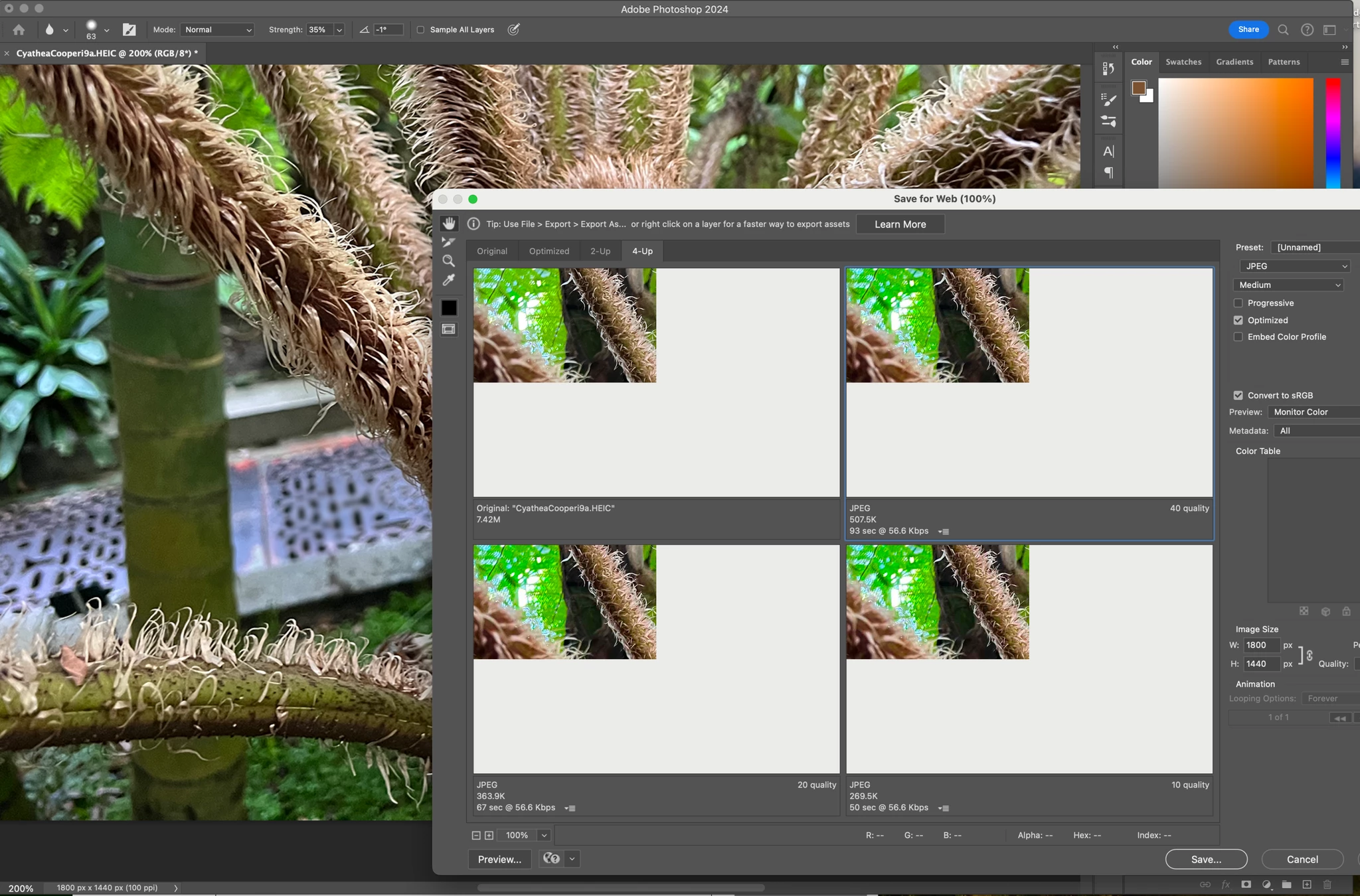
Have just updated to Photoshop 2024 and my save to web panel is now not displaying correctly - see screengrab.  How can I adjust it to have the full image fill the four windows?  cheers, Bob


184 replies

Derek Cross
Community Expert
Community Expert
January 18, 2025

You seem to have a touch of the conspiracy theory about you!

Participating Frequently
January 18, 2025

but more importantly. POP-UPS! lots and lots of Pop-ups! Adobe loves them, especially if they are bright blue and sell you software you already pay for.

Derek Cross
Community Expert
Community Expert
January 18, 2025

Trashing the Photoshop preferences often does sort out application corruption, I can't imagine Adobe wants the scenario you're describing.

D Fosse
Community Expert
Community Expert
January 18, 2025

@brotherb54239633 

Resetting preferences returns the application to out-of-the-box factory state. That's the whole point. That's why it's the first go to troubleshooting step.


Preferences are prone to corruption because they are rewritten on every exit. Preferences contain the entire app configuration, not just user settings.

Participating Frequently
January 18, 2025

This is the preferred correct answer from Adobe, because resetting preference brings back all their annoying pop-ups, hints, unwanted tutorials, start pages no one wants, licensing checks to make sure you paid, and a save-to-cloud option no one uses. ✔ (Click here to collaborate)

Kevin Stohlmeyer
Community Expert
Community Expert
December 8, 2023

@default8bk0iqml6ylx Go to Photoshop Help Menu/System Info and copy/paste details in a reply. Post only once as the system takes time to process the large amount of data.

Participant
December 8, 2023

Kevin, do you have any other ideas for resolving this issue? I'm still getting the same error- I've reset my preference and my PSD and mac software are updated

Participant
November 8, 2023

Thank you. I will!

--<removed personal information>

Kevin Stohlmeyer
Community Expert
Community Expert
November 8, 2023

@Vansray1966 Apple has released 14.1.1 which has resolved a lot of UI issues in PS. Try upgrading your OS and try again.

Participant
November 8, 2023

This has not resolve my save for web issue at all. I'm on MacBook Pro M1 Max Sonoma 14.1 Photoshop 2024 clean reinstall (removing preferences). Still getting this error. This is on 2 seporate Macs using different users and CC accounts