
Participant
September 16, 2023

P: (macOS Sonoma) Photoshop 2023/2024 Save for Web shows incomplete preview

  • September 16, 2023
  • 184 replies
  • 38173 views

Have just updated to Photoshop 2024 and my save to web panel is now not displaying correctly - see screengrab.  How can I adjust it to have the full image fill the four windows?  cheers, Bob
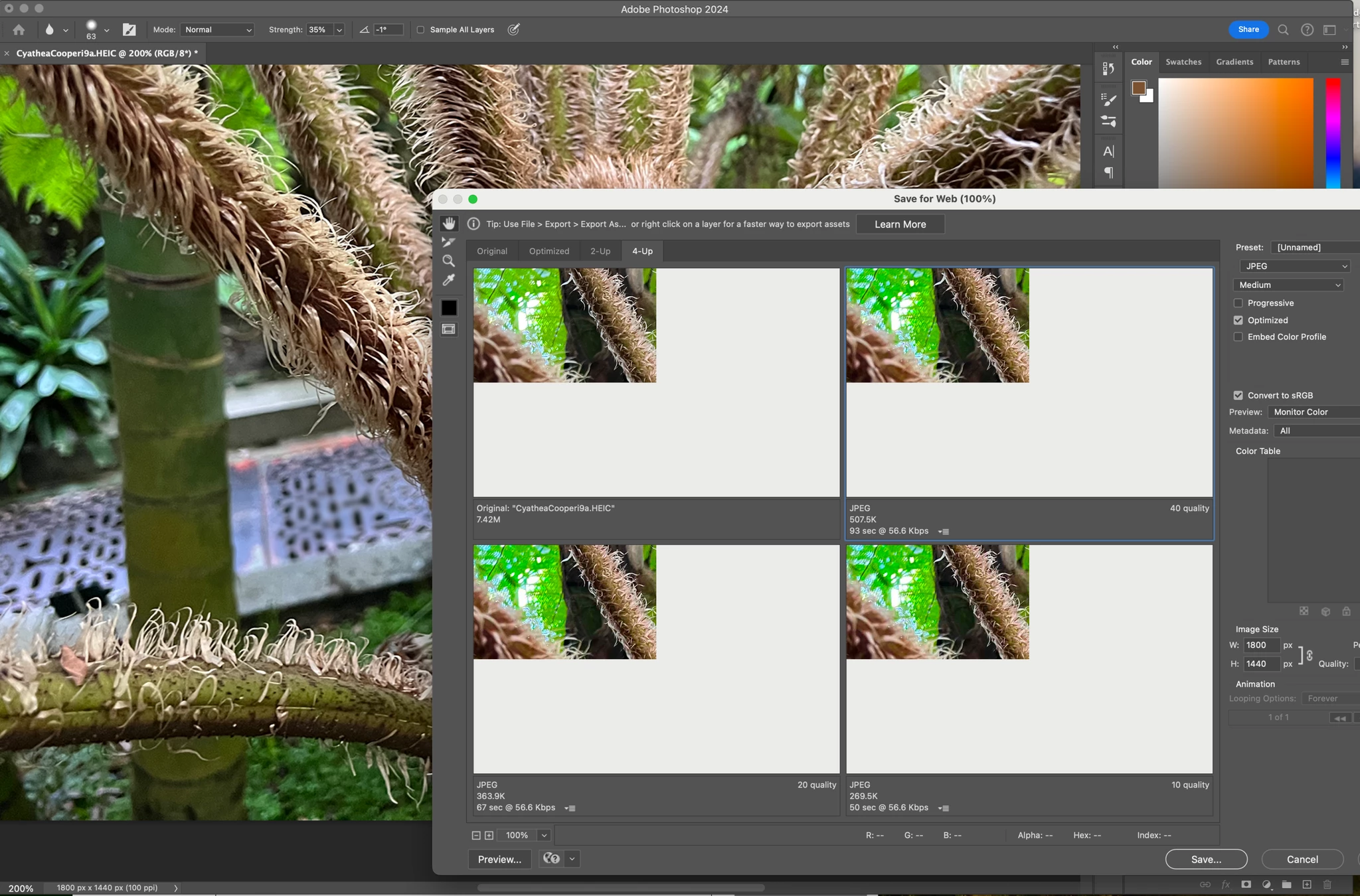


184 replies

Participating Frequently
October 13, 2023

Pretty much every company out there collects all the contact info it can on us and never/rarely uses it to actually help the customer by alerting them with important issues.  They only use it to spam us with ads for MORE product.

A million ways to communicate and companies choose to use none of them to actually help their paying customers.

Participant
October 13, 2023

Same here, folks!

Participant
October 13, 2023

A little thing I just realized: The partial view still kinda works, if ypou are not resizing the image in the export window. Just exported an image that was done on 4000 x 4000 px but resized to 2000 x 2000 px in the export window. As soon as the new value is input, the screen redraws to dark grey. No image shown now, not even partially. However, depending on the enlargement factor within the export window, it is still possible to move the image around within the quarter of the frame (before resizing it, though). With other words, you can move the image around within the display area that actually shows the image.

Participant
October 12, 2023

Same issue with all Creative Cloud programs that have the Save For Web (Legacy) option.

Participant
October 12, 2023

Same issue here.
Hardware: MB Pro 16 M1 Max. Mac OS Sonoma. Photoshop 2024 or Beta (last update).

Before updating to Sonora a couple of days ago "Save for web" is working good.

Participating Frequently
October 12, 2023

Today there was a little Upate on Photoshop. Now the preview-window is totaly empty and white (even the little corner with the part of image is not there andymore). 😞

Participant
October 12, 2023

Same issue here.
Hardware: MB Pro M2 Max, secondary monitor: LG Ultra Fine. Mac OS Sonora (14.0)

It does not matter, though, on which monitor the preview window sits, it won’t show any preview. The picture gets exported correctly, though. Before updating to Sonora a couple of days ago, there was a preview, but that one only showed the upper left quarter of the picture. After the update, no picture at all.

Known Participant
October 11, 2023

I can confirm this is a 2-monitor issue for me as well. It does not display on my main display, but when I move it to my secondary one, it works fine. I'm having a similar problem with Splashtop when connecting to remote machines. It seems like this is a MacOS Sonoma issue.

emlli
Participant
October 11, 2023

Im also having this problem, but whats strange is when I drag the Save for Web preview from my Macbook Pro laptop screen to my second monitor (a cheap "PC" style HP screen) the problem disappears and I can see the complete image

I just double checked that it wasnt somehow an issue with which screen was set to be the main display by switching them and it still only worked on the PC monitor. Its color prodifle is "HP 22yh calibrated to match Macbook Pro" and my Macbook's color profile is just "Color LCD"

Participant
October 11, 2023

When I try to enter the vanishing point, the preview doesn't keep the image centered in the window. And when I try to add an image to the created field, the image isn't added in the correct location.