


Exit
  • Global community
    • Language:
      • Deutsch
      • English
      • Español
      • Français
      • Português
  • 日本語コミュニティ
  • 한국 커뮤니티
29

P: Mixer Brush Not Working Corrrectly?

Explorer ,
Mar 10, 2022 Mar 10, 2022

Hello, 


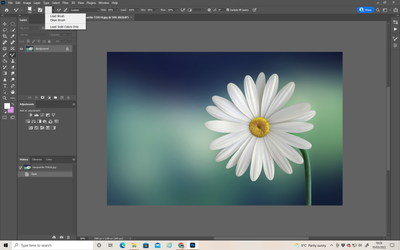
When I try to paint with a clean brush instead of picking up the colour from the base layer, it's selecting the foreground colour even though I've deselected it. 

Below you can see:

Image 1) I've a base layer.  An empty layer to paint on.  "Load Solid Colours Only" deselected. 

Image 2) It should sample from the base layer and allow me to paint with only those colours, but instead it's automatically using the foreground colour. 


Anyone else experiencing this bug and found how to fix it?


lesa5EA2_0-1646907890506.pnglesa5EA2_1-1646907933792.png


Bug Acknowledged
TOPICS
macOS , Windows
15.3K
Translate
Report
Community guidelines
Be kind and respectful, give credit to the original source of content, and search for duplicates before posting. Learn more
community guidelines

correct answers 1 Correct answer

Adobe Employee , Oct 17, 2022 Oct 17, 2022

The bug that was fixed is what @Michal G_1 described in this thread back in July. 


The issue where the foreground color gets loaded on change of brush size or flip foreground/background color has been around as far back as PS 2018.  That has not been fixed. 


Translate
58 Comments
Enthusiast ,
Feb 06, 2024 Feb 06, 2024

@annes52155099 I agree with you. I don't think it's trivial, either. It's inconvenient.

But since the bugs that make Photoshop so inconvenient to use at all (hand tool for example) are already continuing to the latest version, this thread has not been noticed by the big bugs, so I'm just working by adapting. Don't get me wrong.

Translate
Report
Adobe Employee ,
Feb 21, 2024 Feb 21, 2024

Thanks for continuing to push for this. I've escalated again to Dev and Product Management requesting prioritization.

Translate
Report
New Here ,
Jun 11, 2024 Jun 11, 2024

Hello, I'm so stuck at what to do I have tried all the tricks below and completely updated my photoshop and the mixer brush is still not staying clean, hopefully this can be fixed soon, thank you! 

Translate
Report
Contributor ,
Oct 08, 2025 Oct 08, 2025

Hello,
With the mixer brush set to "Load Solid Colors Only", and "Sample All Layers" turned on, I would expect it to be able to pick colors from the layers below, but that fails.
It is able to pick patterns from layers below when "Load Solid Colors Only" is unchecked, which leads me to think that this is a bug, since picking up a color should be a lot simpler, and since that would be the expected behavior when "Sample All Layers" is checked.

Translate
Report
Explorer ,
Dec 04, 2025 Dec 04, 2025

Is there any progress on this? Will this bug ever be fixed?

@Aleke   @CMass  @Srishti Bali  @Anshul_Saini @Chad Rolfs 

Translate
Report
New Here ,
Dec 04, 2025 Dec 04, 2025

Still the same

Translate
Report
Mentor ,
Dec 04, 2025 Dec 04, 2025

>The issue where the foreground color gets loaded on change of brush size or flip foreground/background color has been around as far back as PS 2018.


I guess it's ok with Adobe to let a bug persist for almost 8 years? Why is this acceptable? Maybe it's time for us to start behaving the way gamers behave towards those devs? 

Translate
Report
Participant ,
Dec 18, 2025 Dec 18, 2025
LATEST

There’s another bug that compounds this problem: If you save mixer brushes with “include size”, then switch among differently sized brushes, the foreground color replaces your sample, but the reservoir icon does not update until you touch down for the actual stroke—so you have no warning that you’ll now be painting with something different.


As a workaround, if I’m going to save a brush at a particular size, I set its color to something garish that will be noticeable in peripheral vision and “include color” when saving it. This forces the reservoir to update immediately upon brush selection, as a warning that I need to re-sample.


Please fix this, Adobe. Having to re-sample every time you change size is a serious impediment.

Translate
Report
