Inspiring
October 29, 2021

P: New Export As gives bad results for PNG (8-bit) Smaller Size

  • October 29, 2021
  • 19 replies
  • 10306 views

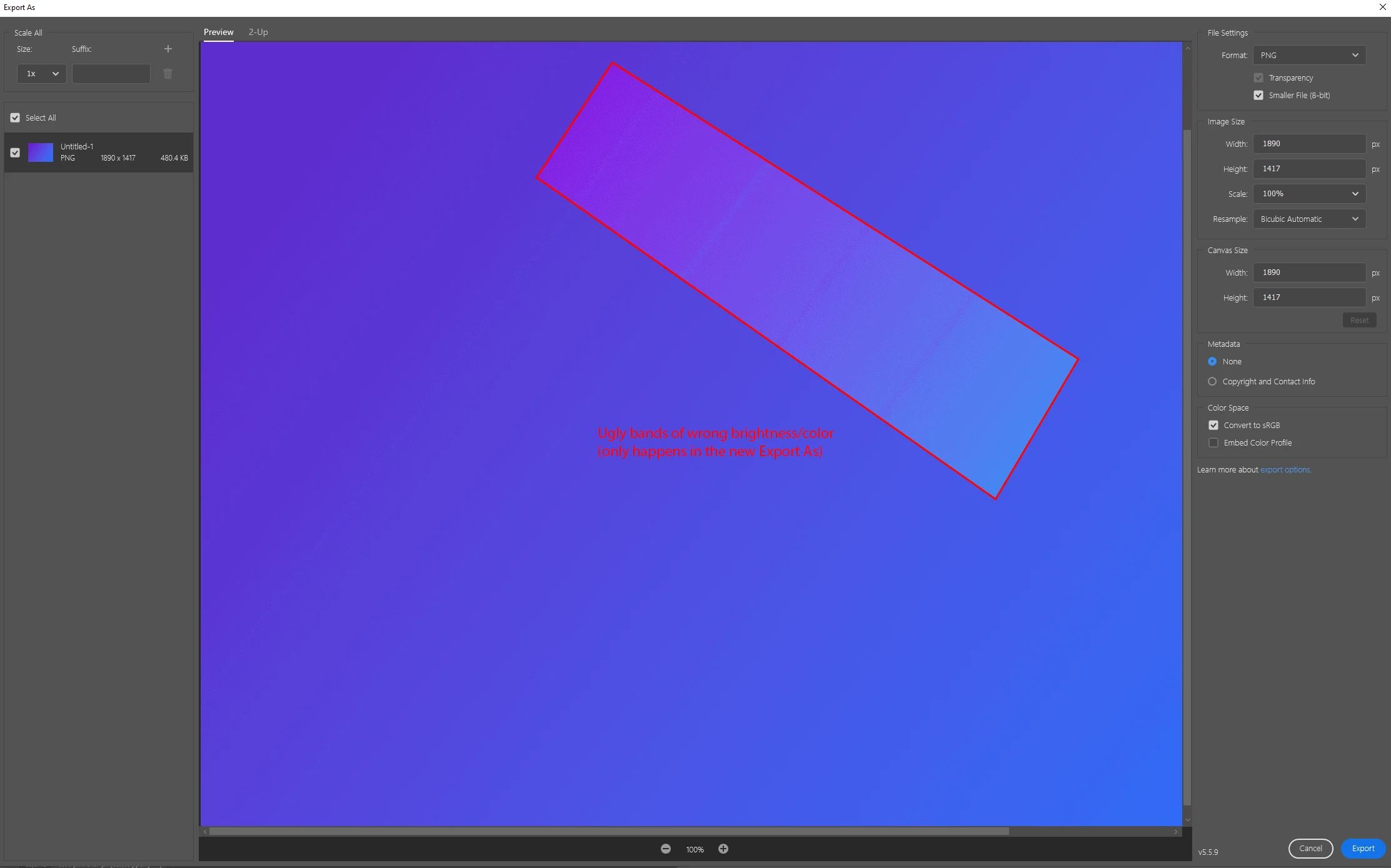
The new Export As gives bad results for PNG (8-bit) when reducing the color palette. This is most visible in gradients. Tested on Photoshop v23.0.0 on Windows 10.


Workaround: Enable Legacy Export As in Preferences.


Steps to reproduce problem:

  1. Create a new image
  2. Make a gradient using the Blue_24 preset (or similar, but that's the one I used).
  3. File > Export > Export As...
  4. Choose PNG, and "Smaller File (8-bit)"
  5. Result: You get a few lines through the gradient that are too bright or dark. Not good.
  6. Result if using Legacy Export As (or Save for Web): A smooth-looking gradient as expected.
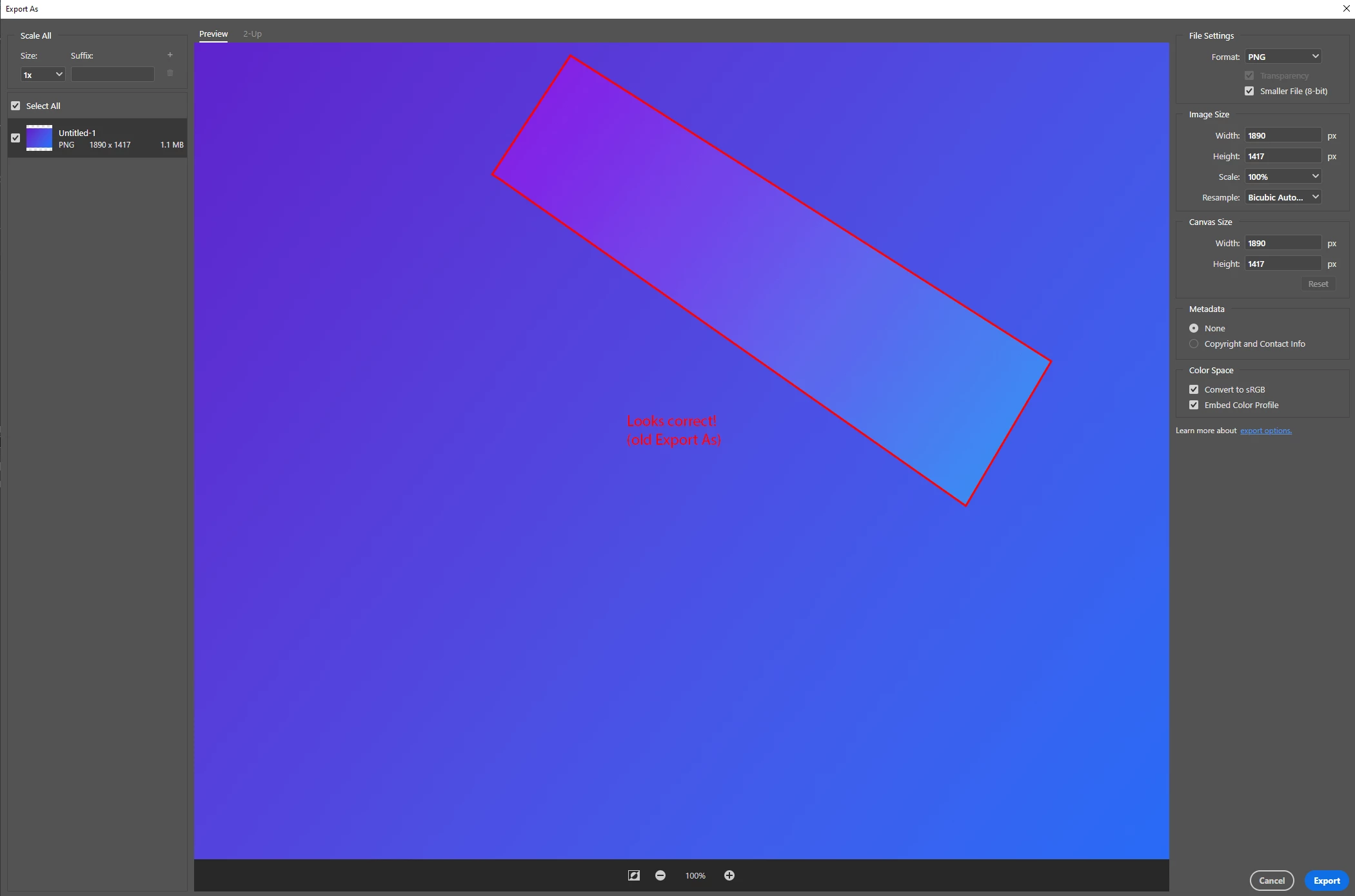
 

Full resolution/lossless screenshots attached to this post.

This topic has been closed for replies.

19 replies

Participant
July 27, 2023

Mehebub alam 

Earth Oliver
Legend
July 26, 2023

Do yourselves a favor and just avoid using Export As at all costs. Eight years of development and Save for Web is still superior.
As an example of how little Adobe cares about Export As, you STILL CAN'T ADD EXPORT AS TO AN ACTION.
That's right, this tool meant for professionals to help them get their jobs done is not automatable. Nor can you create presets!!!

Participant
July 26, 2023

I am experiencing the same issue and have updated to the latest PS and its still occurring. The examples provided show the banding with the use of the New Gradient Tool vs the Classic Gradient Tool. The example on top is the Classic Gradient Tool.

Participant
April 27, 2022

Oh god, the horrible aliasing in the latest update was doing my head in. Thanks, Enable Legacy Export As in Preferences seems to have worked.

jimb86332146
Participant
April 18, 2022

I concur with the comments here. Since updating to 23.3.0 the 8-bit PNG renders look absolutely HORRIBLE. I was shocked by the renders. Transparency gradients are COMPLETE FAIL!


Chain83Author
Inspiring
April 6, 2022

Could you post a sample image from 23.2.1? Would be interesting to look a bit closer.

(And also, do a new thread for the problem, as this thread is a separate issue).

Participant
April 5, 2022

Agreed---rolling back to 23.2.1 from 23.2.2 DOES fix the "Smaller File (8-bit)" .png export problem. 


Nothing about my workflow had changed when these gargbage results started "out of the blue" (with 23.2.2)


That being said, I was not having any PSD related issues before 23.2.1 


All hail the roll-back option.

Chain83Author
Inspiring
April 4, 2022

You're right, i checked the specs and it's alpha values per table entry, not a separate channel. I was mistaken (and with a low enough amount of colors it would look the same). Result is still that you definitely should be able to have semi-transparent pixels in an indexed PNG, and Export As certainly did allow partially transparent pixels originally when choosing 8-bit. And the current version does not.


I don't have any sample files at hand, but if someone installs whatever version of Ps Export As first shipped with, it should be easy to verify how it was encoding the colors/transparency by inspecting the resulting files.


Ps: I also notice that you can't uncheck "Transparency" when choosing 8-bit in Export As. It gets grayed out for no good reason. That's a separate annoying issue. Export As really is still inferior to Save for web for most tasks. Not sure why Adobe just launched it half-done then seemingly stopped developing it beyond a few minor tweaks (like changing the quality slider into a bad drop-down, and then back into a slider). They should give all 3 transparency options and let the user be able to choose. 😕😕

Legend
April 1, 2022

I saw a post or two which suggested almost everyone has the wrong idea of the bug that was fixed; it was essentially the opposite bug. 

- PNG allows full colour (often called 24 bit) or indexed colour (by Photoshop called 8 bit)

- full colour can have a greyscale alpha mask, so edges can be any transparency required

- indexed colour does NOT allow a greyscale alpha mask. But it allows transparency values to be applied to the each entry in the colour palette.

- so an "8-bit" (indexed) colour could have 255 levels of transparency, but only for a solid colour (only one colour needed). For a design with, say, 250 colours, there could only be 5 levels of transparency, all of one colour. In other words, it's very limited and the limit in available transparent shades will almost always make a ragged edge (except in the special case of a 1-colour design). 

What I read suggested the bug was NOT that suddenly the export had broken for 8-bit. It suggested a bug was fixed where, if the user asked for 8 bit and transparency, Photoshop would silently switch to 24-bit to give the transparency. 

Here is the test. Does anyone have an image that is

- PNG

- non-rectangular transparency

- multiple colours 

- exported as 8-bit with transparency from an older version from Photoshop

- with good smooth edges 

If anyone has one of these, please share it, and it may be possible to check what Photoshop actually did.

BrettN
Community Manager
Community Manager
April 1, 2022

Merged the last reply from @defaultkac7l92ac9ov with the appropriate thread