


Participant
November 7, 2023

P: Photoshop 25.0 Graphics Processor Compatibility Check fails: Unknown GPU

  • November 7, 2023
  • 179 replies
  • 26137 views

Hello, I just updated to Photoshop 2024 but I cannot get it to work with GPU acceleration. When I start Photoshop, I get this error: 


I am running a Windows 10 PC with two Nvidia RTX 3090 video cards and a 5950x CPU. 


So far, I have tried:

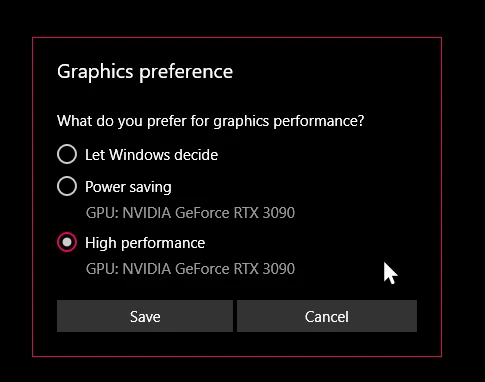
- Setting Photoshop and sniffer.exe to use my, uh, 'high performance 3090' as opposed to my 'power saving' 3090 (excellent work, Windows)  
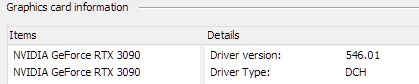
- Updated to the latest Nvidia studio drivers and installed all Windows 10 updates
 

- Removed 'sniffer.exe' from the Photoshop folder as suggested, causes Photoshop to not boot. 

- Enabled "Older GPU Mode" in the Technology Previews, get same error so I disabled it again. 

-  Tried setting the GPU in Nvidia Control Panel, but I don't have a "Preferred GPU" setting like a laptop or PC with integrated graphics. 

- Disabled SLI

- Uninstalled and reinstalled Photoshop 2024

- Manually ran sniffer.exe, it sees the video cards just fine
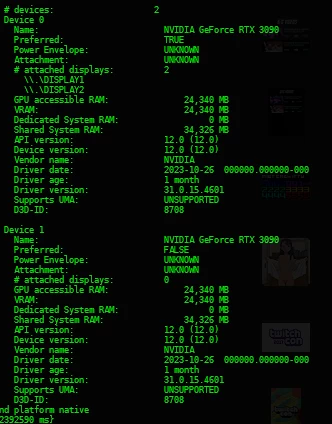
 

Thanks for the update Adobe, it works really well

179 replies

RealXanathon
Known Participant
May 25, 2024

@Derek Cross as we see in this thread, Adobe devs ARE here, they look into the posts and they answer (and later they obviously choose not to fix the bugs, because they think those blatant bugs are "irrelevant"). And actually I was offered three months free time because of the problems in this thread, so you are wrong.

@peters88929131 Nice try, but posts like yours are unfortunately ignored. The only way to go and force Adobe to act would be through your lawyer. But from own experience they will tell you that working software is not part of the license and you are not entitled to it. Happened to me.

Derek Cross
Community Expert
Community Expert
May 25, 2024

Please note this is a user-to-user support forum and we can't deal with payment issues.

Please describe the issues you are having and maybe we can help.

Please delete your personal details from this public forum.

peters88929131
Inspiring
May 25, 2024

Subject: Complaint Regarding Issues with Adobe Photoshop Update and Request for Subscription Discount

Dear Adobe Team,

I am a long-time user of Adobe Photoshop and greatly appreciate the features your software provides. However, after the recent update to the latest version, I have encountered significant issues that prevent the program from launching. I have found that I am not alone in facing these problems, indicating a broader technical issue.

Specifically, the program does not start at all after the update, which severely disrupts my workflow. As a professional graphic designer, Photoshop is an essential tool for my daily activities. This problem negatively affects my productivity and ability to meet my clients' deadlines.

Given these circumstances, I would like to request the following:

Urgent Fix: Please address the technical issues as soon as possible to make the software fully operational again.
Subscription Discount: Due to the inability to use the service fully, I request a reduction in the monthly subscription fee until these issues are resolved.
I believe that Adobe values its customers and that we can find a fair and satisfactory resolution for both parties.

Thank you for your attention and I look forward to your prompt response.

Sincerely,

Peter Salczer, Trnava, Slovakia

---------------
Intel(R) Core(TM) i7 CPU 870 @ 2.93GHz
MSI 2A9C,Intel H57 (IbexPeak DH)
RAM: 24 GB
NVIDIA GeForce GTX 1050 Ti /GP107-400/ 4096 MB GDDR5 SDRAM [Micron]

RealXanathon
Known Participant
May 25, 2024

@Shhhh!DigitalMedia That never worked for me to resolve the bug.

@mr3746448219o4 From what I see here adobe just don't cares about their customers that fight with this problem. Despite all the promises fixing this, it never happened and from their last replies, it never will. It is too "low priority" for them.


In their frenzy to include so-called "AI" features they clearly rushed the release of 25 (including the new graphic routines for Nvidia cards), because this is not the only problem with the version higher than 24; 25  and all betas so far are highly unstable and crash regularily, or functions do not or no longer work as expected. QA at Adobe seems to have become VERY bad.

I already bought the full Affinity package. It is lacking in many aspects, unfortunately, but it (and other software) may be a way out of Adobe's respectless behaviour in the long run.

Known Participant
May 17, 2024

How long will Adobe be "Updating status" and "investigating" this isssue?

There is a system command that gets you a GPU name:

>wmic path win32_videocontroller get name Name


Shhhh!DigitalMedia
Participant
May 5, 2024

Just to add to my answer (about running the Photoshop.exe as Administrator), this only seems to work when it is directly run that way by right-clicking the Photoshop.exe executable and selecting Run As Administrator... from the context menu.  If you try setting it up to use a shortcut with the Run As Administrator checkbox, it won't work as far as I've seen. Just open an explorer window in the directory of your Adobe Photoshop (Beta) folder and right-click Photoshop.exe, select Run As Administrator from the context menu and you're good to go 🙂

Shhhh!DigitalMedia
Participant
May 3, 2024

In case you haven't solved this issue, I've found a (temporary?) workaround. I was getting the Unknown GPU error and managed to circumvent that problem in Windows 11 simply by running Photoshop as administrator (right-click the Photoshop.exe in your ?:\Program Files\Adobe\Adobe Photoshop (Beta) folder and select Run As Administrator from the context menu). From that point onward, it correctly detected my GPU and seems thus far to be functioning as intended and that's with Photoshop Beta (25.9.0 Release).

I hope that helps.

RealXanathon
Known Participant
April 25, 2024

@PanBeep after years of experiencing extremely abysmal support from Adobe about heaps of bugs, promises that are not met, lies and bugs are not fixed for years (in one special case I was promised a fix two times, once two years ago and once some time ago in a PM here in the forums - and nothing), if ever, I came to the conclusion that they do not care at all about their customers. They are too big and rake in too much money (multimillion dollar company) to care about us.

PanBeep
Known Participant
April 24, 2024

I've just updated photoshop to latest 25.7 version and guess what? Photoshop still can't see my GPU. This is pretty funny and at the same time pretty annoying. Why are you doing this? You are not a garage compay but multimilion dollar corporation. Stop doing that AI (cursing removed) and fix your software, please!

RealXanathon
Known Participant
April 22, 2024

@Mark29332349j631 

@Mark.Dahm 


PS25 still is mostly useless. Even with the two new video cards that no longer generate the "no GPU detected" error, GPU performance is horrible and all but one "neural filter" is greyed out and not usable, PS does not give me any hints on why, but from what I see I would assume that it does not regonize the gPU correctly.


@D Fosse read through this thread. Using multiple GPUs is perfectly normal nowadays in graphic design and especially in 3D work. The problem are not the users and their systems, the problems seems to be sloppy coding. Because this worked flawlessly until PS24. And claiming "only a small number of users" has this is a very bad excuse for not providing professional software for perfectly normal use cases.


From what I see Adobe was desperate to jump onto the "AI" bandwagon and the development of those "features" was rushed.