


Exit
  • Global community
    • Language:
      • Deutsch
      • English
      • Español
      • Français
      • Português
  • 日本語コミュニティ
  • 한국 커뮤니티
165

P: PNG Images Opens with Distortion

Participant ,
Jan 27, 2018 Jan 27, 2018

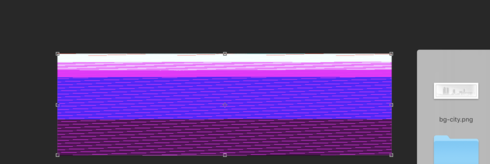
From time to time, when I open a png image, it will appear as bright, distorted lines.

I have deleted all Photoshop preference files, uninstalled the app, reinstalled it and restarted the computer. Does not prevent it from happening.

When it happens, I can quit Photoshop and reopen it and the png appears correctly. But then it will happen again later that day or the next. Rinse/Repeat.

RackMultipart20180128994031501-54f6197b-8f51-4009-abb7-2b3f6c2062de-1980023720.pngRackMultipart20180128994031501-54f6197b-8f51-4009-abb7-2b3f6c2062de-1980023720.png

Very annoying. Please get better quality control Photoshop. CC seems to get progressively worse in terms of bugs.

Photoshop 19.1
Mac osX 10.13.2
5k iMac

Bug Fixed
TOPICS
macOS , Windows
3.7K
Translate
Report
Community guidelines
Be kind and respectful, give credit to the original source of content, and search for duplicates before posting. Learn more
community guidelines

correct answers 1 Correct answer

Adobe Employee , Mar 12, 2018 Mar 12, 2018
This PNG distortion issue should be fixed with the Photoshop CC 2018 (19.1.2) update which is now available. 
Please install the update and let us know if you still see this issue.

To update, click Update next to Photoshop CC in the Creative Cloud desktop application.
If you don't see the update right away, click the 3 dots in the upper right and choose Check for App Updates.

Regards
Pete
Translate
replies 204 Replies 204
204 Comments
Community Beginner ,
Oct 11, 2018 Oct 11, 2018
Hey Hannah. I'm trying to figure out how to get back to this issue. I loved the effects it had, and would really love to  be able to randomly manipulate my art this way again. Is there any way I can access the version of photoshop that contains this glitch?

RackMultipart2018101163818ekh0-9ba8bbdc-642f-474b-ba4c-8a3684ddf29f-1867753794.png
Translate
Report
Community Beginner ,
Oct 11, 2018 Oct 11, 2018
Evan! What a great post to see after the months of turmoil of Hannah trying to sort this out!

At points I had exactly the same feeling during the process - it was resulting in some really wonderful imagery even though it was enormously getting in the way of the work.

What was so gratifying was the absolute randomness of the colour grids it threw up - although oddly it did also have a sense of consistency within it).

It's funny to see a request to be able to re-implement this 'feature' despite it having been so vilified and brings up the really interesting notion of 'mistakes' creating something that could previously have never been discovered (something at the heart of 'art').

Bravo and I look forward to hearing the reactions this post brings up!

Jim
Translate
Report
LEGEND ,
Oct 12, 2018 Oct 12, 2018
I am super intrigued by this too.
I always used to call it 'accidental coolness'

...serendipitous CC glitchy goodness.

Glad Evan named and dated his work in the file name. This one piece is so high level  it is gallery exhibit-table generative art.
Translate
Report
Community Beginner ,
Oct 12, 2018 Oct 12, 2018
LATEST
Glad y'all enjoy my post! Thanks for the kind words, Andre and Jim! I think you both might enjoy knowing two further details about all this. Firstly, I ended up gathering a bunch of these screenshots, cropping them, and titling them "Unintentional Progress #1", "Unintentional Progress #2", etc. And secondly, many of them include the words "NOTHING LASTS", a phrase I use quite frequently. It's become sort of a personal mantra for me, and this glitch is just another in a long line of examples that prove it's veracity.

RackMultipart2018101282745acgc-b858f693-fe51-4cda-ab50-f97bbb7d1e56-2088265473.jpg
Translate
Report