


Participant
July 2, 2025

P: PS v26.8.1 Info panel doesn't show "before" values, only "after" using Image > Adjustments

  • July 2, 2025
  • 14 replies
  • 1783 views

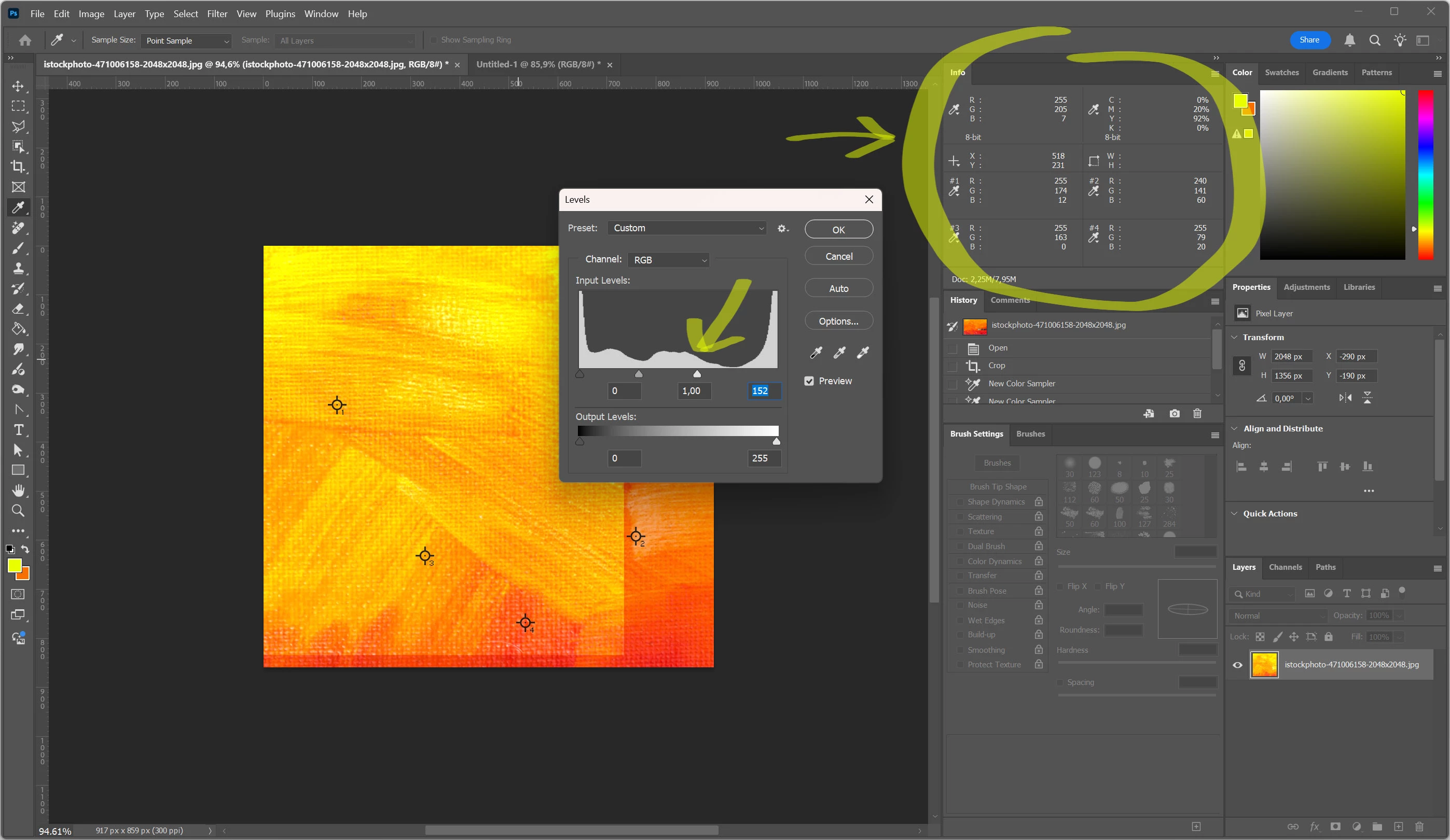
Info panel doesn't show "before" values, only "after". (Photoshop release 26.8.1). 

Every section of the panel show only one value, even for custom sample points, check screenshot attached.

Is it a bug?
 

14 replies

davescm
Community Expert
Community Expert
July 23, 2025

It looks like a bug in 26.8.1. If you use an adjustment layer both values show. If you use Image > Adjustments only the resulting value is shown.
I opened PS 25.12.3 to check and in that version both show as expected.


Tested in Windows 11 with RTX3090 GPU.

Dave

Sameer K
Community Manager
Community Manager
July 24, 2025

Thanks for sharing this, @daring_individuality44832, and for verifying this, @davescm. I see this in Ps 26.8.1 and the current Beta. I've shared this with the team for review. 
Best! 
Sameer K

Noel Orridge
Community Manager
Community Manager
July 23, 2025

Hi @daring_individuality44832! Thank you for reaching out!


Could you please share your system information (form Help> System info> Copy and paste it into a text file and attach it to your response)? 


Please try resetting the preferences to their default state. A corrupted preferences file can sometimes cause all sorts of trouble. I suggest you back up your preferences before resetting them. For steps and more info, please check out this Helpx article: Preferences in Photoshop.


To test whether the issue is GPU-related, turn off the GPU from Edit> Preferences> Performance, uncheck Use Graphics Processor, and restart Photoshop.


Let us know how it goes! 

Cheers!

Noel
OrhanTekis
Participant
July 3, 2025

Hello,

I am using Photoshop version 26.8.1.

When I change the color with Curve in the information section, it does not show the before and after values. What could be the reason?
How can I solve this problem?


For Mac...

creative explorer
Community Expert
Community Expert
July 3, 2025

@OrhanTekis The Info panel displays the color values of the pixels currently under your cursor in real-time. To see "before and after" values for a Curves adjustment, you'll need to either manually sample before and after applying the adjustment, or use Photoshop's History panel or multiple windows for a visual comparison of the states. The Curves panel itself will show you input/output values on the curve for the selected channel if you use its eyedroppers.

m
Inspiring
July 3, 2025

When a curve, levels, etc. dialog is active the RGB values have always split into two values separated by a slash. On the left is the original value and on the right is the edited value. Cursor must be on the image area to invoke that behavior.


I am having the same issue. Went to old computer with PS6 and confirms that. Been that way for 20 years or more.

Panel options have nothing to do wth it, nor PS prefs which I refreshed.  

Inspiring
July 2, 2025

When using curves, levels, etc. the info panel does not show a forward slash with results on the right side and original values on the left. It only shows current values with the editing tools result.


This is new for 26.8.1.


Mac Mini 4, Mac OS Sequoia 15.5, PS 26.8.1

Inspiring
July 3, 2025

Installed 26.8 still shows behavior. Installed 26.7 behavior corrected.

Participating Frequently
July 23, 2025

I am using 28.6.1 and I noticed this a couple of weeks ago. Split values seperated by a forward slash of the actual and current correction values have ALWAYS been shown since year dot of Photoshop.

No longer they have gone, there is no setting in the info panel to turn this on or off as an option. WHATS GOING ON?